
chatbox的定位
我正在开发一个类似Facebook的chatbox功能。我在定位多个聊天室方面有问题。
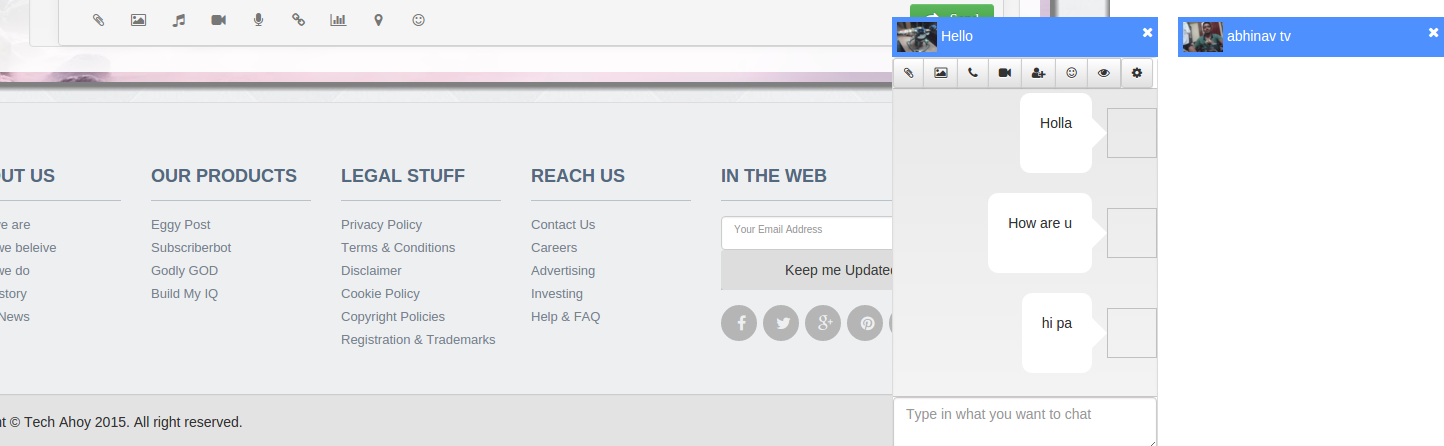
你可以看到底部有两个聊天室。我将所有的聊天室都封装在一个容器中,并且每个chatbox都被动态地附加到该容器中,并且工作正常。但是我提供了一个折叠chatbox的选项,这就是当我崩溃时发生的事情(第二次chatbox)
标签显示在容器的顶部,但我希望它在底部(就像facebook)。我尝试了立场:绝对,这是有效的,但我将不能使用浮子附加其他聊天室(我必须计算位置,我尝试的方式,它没有出来是好的)。
<div class="chatbox_container" style="position:fixed;bottom:0px;right:0px;z-index:10000;">

  <div class="taprofilechatbox" style="float:right;margin-left:20px;/* vertical-align: bottom; */position: relative;/* top: -1px; */" data-threadid="3a6cc9bd810" data-vuid="66143ccc50">
    <div class="tachatboxlabel">
      <img src="/media/usermedia/tvabhinav_3eca38fa3ed80d6/gal/e8cab7c70fc33368e/t_3488db6987a093_80x80.jpg" height="30">abhinav tv <span class="pull-right chatbxclose"><i class="fa fa-times"></i></span>
    </div>
    <div class="tachatboxcont well" style="display: none;">
      <div class="chatbx_headercontrol">
        <div class="btn-group">
          <button class="btn btn-default btn-sm" title="Send Files"><i class="fa fa-paperclip"></i>
          </button>
          <button class="btn btn-default btn-sm" title="Send Images"><i class="fa fa-picture-o"></i>
          </button>
          <button class="btn btn-default btn-sm" title="Audio Call"><i class="fa fa-phone"></i>
          </button>
          <button class="btn btn-default btn-sm" title="Video Call"><i class="fa fa-video-camera"></i>
          </button>
          <button class="btn btn-default btn-sm" title="Add Users to Conversation"><i class="fa fa-user-plus"></i>
          </button>
          <button class="btn btn-default btn-sm" title="Add Smileys"><i class="fa fa-smile-o"></i>
          </button>
          <button class="btn btn-default btn-sm" title="View Full Conversation"><i class="fa fa-eye"></i>
          </button>
          <div class="dropdown pull-left">
            <button class="dropdown-toggle btn btn-default btn-sm" data-toggle="dropdown"><i class="fa fa-cog"></i>
            </button>
            <ul class="dropdown-menu dropdown-menu-right">
              <li><a href="#">Mute this conversation</a>
              </li>
              <li><a href="#">Delete this conversation</a>
              </li>
              <li><a href="#">Archive this conversation</a>
              </li>
            </ul>
          </div>
        </div>
        <div style="clear:both;"></div>
      </div>
      <div class="chatbx_threads">
        <img alt="" src="" width="50" height="50" class="convbx_cthumbimg pull-right">
        <div class="convbx_bubble_right pull-right">tests</div>
        <div style="clear:both;"></div>
        <img alt="" src="" width="50" height="50" class="convbx_cthumbimg pull-right">
        <div class="convbx_bubble_right pull-right">hi how are u? i am fine</div>
        <div style="clear:both;"></div>
      </div>
      <div class="chatbx_footercontrol">
        <textarea placeholder="Type in what you want to chat" class="form-control chatbx_footertarea" data-threadid="3a6cc9bd810"></textarea>
      </div>
    </div>
  </div>


  <div class="taprofilechatbox" style="float:right;margin-left:20px;" data-threadid="c12b84157" data-vuid="66143ccc50">
    <div class="tachatboxlabel">
      <img src="/media/usermedia/tvvenkat_951120/gal/a6f666f8004c7/t_4f39ebb07d68fa062467280d1cf8_80x80.jpg" height="30">Hello <span class="pull-right chatbxclose"><i class="fa fa-times"></i></span>
    </div>
    <div class="tachatboxcont well">
      <div class="chatbx_headercontrol">
        <div class="btn-group">
          <button class="btn btn-default btn-sm" title="Send Files"><i class="fa fa-paperclip"></i>
          </button>
          <button class="btn btn-default btn-sm" title="Send Images"><i class="fa fa-picture-o"></i>
          </button>
          <button class="btn btn-default btn-sm" title="Audio Call"><i class="fa fa-phone"></i>
          </button>
          <button class="btn btn-default btn-sm" title="Video Call"><i class="fa fa-video-camera"></i>
          </button>
          <button class="btn btn-default btn-sm" title="Add Users to Conversation"><i class="fa fa-user-plus"></i>
          </button>
          <button class="btn btn-default btn-sm" title="Add Smileys"><i class="fa fa-smile-o"></i>
          </button>
          <button class="btn btn-default btn-sm" title="View Full Conversation"><i class="fa fa-eye"></i>
          </button>
          <div class="dropdown pull-left">
            <button class="dropdown-toggle btn btn-default btn-sm" data-toggle="dropdown"><i class="fa fa-cog"></i>
            </button>
            <ul class="dropdown-menu dropdown-menu-right">
              <li><a href="#">Mute this conversation</a>
              </li>
              <li><a href="#">Delete this conversation</a>
              </li>
              <li><a href="#">Archive this conversation</a>
              </li>
            </ul>
          </div>
        </div>
        <div style="clear:both;"></div>
      </div>
      <div class="chatbx_threads">
        <img alt="" src="" width="50" height="50" class="convbx_cthumbimg pull-right">
        <div class="convbx_bubble_right pull-right">Holla</div>
        <div style="clear:both;"></div>
        <img alt="" src="" width="50" height="50" class="convbx_cthumbimg pull-right">
        <div class="convbx_bubble_right pull-right">How are u</div>
        <div style="clear:both;"></div>
        <img alt="" src="" width="50" height="50" class="convbx_cthumbimg pull-right">
        <div class="convbx_bubble_right pull-right">hi pa</div>
        <div style="clear:both;"></div>
      </div>
      <div class="chatbx_footercontrol">
        <textarea placeholder="Type in what you want to chat" class="form-control chatbx_footertarea" data-threadid="c12b84157"></textarea>
      </div>
    </div>
  </div>
</div>
我单独插入了chatbox片段,没有CSS和其他东西。如何定位chatbox,使其在折叠时,标签出现在底部。
如果代码没有意义,我检查元素并将动态加载的内容粘贴到代码中。
回答 2
Stack Overflow用户
发布于 2015-12-18 12:54:23
好吧,看看我为你做的事。为了更好地说明,增加了边界:
* {box-sizing: border-box;}
.chat-container {position: fixed; bottom: 0; right: 0; border: 1px solid #99c;}
.chat-container .chat-box {border: 1px solid #66f; display: inline-block; width: 175px; vertical-align: bottom;}
.chat-container .chat-box .chat-head {background-color: #99f;}<div class="chat-container">
<div class="chat-box">
<div class="chat-head">Person Name</div>
<div class="chat-cont">
<p>Lorem ipsum dolor sit amet, consectetur adipisicing elit. Aspernatur ex totam, quis itaque maiores, aut quam optio nihil nesciunt voluptatibus sit quae, minus officiis ipsa amet expedita eum provident quidem?</p>
</div>
</div>
<div class="chat-box">
<div class="chat-head">Person Name (Closed)</div>
</div>
</div>
我能够实现一个跨浏览器的版本,你想做什么,在简单的三条规则。看一看,现场直播。
输出: http://output.jsbin.com/kovoritobo
Stack Overflow用户
发布于 2015-12-18 13:23:05
我会给你一个简单的答案。没必要用任何东西。
只需删除display:inline-block.浮点数:从"taprofilechatbox DIV“中删除左并添加
作为您的代码,您的"taprofilechatbox DIV“是动态的。只需删除内联浮点数:对,然后在那里添加display:inline-block。
你能感觉到一切都会好起来的。只需看下面给出的片段。
<div class="chatbox_container" style="position:fixed;bottom:0px;right:0px;z-index:10000;">
  <!--[if lte IE 6]><html class="ie6 no-js"><!--[if gt IE 8]><!-->
  <!--<![endif]-->
  <meta http-equiv="Content-Type" content="text/html; charset=utf-8">
  <meta name="viewport" content="width=device-width, initial-scale=1,user-scalable=yes">
  <meta charset="utf-8">
  <!--[if IE]> <meta http-equiv="X-UA-Compatible" content="IE=edge,chrome=1"> <![endif]-->
  <title>Tech Ahoy - Voicing Technology To The World</title>
  <!-- change this div to below div, remove float:right and add DISPLAY:INLINE-BLOCK <div class="taprofilechatbox" style="float:right;margin-left:20px;/* vertical-align: bottom; */position: relative;/* top: -1px; */" data-threadid="3a6cc9bd810" data-vuid="66143ccc50">-->
  <div class="taprofilechatbox" style="display:inline-block;margin-left:20px;/* vertical-align: bottom; */position: relative;/* top: -1px; */" data-threadid="3a6cc9bd810" data-vuid="66143ccc50">
    <div class="tachatboxlabel">
      <img src="/media/usermedia/tvabhinav_3eca38fa3ed80d6/gal/e8cab7c70fc33368e/t_3488db6987a093_80x80.jpg" height="30">abhinav tv <span class="pull-right chatbxclose"><i class="fa fa-times"></i></span>
    </div>
    <div class="tachatboxcont well" style="display: none;">
      <div class="chatbx_headercontrol">
        <div class="btn-group">
          <button class="btn btn-default btn-sm" title="Send Files"><i class="fa fa-paperclip"></i>
          </button>
          <button class="btn btn-default btn-sm" title="Send Images"><i class="fa fa-picture-o"></i>
          </button>
          <button class="btn btn-default btn-sm" title="Audio Call"><i class="fa fa-phone"></i>
          </button>
          <button class="btn btn-default btn-sm" title="Video Call"><i class="fa fa-video-camera"></i>
          </button>
          <button class="btn btn-default btn-sm" title="Add Users to Conversation"><i class="fa fa-user-plus"></i>
          </button>
          <button class="btn btn-default btn-sm" title="Add Smileys"><i class="fa fa-smile-o"></i>
          </button>
          <button class="btn btn-default btn-sm" title="View Full Conversation"><i class="fa fa-eye"></i>
          </button>
          <div class="dropdown pull-left">
            <button class="dropdown-toggle btn btn-default btn-sm" data-toggle="dropdown"><i class="fa fa-cog"></i>
            </button>
            <ul class="dropdown-menu dropdown-menu-right">
              <li><a href="#">Mute this conversation</a>
              </li>
              <li><a href="#">Delete this conversation</a>
              </li>
              <li><a href="#">Archive this conversation</a>
              </li>
            </ul>
          </div>
        </div>
        <div style="clear:both;"></div>
      </div>
      <div class="chatbx_threads">
        <img alt="" src="" width="50" height="50" class="convbx_cthumbimg pull-right">
        <div class="convbx_bubble_right pull-right">tests</div>
        <div style="clear:both;"></div>
        <img alt="" src="" width="50" height="50" class="convbx_cthumbimg pull-right">
        <div class="convbx_bubble_right pull-right">hi how are u? i am fine</div>
        <div style="clear:both;"></div>
      </div>
      <div class="chatbx_footercontrol">
        <textarea placeholder="Type in what you want to chat" class="form-control chatbx_footertarea" data-threadid="3a6cc9bd810"></textarea>
      </div>
    </div>
  </div>
  <script type="text/javascript">
    var mychatbox = $('.taprofilechatbox[data-threadid="3a6cc9bd810"]'); /*if(window.totchatbox==1) { rpos=150; } else { rpos=(window.totchatbox*150)+130; } mychatbox.css("right",rpos);*/
    var loadobj = new JS_LOADER();
    var tarea = $('.chatbx_footertarea[data-threadid="3a6cc9bd810"]');
    tarea.on("keyup", function(e) {
      var mytarea = $(this);
      if (e.keyCode == 13 && !e.shiftKey) {
        e.preventDefault();
        var themsg = mytarea.val();
        console.log("SENT:" + themsg);
        var tid = "3a6cc9bd810";
        var uid = "66143ccc50";
        loadobj.ajax_call({
          url: "/request_process.php",
          method: "POST",
          data: {
            mkey: "tbx_threadmsg",
            tid: tid,
            uid: uid,
            msg: themsg
          },
          cache: false,
          success: function(data) {
            mytarea.val("");
            console.log("MSG SENT");
          }
        });
        return false;
      } else if (e.keyCode == 13 && e.shiftKey) {
        process_tarea(mytarea);
      }
    });
  </script>
  <!--[if lte IE 6]><html class="ie6 no-js"><!--[if gt IE 8]><!-->
  <!--<![endif]-->
  <meta http-equiv="Content-Type" content="text/html; charset=utf-8">
  <meta name="viewport" content="width=device-width, initial-scale=1,user-scalable=yes">
  <meta charset="utf-8">

  <!--[if IE]> <meta http-equiv="X-UA-Compatible" content="IE=edge,chrome=1"> <![endif]-->
  <title>Tech Ahoy - Voicing Technology To The World</title>
  <!--change this div to below div, remove float:right and add DISPLAY:INLINE-BLOCK <div class="taprofilechatbox" style="float:right;margin-left:20px;" data-threadid="c12b84157" data-vuid="66143ccc50">-->
    <div class="taprofilechatbox" style="display:inline-block;margin-left:20px;" data-threadid="c12b84157" data-vuid="66143ccc50">
    <div class="tachatboxlabel">
      <img src="/media/usermedia/tvvenkat_951120/gal/a6f666f8004c7/t_4f39ebb07d68fa062467280d1cf8_80x80.jpg" height="30">Hello <span class="pull-right chatbxclose"><i class="fa fa-times"></i></span>
    </div>
    <div class="tachatboxcont well">
      <div class="chatbx_headercontrol">
        <div class="btn-group">
          <button class="btn btn-default btn-sm" title="Send Files"><i class="fa fa-paperclip"></i>
          </button>
          <button class="btn btn-default btn-sm" title="Send Images"><i class="fa fa-picture-o"></i>
          </button>
          <button class="btn btn-default btn-sm" title="Audio Call"><i class="fa fa-phone"></i>
          </button>
          <button class="btn btn-default btn-sm" title="Video Call"><i class="fa fa-video-camera"></i>
          </button>
          <button class="btn btn-default btn-sm" title="Add Users to Conversation"><i class="fa fa-user-plus"></i>
          </button>
          <button class="btn btn-default btn-sm" title="Add Smileys"><i class="fa fa-smile-o"></i>
          </button>
          <button class="btn btn-default btn-sm" title="View Full Conversation"><i class="fa fa-eye"></i>
          </button>
          <div class="dropdown pull-left">
            <button class="dropdown-toggle btn btn-default btn-sm" data-toggle="dropdown"><i class="fa fa-cog"></i>
            </button>
            <ul class="dropdown-menu dropdown-menu-right">
              <li><a href="#">Mute this conversation</a>
              </li>
              <li><a href="#">Delete this conversation</a>
              </li>
              <li><a href="#">Archive this conversation</a>
              </li>
            </ul>
          </div>
        </div>
        <div style="clear:both;"></div>
      </div>
      <div class="chatbx_threads">
        <img alt="" src="" width="50" height="50" class="convbx_cthumbimg pull-right">
        <div class="convbx_bubble_right pull-right">Holla</div>
        <div style="clear:both;"></div>
        <img alt="" src="" width="50" height="50" class="convbx_cthumbimg pull-right">
        <div class="convbx_bubble_right pull-right">How are u</div>
        <div style="clear:both;"></div>
        <img alt="" src="" width="50" height="50" class="convbx_cthumbimg pull-right">
        <div class="convbx_bubble_right pull-right">hi pa</div>
        <div style="clear:both;"></div>
      </div>
      <div class="chatbx_footercontrol">
        <textarea placeholder="Type in what you want to chat" class="form-control chatbx_footertarea" data-threadid="c12b84157"></textarea>
      </div>
    </div>
  </div>
  <script type="text/javascript">
    var mychatbox = $('.taprofilechatbox[data-threadid="c12b84157"]'); /*if(window.totchatbox==1) { rpos=150; } else { rpos=(window.totchatbox*150)+130; } mychatbox.css("right",rpos);*/
    var loadobj = new JS_LOADER();
    var tarea = $('.chatbx_footertarea[data-threadid="c12b84157"]');
    tarea.on("keyup", function(e) {
      var mytarea = $(this);
      if (e.keyCode == 13 && !e.shiftKey) {
        e.preventDefault();
        var themsg = mytarea.val();
        console.log("SENT:" + themsg);
        var tid = "c12b84157";
        var uid = "66143ccc50";
        loadobj.ajax_call({
          url: "/request_process.php",
          method: "POST",
          data: {
            mkey: "tbx_threadmsg",
            tid: tid,
            uid: uid,
            msg: themsg
          },
          cache: false,
          success: function(data) {
            mytarea.val("");
            console.log("MSG SENT");
          }
        });
        return false;
      } else if (e.keyCode == 13 && e.shiftKey) {
        process_tarea(mytarea);
      }
    });
  </script>
</div>
https://stackoverflow.com/questions/34356053
复制相似问题
腾讯云开发者

Copyright © 2013 - 2026 Tencent Cloud. All Rights Reserved. 腾讯云 版权所有
深圳市腾讯计算机系统有限公司 ICP备案/许可证号:粤B2-20090059  粤公网安备44030502008569号
腾讯云计算(北京)有限责任公司 京ICP证150476号 | 京ICP备11018762号