
jQuery数据报警器:在今后两年中限制数据传送器
jQuery数据报警器:在今后两年中限制数据传送器
提问于 2015-12-18 06:03:17
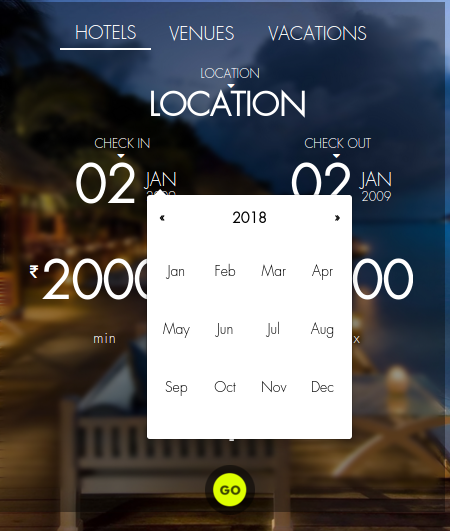
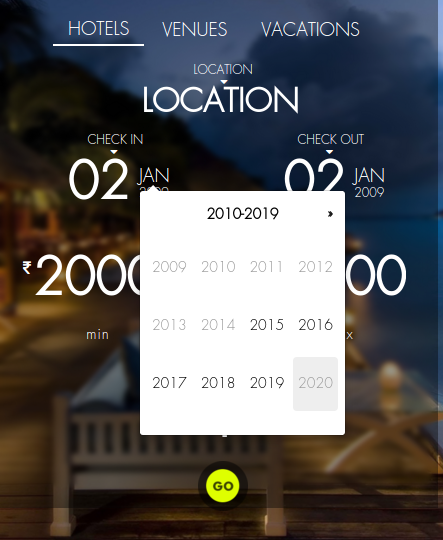
我有个关于数据报童的问题。我已经包括了maxDate: "+2y",但它并没有考虑到它。我会在下面张贴我的代码,任何帮助都将不胜感激。
HTML/:
          <div class="col-md-6 col-xs-6">
                <label class="no-margin txt-upper txt-medium">Check In</label>
                <label class="no-margin arrow_label txt-medium"><i class="fa fa-caret-down"></i></label>
                <div id="check_in_box" style="position:relative; padding-right: 20px;">
                    <span id="check_in_d" class="font-size-5" style="font-weight: 600;"><?php echo date('d')?></span><span style="margin-left:5px">
                    <span id="check_in_m" class="dates txt-upper checkin" style="font-size:18px;"><?php echo date('M')?></span>
                    <span id="check_in_y" class="dates checkin1" style="font-size:12px;"><?php echo date('Y')?></span></span>
                    <input name="check_in" id="check_in"  value="<?php echo date('d/m/y')?>" type="text" class="datepicker search-date" style="opacity:0;height:0px;width:0;" autocomplete="off" />
                </div>

          </div>
上面的代码是包含以下javascript中提到的所有id的html/css代码:
     $('#check_in_box').click(function(e){
     $('#check_in').datepicker({ format: "dd/mm/yyyy",
        startView: "months",
        maxDate: "+2y"
    }).on('changeDate', function (ev) {
        $('#check_in_d').text(ev.date.getDate());
        console.log(ev.date.getFullYear());
        $('#check_in_y').text(ev.date.getFullYear());
        $('#check_in_m').text(months[ev.date.getMonth()]);

        var startDate = new Date(ev.date.valueOf());
        startDate.setDate(startDate.getDate(new Date(ev.date.valueOf())));
        $('#check_out').datepicker('setStartDate', startDate);
    });
    $('#check_in').datepicker('show')
})我所包含的maxDate:选项仅显示当前日期起最多两年的+2y
下面是我的头文件:
<!DOCTYPE html>
<html lang="en">
<head>

<meta charset="utf-8">
<meta http-equiv="X-UA-Compatible" content="IE=edge">
<meta name="viewport" content="width=device-width, initial-scale=1">
<meta name="description" content="">
<meta name="author" content="">

<title><?php echo $meta_title; ?></title>

<!-- Bootstrap Core CSS -->
<link href="<?=site_url('css/bootstrap.min.css')?>" rel="stylesheet">

<!-- user asse -->
<link href="<?=site_url('css/select2.css')?>" rel="stylesheet">

<!-- Custom CSS -->
<link href="<?=site_url('css/grayscale.css')?>" rel="stylesheet">
<link href="<?=site_url('css/custom.css')?>" rel="stylesheet">
<link href="<?=site_url('css/pagination.css')?>" rel="stylesheet">

<link href="<?=site_url('assests/css/bootstrap-datepicker3.css')?>" rel="stylesheet">
<!--link rel="stylesheet" href="//maxcdn.bootstrapcdn.com/font-awesome/4.3.0/css/font-awesome.min.css">
<!-- Custom Fonts -->
<link href="<?=site_url()?>font-awesome/css/font-awesome.min.css" rel="stylesheet" type="text/css">
<link rel="shortcut icon" href="<?=site_url()?>img/logo.png">
<link href="<?php echo site_url('css/tooltipster.css'); ?>" rel="stylesheet">
<!-- HTML5 Shim and Respond.js IE8 support of HTML5 elements and media queries -->
<!-- WARNING: Respond.js doesn't work if you view the page via file:// -->
    <!--[if lt IE 9]>
    <script src="https://oss.maxcdn.com/libs/html5shiv/3.7.0/html5shiv.js"></script>
    <script src="https://oss.maxcdn.com/libs/respond.js/1.4.2/respond.min.js"></script>
    <![endif]-->
    <!-- jQuery -->

   <!-- Favicons-->
<link rel="shortcut icon" href="<?=site_url()?>/img/favicon.ico">
<link rel="apple-touch-icon" href="<?=site_url()?>/img/apple-touch-icon.png">
<link rel="apple-touch-icon" sizes="72x72" href="<?=site_url()?>/img/apple-touch-icon-72x72.png">
<link rel="apple-touch-icon" sizes="114x114" href="<?=site_url()?>/img/apple-touch-icon-114x114.png">
<link href="<?=site_url('css/custom.css')?>" rel="stylesheet">
<link href="<?=site_url('css/box_layout.css')?>" rel="stylesheet">
<link rel="stylesheet" href="<?=site_url('front_end/css/skeleton.css')?>">
<link rel="shortcut icon" href="<?=site_url()?>img/logo.png">

 <!--<link rel="stylesheet" href="//code.jquery.com/ui/1.11.4/themes/smoothness/jquery-ui.css">
 jQuery -->
<link rel="stylesheet" href="<?=site_url('front_end')?>/css/skeleton.css">
<link rel="stylesheet" href="<?=site_url('front_end')?>/css/menu.css">
<link rel="stylesheet" href="<?=site_url('front_end')?>/css/layout.css">
<link rel="stylesheet" href="<?=site_url('front_end')?>/css/calendar.css">
<link rel="stylesheet" href="<?=site_url('front_end')?>/css/fontello.css">
<link rel="stylesheet" href="<?=site_url('front_end')?>/css/flexslider.css">

<script src="<?=site_url('js/jquery.js')?>"></script>
<link href="<?php echo site_url('backend/css/datatables/jquery.dataTables.css'); ?>" rel="stylesheet">
<script src="<?php echo site_url('backend/js/datatables/jquery.dataTables.js'); ?>"></script>
<!-- multiselect -->
<?php if (isset( $multiSelect ) ): ?>
<script src="<?php echo site_url('backend/js/multiselect/bootstrap-multiselect.js'); ?>"></script>
<?php endif; ?>

<!-- drop zone -->
<link href="<?php echo site_url('backend/css/dropzone/css/dropzone.css'); ?>" rel="stylesheet" type="text/css" />
<script type="text/javascript" src="<?php echo site_url('backend/css/dropzone/dropzone.js'); ?>"></script>
<!-- /multiselect -->
<script type="text/javascript" src="<?php echo site_url('js/jquery.tooltipster.js'); ?>"></script>

<?php if(isset($map_page)){ ?>

<script src="http://maps.googleapis.com/maps/api/js?sensor=false"></script>
<?php } ?>
<script>
            $(document).ready(function() {
                $(".tabrow a").click(function(event) {
                    event.preventDefault();
                    $(this).parent().addClass("selected");
                $(this).parent().siblings().removeClass("selected");
                    var tab = $(this).attr("href");
                    $(".tab-content").not(tab).css("display", "none");
                    $(tab).fadeIn();
                });
            });
</script>
<script>
                $(document).ready(function() {
                $(".tabrow2 a").click(function(event) {
                    event.preventDefault();
                    $(this).parent().addClass("selected");
                    $(this).parent().siblings().removeClass("selected");
                    var tab = $(this).attr("href");
                    $(".tab-content2").not(tab).css("display", "none");
                    $(tab).fadeIn();
                });
            });
</script>
<script>
  function showStuff (id)
 {

    document.getElementById("firstab-1").style.display = "none";
    document.getElementById("firstab-2").style.display = "none";
    document.getElementById("firstab-3").style.display = "none";
    document.getElementById("firstab-4").style.display = "none";
    document.getElementById(id).style.display = "block";

  }
  </script>
  <script>
  function showStuffI (id)
  {

    document.getElementById("firstab-1").style.display = "none";
    document.getElementById("firstab-2").style.display = "none";
    document.getElementById("firstab-3").style.display = "none";
    document.getElementById(id).style.display = "block";

  }
  </script>
</script>
回答 1
Stack Overflow用户
发布于 2015-12-18 06:36:50
请试试下面的代码。会很好的。
<!doctype html>
<html lang="en">
    <head>
        <meta charset="utf-8">
        <title>jQuery UI Datepicker - Default functionality</title>
        <link rel="stylesheet" href="//code.jquery.com/ui/1.11.4/themes/smoothness/jquery-ui.css">
        <script src="//code.jquery.com/jquery-1.10.2.js"></script>
        <script src="//code.jquery.com/ui/1.11.4/jquery-ui.js"></script>

    </head>
    <body>

        <div class="col-md-6 col-xs-6">
            <label class="no-margin txt-upper txt-medium">Check In</label>
            <label class="no-margin arrow_label txt-medium"><i class="fa fa-caret-down"></i></label>
            <div id="check_in_box" style="position:relative; padding-right: 20px;">
                <span id="check_in_d" class="font-size-5" style="font-weight: 600;"><?php echo date('d') ?></span><span style="margin-left:5px">
                    <span id="check_in_m" class="dates txt-upper checkin" style="font-size:18px;"><?php echo date('M') ?></span>
                    <span id="check_in_y" class="dates checkin1" style="font-size:12px;"><?php echo date('Y') ?></span></span>
                <input name="check_in" id="check_in"  value="<?php echo date('d/m/y') ?>" type="text" class="datepicker search-date" style="opacity:0;height:0px;width:0;" autocomplete="off" />
            </div>

        </div>

    </body>
</html>

<script>
    var months = ['Jan', 'Feb', 'Mar', 'Apr', 'May', 'Jun', 'Jul', 'Aug', 'Sep', 'Oct', 'Nov', 'Dec'];
    $(function() {
        $('#check_in').datepicker({format: "dd/mm/yyyy",
            startView: "months",
            maxDate: "+2y"
        }).on('change', function(ev) {
            var sel_date = new Date($(this).val());
            $('#check_in_d').html(sel_date.getDate());

            $('#check_in_y').html(sel_date.getFullYear());
            $('#check_in_m').html(months[sel_date.getMonth()] + "");

            var startDate = new Date($(this).val());
            startDate.setDate(startDate.getDate(new Date($(this).val())));
            $('#check_out').datepicker('setStartDate', startDate);
        });
        $('#check_in_box').click(function(e) {

            $('#check_in').datepicker('show')
        });
    });
</script>页面原文内容由Stack Overflow提供。腾讯云小微IT领域专用引擎提供翻译支持
原文链接:
https://stackoverflow.com/questions/34349379
复制相关文章
相似问题
腾讯云开发者

Copyright © 2013 - 2026 Tencent Cloud. All Rights Reserved. 腾讯云 版权所有
深圳市腾讯计算机系统有限公司 ICP备案/许可证号:粤B2-20090059  粤公网安备44030502008569号
腾讯云计算(北京)有限责任公司 京ICP证150476号 | 京ICP备11018762号