
消除SVG圆单元上的混叠
消除SVG圆单元上的混叠
提问于 2015-12-17 10:45:07
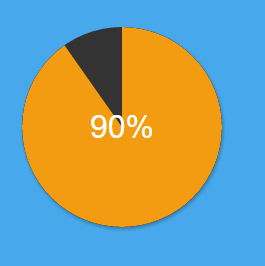
我在做一个动画的SVG饼图。基本上,我有两个SVG元素,第一个是border-radius of 50%,第二个是填充到一个特定值的圆圈。最后,这使得一个圆高于另一个圆,它们都有相同的维度。
有些SVG混叠似乎很难摆脱。它在圆圈的上、左、下和右角都很明显,至少在Google上是这样。
这里是HTML部分
<figure id="pie" data-percentage="60">
  <div class="receiver"></div>
  <svg width="200" height="200" class="chart" shape-rendering="geometricPrecision">
    <circle r="50" cx="100" cy="100" class="pie" shape-rendering="geometricPrecision"/>
  </svg>
</figure>这是我的码页,可以更准确地描述这个问题。我尝试过各种解决方案,包括呈现形状的SVG属性,但都没有效果。
这是一个截图,别名不像代码页那样明显(至少对我来说是这样)
回答 1
Stack Overflow用户
回答已采纳
发布于 2015-12-17 12:43:04
全svg百分比圆
我以前也遇到过这样的问题:当您修改带有边框半径的a元素时,圆上像素边缘会发生这种情况。
您可以在上面链接的答案中找到答案,但是我认为如果只使用/修改svg,那么性能和美观都会更好。
示例:
var circ = document.getElementsByClassName("pie2");
var text = document.getElementsByClassName("text");
text = text[0];
circ = circ[0];
var maxvalue = 320;
var value = maxvalue;
var stop = false;

function increase() {
  if (value > 0) {
    circ.style.strokeDashoffset = value--;
    text.textContent = Math.abs(Math.floor((value / maxvalue) * 100) - 100) + "%";
  } else {
    clearInterval(intervalid);
  }
}

var intervalid = setInterval(increase, 25);.pie {
fill: none;
stroke: #222;
stroke-width: 99;
}
.pie2 {
fill: none;
stroke: orange;
stroke-width: 100;
stroke-dasharray: 320;
stroke-dashoffset: 320;
}
.text {
font-family: Arial;
font-weight: bold;
font-size: 2em;
}<figure id="pie" data-percentage="90">
<svg width="200" height="200" class="chart" shape-rendering="geometricPrecision">
<circle r="50" cx="100" cy="100" class="pie" shape-rendering="geometricPrecision" />
<circle r="50" cx="100" cy="100" class="pie2" />
<text class="text" x="80" y="110">0%</text>
</svg>
</figure>
页面原文内容由Stack Overflow提供。腾讯云小微IT领域专用引擎提供翻译支持
原文链接:
https://stackoverflow.com/questions/34332615
复制相关文章
相似问题
腾讯云开发者

Copyright © 2013 - 2026 Tencent Cloud. All Rights Reserved. 腾讯云 版权所有
深圳市腾讯计算机系统有限公司 ICP备案/许可证号:粤B2-20090059  粤公网安备44030502008569号
腾讯云计算(北京)有限责任公司 京ICP证150476号 | 京ICP备11018762号