
在PDF旋转文本上更改字体
在PDF旋转文本上更改字体
提问于 2015-12-16 10:50:08
我使用iText在PDF上创建与此格式相同的条形码:
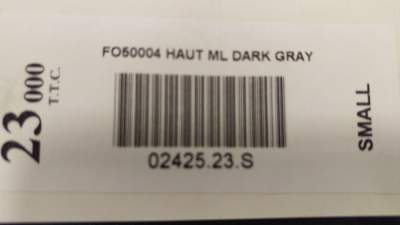
问题是左数,第一个零位数必须较小,其余的数字也必须粗体。"T.T.C.“此外,还必须更小(它不必在另一条线上)。我能够用以下代码旋转这个数字:
String price = "23000 T.T.C.";
PdfContentByte cb = docWriter.getDirectContent();
PdfTemplate textTemplate = cb.createTemplate(50, 50);
ColumnText columnText = new ColumnText(textTemplate);
columnText.setSimpleColumn(0, 0, 50, 50);
columnText.addElement(new Paragraph(price));
columnText.go();
Image image;
image = Image.getInstance(textTemplate);
image.setAlignment(Image.MIDDLE);
image.setRotationDegrees(90);
doc.add(image);
问题是,当字符串价格打印在PDF上时,我无法在线更改字符串价格中某些字符的字体。
回答 1
Stack Overflow用户
回答已采纳
发布于 2015-12-17 10:48:50
我创建了一个小的概念证明,结果是一个PDF格式,如下所示:
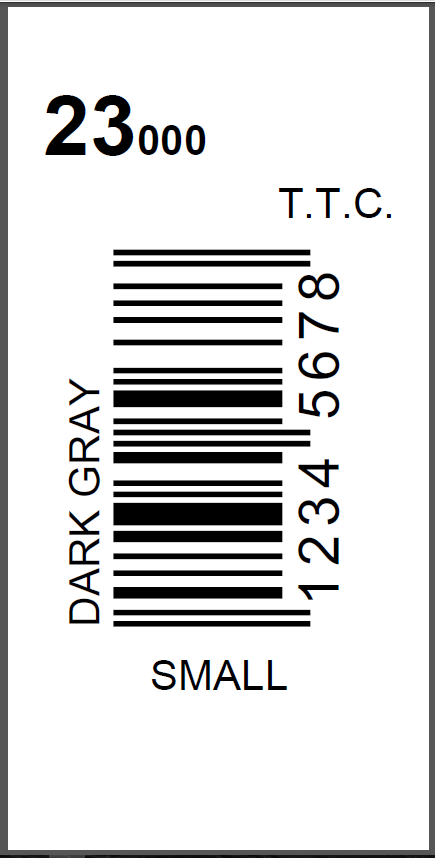
如您所见,它有不同大小和样式的文本。它还有一个旋转的条形码。
请看一下RotatedText示例:
public void createPdf(String dest) throws IOException, DocumentException {
    // step 1
    Document document = new Document(new Rectangle(60, 120), 5, 5, 5, 5);
    // step 2
    PdfWriter writer = PdfWriter.getInstance(document, new FileOutputStream(dest));
    // step 3
    document.open();
    // step 4
    PdfContentByte canvas = writer.getDirectContent();

    Font big_bold = new Font(FontFamily.HELVETICA, 12, Font.BOLD);
    Font small_bold = new Font(FontFamily.HELVETICA, 6, Font.BOLD);
    Font regular = new Font(FontFamily.HELVETICA, 6);
    Paragraph p1 = new Paragraph();
    p1.add(new Chunk("23", big_bold));
    p1.add(new Chunk("000", small_bold));
    document.add(p1);

    Paragraph p2 = new Paragraph("T.T.C.", regular);
    p2.setAlignment(Element.ALIGN_RIGHT);
    document.add(p2);

    BarcodeEAN barcode = new BarcodeEAN();
    barcode.setCodeType(Barcode.EAN8);
    barcode.setCode("12345678");
    Rectangle rect = barcode.getBarcodeSize();
    PdfTemplate template = canvas.createTemplate(rect.getWidth(), rect.getHeight() + 10);
    ColumnText.showTextAligned(template, Element.ALIGN_LEFT,
            new Phrase("DARK GRAY", regular), 0, rect.getHeight() + 2, 0);
    barcode.placeBarcode(template, BaseColor.BLACK, BaseColor.BLACK);
    Image image = Image.getInstance(template);
    image.setRotationDegrees(90);
    document.add(image);

    Paragraph p3 = new Paragraph("SMALL", regular);
    p3.setAlignment(Element.ALIGN_CENTER);
    document.add(p3);

    // step 5
    document.close();
}
此示例解决了所有问题:
- 您希望
Paragraph使用不同的字体:使用不同的Chunk对象组成一个Chunk。 - 您希望在条形码的基础上添加额外的文本:将条形码添加到
PdfTemplate中,并使用ColumnText.showTextAligned()添加额外的文本(如果需要使用该额外文本中的多个字体,也可以使用不同的Chunk对象编写Phrase)。 - 您需要旋转条形码:将
PdfTemplate封装在Image对象中并旋转图像。
您可以检查结果:text.pdf
我希望这能帮到你。
页面原文内容由Stack Overflow提供。腾讯云小微IT领域专用引擎提供翻译支持
原文链接:
https://stackoverflow.com/questions/34310018
复制相关文章
相似问题
腾讯云开发者

Copyright © 2013 - 2026 Tencent Cloud. All Rights Reserved. 腾讯云 版权所有
深圳市腾讯计算机系统有限公司 ICP备案/许可证号:粤B2-20090059  粤公网安备44030502008569号
腾讯云计算(北京)有限责任公司 京ICP证150476号 | 京ICP备11018762号