
在任何画布形状周围绘制内外边框
如何在任何画布形状周围绘制内外边框?
我在html画布上画了几个只有笔画的形状,我想在它们周围画一个内外边框。
示例草案:
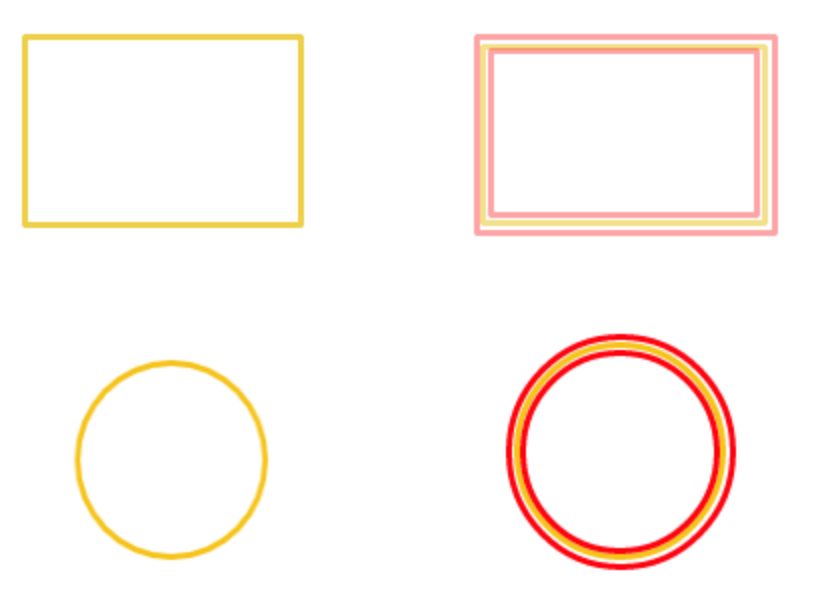
有没有一个通用的,为什么要做任何形状(假设它是一个封闭的笔画形状)?
回答 1
Stack Overflow用户
发布于 2015-12-12 00:07:25
两种方法
没有内置的方法可以做到这一点,而且我使用了两种编程方法。第一个是复杂的,涉及到扩展和收缩路径,然后沿着这条路径绘制。这在大多数情况下都有效,但在复杂的情况下会失败,解决方案有许多变量和选项来解释这些复杂问题以及如何处理它们。
是两个中最好的一个
下面我介绍的第二个也是最简单的方法是使用ctx.globalCompositeOperation设置来掩盖您想要绘制的内容。当笔画沿着中心画,填充到中心,你可以画两倍的宽度,然后遮掩或遮掩内外部分。
当您开始创建非常复杂的图像时,这将成为问题,因为掩蔽()将干扰已经绘制的图像。
为了简化过程,您可以创建与原始画布大小相同的第二个画布,作为划痕空间。然后,您可以在划痕帆布上绘制形状,进行掩蔽,然后将划痕画布绘制到工作画布上。
虽然这种方法不像计算扩展路径或收缩路径那样快,但它不存在路径中移动点所面临的歧义。此方法也不为内部或外部边缘创建具有正确行联接或符号化的线条,因为您必须使用另一种方法。对大多数目的来说,掩蔽它是一个很好的解决方案。
下面是用于绘制内部或外部路径的掩蔽方法的演示。如果您修改掩码,包括绘制一个笔画和填充,您也可以设置一个偏移量,以便轮廓或内联将被许多像素偏移。我把它留给你了。(提示:在绘制掩码时,添加笔画并将线宽设置为偏移距离的两倍)。
var demo = function(){

    /** fullScreenCanvas.js begin **/
    var canvas = ( function () {
        canvas = document.getElementById("canv");
        if(canvas !== null){
            document.body.removeChild(canvas);
        }
        // creates a blank image with 2d context
        canvas = document.createElement("canvas");
        canvas.id = "canv";
        canvas.width = window.innerWidth;
        canvas.height = window.innerHeight;
        canvas.style.position = "absolute";
        canvas.style.top = "0px";
        canvas.style.left = "0px";
        canvas.style.zIndex = 1000;
        canvas.ctx = canvas.getContext("2d");
        document.body.appendChild(canvas);
        return canvas;
    })();
    var ctx = canvas.ctx;
    /** fullScreenCanvas.js end **/


    /** CreateImage.js begin **/
    // creates a blank image with 2d context
    var createImage = function(w,h){
        var image = document.createElement("canvas");
        image.width = w;
        image.height =h;
        image.ctx = image.getContext("2d");
        return image;
    }
    /** CreateImage.js end **/


    // define a shape for demo
    var shape = [0.1,0.1,0.9,0.1,0.5,0.5,0.8,0.9,0.1,0.9];

    // draws the shape as a stroke
    var strokeShape = function (ctx) {
        var w, h, i;
        w = canvas.width;
        h = canvas.height;
        ctx.beginPath();
        ctx.moveTo(shape[0]  *w, shape[1]  *h)
        for (i = 2; i < shape.length; i += 2) {
            ctx.lineTo(shape[i] * w, shape[i + 1] * h);
        }
        ctx.closePath();
        ctx.stroke();
    }
    // draws the shape as filled
    var fillShape = function (ctx) {
        var w, h, i;
        w = canvas.width;
        h = canvas.height;

        ctx.beginPath();
        ctx.moveTo(shape[0] * w,shape[1] * h)
        for (i = 2; i < shape.length; i += 2) {
            ctx.lineTo(shape[i]*w,shape[i+1]*h);
        }
        ctx.closePath();
        ctx.fill();
    }

    var drawInOutStroke = function(width,style,where){
        //  clear the workspace
        workCtx.ctx.globalCompositeOperation ="source-over";
        workCtx.ctx.clearRect(0, 0, workCtx.width, workCtx.height);

        // set the width to double
        workCtx.ctx.lineWidth = width*2;
        workCtx.ctx.strokeStyle = style;

        // fill colour does not matter here as its not seen
        workCtx.ctx.fillStyle = "white";

        // can use any join type
        workCtx.ctx.lineJoin = "round";

        // draw the shape outline at double width
        strokeShape(workCtx.ctx);

        // set comp to in.
        // in means leave only pixel that are both in the source and destination
        if (where.toLowerCase() === "in") {
            workCtx.ctx.globalCompositeOperation ="destination-in";
        } else {
            // out means only pixels on the destination that are not part of the source
            workCtx.ctx.globalCompositeOperation ="destination-out";
        }
        fillShape(workCtx.ctx);
        ctx.drawImage(workCtx, 0, 0);
    }

    // clear in case of resize
    ctx.globalCompositeOperation ="source-over";
    ctx.clearRect(0,0,canvas.width,canvas.height);

    // create the workspace canvas
    var workCtx = createImage(canvas.width, canvas.height);

    // draw the outer stroke
    drawInOutStroke((canvas.width + canvas.height) / 45, "black", "out");

    // draw the inner stroke
    drawInOutStroke((canvas.width + canvas.height) / 45, "red", "in");

    // draw the shape outline just to highlight the effect
    ctx.strokeStyle = "white";
    ctx.lineJoin = "round";
    ctx.lineWidth = (canvas.width + canvas.height) / 140;

    strokeShape(ctx);

};
// run the demo
demo();
// incase fullscreen redraw it all
window.addEventListener("resize",demo)
https://stackoverflow.com/questions/34233514
复制相似问题
腾讯云开发者

Copyright © 2013 - 2026 Tencent Cloud. All Rights Reserved. 腾讯云 版权所有
深圳市腾讯计算机系统有限公司 ICP备案/许可证号:粤B2-20090059  粤公网安备44030502008569号
腾讯云计算(北京)有限责任公司 京ICP证150476号 | 京ICP备11018762号