
双向QSplitter
我想要做一个应用程序,其中包括四个小部件,这些小部件可以使用QSplitter进行调整。在这个应用程序中,我希望当我调整拆分器的大小时,所有四个小部件都会被调整大小。我意识到这一点,有一个水平分离器包含两个垂直分离器。然而,这种方式的垂直拆分只涉及两个小部件,而不是所有四个。这种“矩阵”分裂有什么办法吗?
回答 2
Stack Overflow用户
发布于 2015-12-10 13:55:30
您试过将其中一个的splitterMoved(int,int)信号连接到另一个的moveSplitter(int,int)插槽吗?
QObject::connect(ui->upperSplitter, SIGNAL(splitterMoved(int,int), ui->lowerSplitter, SLOT(moveSplitter(int,int));
QObject::connect(ui->lowerSplitter, SIGNAL(splitterMoved(int,int), ui->upperSplitter, SLOT(moveSplitter(int,int));
http://doc.qt.io/qt-5/qsplitter.html#splitterMoved
http://doc.qt.io/qt-5/qsplitter.html#moveSplitter
或者,您可能需要查看QSplitterHandle类。
http://doc.qt.io/qt-5/qsplitterhandle.html
希望这能有所帮助。
Stack Overflow用户
发布于 2015-12-10 14:21:13
另一个可能的答案是手工布局,在四个小部件的交叉处有一个花哨的单调整手柄。
应该使用几行使用鼠标事件和setGeometry调用的代码来完成。
就像这样(工作示例):
(只需添加一个画图事件,就可以随意在中间画一个句柄)
该死的..。很明显,按钮标签的拷贝‘n’粘贴错误;)我修正了代码.
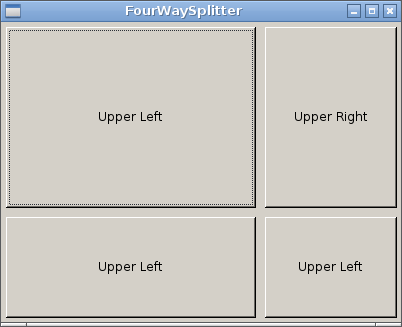
FourWaySplitter::FourWaySplitter(QWidget *parent) :
   QWidget(parent),
   ui(new Ui::FourWaySplitter), m_margin(5)
{
   ui->setupUi(this);

   m_ul = new QPushButton("Upper Left", this);
   m_ur = new QPushButton("Upper Right", this);
   m_ll = new QPushButton("Lower Left", this);
   m_lr = new QPushButton("Lower Right", this);

   setFixedWidth(500);
   setFixedHeight(400);

   // of course, the following needs to be updated in a sensible manner
   // when 'this' is not of fixed size in the 'resizeEvent(QResizeEvent*)' handler
   m_handleCenter = rect().center();

   m_ul->setGeometry(QRect(QPoint(m_margin,m_margin), m_handleCenter - QPoint(m_margin, m_margin)));
   m_ur->setGeometry(QRect(QPoint(width()/2 + m_margin, m_margin), QPoint(width() - m_margin, height()/2 - m_margin)));
   m_ll->setGeometry(QRect(QPoint(m_margin, height()/2 + m_margin), QPoint(width()/2 - m_margin, height() - m_margin)));
   m_lr->setGeometry(QRect(QPoint(width()/2 + m_margin, height()/2 + m_margin), QPoint(width() - m_margin, height() - m_margin)));
}

void FourWaySplitter::mouseMoveEvent(QMouseEvent * e)
{
   if(m_mouseMove) {
      QRect newGeo = m_ul->geometry();
      newGeo.setBottomRight(e->pos() + QPoint(-m_margin, -m_margin));
      m_ul->setGeometry(newGeo);

      newGeo = m_ur->geometry();
      newGeo.setBottomLeft(e->pos() + QPoint(+m_margin, -m_margin));
      m_ur->setGeometry(newGeo);

      newGeo = m_ll->geometry();
      newGeo.setTopRight(e->pos() + QPoint(-m_margin, + m_margin));
      m_ll->setGeometry(newGeo);

      newGeo = m_lr->geometry();
      newGeo.setTopLeft(e->pos() + QPoint(+m_margin, + m_margin));
      m_lr->setGeometry(newGeo);
   }
}

void FourWaySplitter::mousePressEvent(QMouseEvent * e)
{
   if((e->pos() - m_handleCenter).manhattanLength() < 10) {
      m_mouseMove = true;
   }
}

void FourWaySplitter::mouseReleaseEvent(QMouseEvent * e)
{
   m_handleCenter = rect().center();
   m_mouseMove    = false;
}

FourWaySplitter::~FourWaySplitter()
{
   delete ui;
}https://stackoverflow.com/questions/34202805
复制相似问题
腾讯云开发者

Copyright © 2013 - 2026 Tencent Cloud. All Rights Reserved. 腾讯云 版权所有
深圳市腾讯计算机系统有限公司 ICP备案/许可证号:粤B2-20090059  粤公网安备44030502008569号
腾讯云计算(北京)有限责任公司 京ICP证150476号 | 京ICP备11018762号