
UIButton在工作前要用3个水龙头吗?斯威夫特
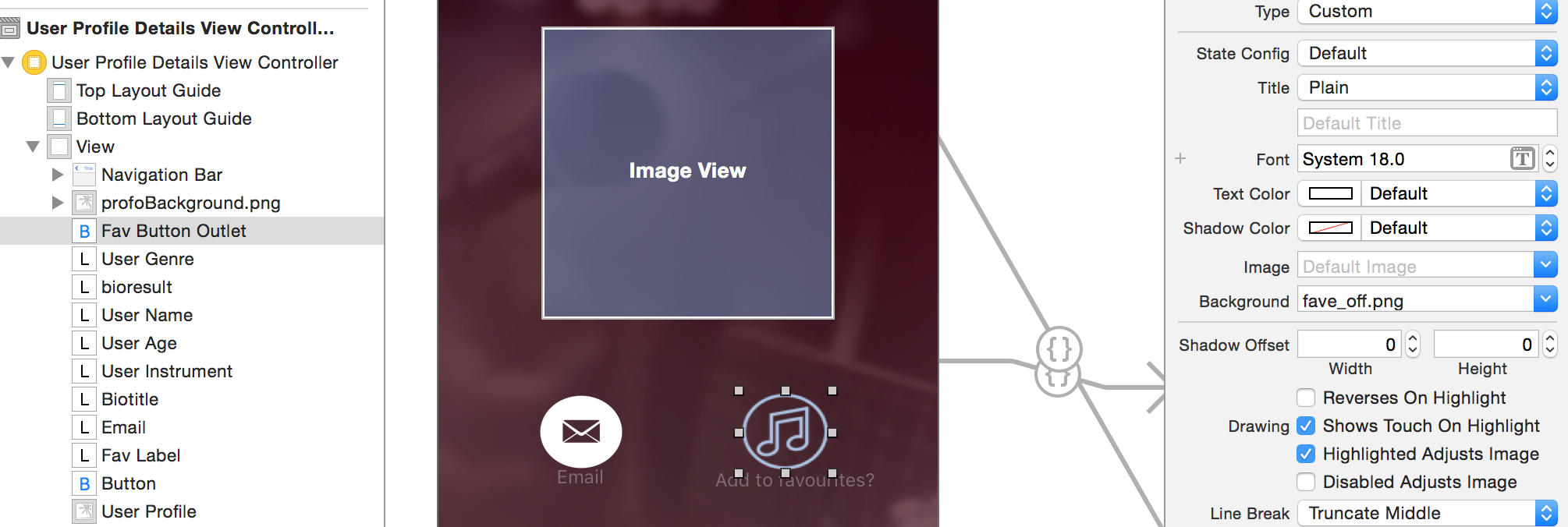
我有一个按钮,就像在图像中看到的那样,当用户首先按下它时,它应该改变图像,用户现在正在遵循这个配置文件。然而,当用户首先按下按钮时,它什么也不做,而在第二个点击时,它就工作了。我怎样才能在第一个水龙头上完成这个任务?
编辑清理了代码这段代码需要两下按钮才能工作。使用双击,它跟踪或取消跟踪用户并更新图像。但就像我说的,这需要两个水龙头。
 @IBAction func favButton(sender: UIButton) {

    buttonPressed = !buttonPressed


            if buttonPressed == true {

                let followedObjectId = userToShowDetail?["name"] as? String

                if isFollowing[followedObjectId!] == true {


                }

            } else  {

                let followedObjectId = userToShowDetail?["name"] as? String

                if isFollowing[followedObjectId!] == false {

                    isFollowing[followedObjectId!] = true
                    sender.setImage(UIImage(named: "fave_on@2x.png"), forState: UIControlState.Normal)


                    print("follow")

                    let following = PFObject(className: "Followers")
                    following["following"] = userToShowDetail?["name"] as? String
                    following["follower"] = PFUser.currentUser()?.objectId
                    favLabel.text = "Favourite Jammer"

                    following.saveInBackground()

                } else {

                    if buttonPressed != true {

                        isFollowing[followedObjectId!] = false
                        print("notFollow")
                        sender.setImage(UIImage(named: "fave_off@2x.png"), forState: UIControlState.Normal)
                        favLabel.text = "Add to favourites?"

                    }

                }
}这段代码在视觉上修复了它,但它不再在幕后工作。按钮更改图像并打印跟随和取消跟踪日志,但它不会取消跟踪一个用户,也添加了跟随的用户到我的数据两次。
        buttonPressed = !buttonPressed

    if buttonPressed == true {

        let followedObjectId = userToShowDetail?["name"] as? String

        isFollowing[followedObjectId!] = true

        sender.setImage(UIImage(named: "fave_on@2x.png"), forState: UIControlState.Normal)
        print("follow")

        let following = PFObject(className: "Followers")
        following["following"] = userToShowDetail?["name"] as? String
        following["follower"] = PFUser.currentUser()?.objectId
        favLabel.text = "Favourite Jammer"

        following.saveInBackground()

    } else {

        if buttonPressed != true {
            let followedObjectId = userToShowDetail?["name"] as? String

            isFollowing[followedObjectId!] = false
            print("notFollow")
            sender.setImage(UIImage(named: "fave_off@2x.png"), forState: UIControlState.Normal)
            favLabel.text = "Add to favourites?"

        } // !=true
    } // else

} // uibutton回答 1
Stack Overflow用户
发布于 2015-12-06 15:58:20
代码很乱,我不建议这样做.太多的查询正在发生,而且在那个按钮中发生的太多了.
但是,任何查询(您想在应用程序中访问和修改的数据)都应该在viewDidLoad (或类似的方法)中,以便在按下按钮之前值就在那里。这些值应该存储在数组中。当按下按钮时,您将已经可以访问这些值,并且在将来和在不同的方法中修改它们会更容易。
这需要缩短。
但是,假设您仍然希望这样做,则需要将按钮逻辑分解为函数。
从该查询中创建一个函数,然后在按钮中引用它。太多的事情正在发生+你在错误的地方调用按钮。
这是一个非常粗略的例子:
你的按钮应该是这样的:
  @IBAction func favButton(sender: UIButton) {

    buttonPressed = !buttonPressed

    if buttonPressed == true {

        let followedObjectId = userToShowDetail?["name"] as? String

        if isFollowing[followedObjectId!] == true {

            //something needs to happen here?

        }

        updateImage()

    } else  {


      followersUpdate()

    }

   }


      //Your functions below the button:

 func followersUpdate() {

    let followedObjectId = userToShowDetail?["name"] as? String

    if isFollowing[followedObjectId!] == false {

    isFollowing[followedObjectId!] = true
    sender.setImage(UIImage(named: "fave_on@2x.png"), forState: UIControlState.Normal)

    print("follow")

    let following = PFObject(className: "Followers")
    following["following"] = userToShowDetail?["name"] as? String
    following["follower"] = PFUser.currentUser()?.objectId
    favLabel.text = "Favourite Jammer"

    following.saveInBackground()

    } else {

    }

}

func updateImage() {
        if buttonPressed != true {

            isFollowing[followedObjectId!] = false
            print("notFollow")
            sender.setImage(UIImage(named: "fave_off@2x.png"), forState: UIControlState.Normal)
            favLabel.text = "Add to favourites?"


            let query = PFQuery(className: "Followers")

            query.whereKey("follower", equalTo: PFUser.currentUser()!.objectId!)
            query.whereKey("following", equalTo: (userToShowDetail?["name"] as? String)!)

            query.findObjectsInBackgroundWithBlock({ (objects, error) -> Void in

                if let objects = objects {

                    for object in objects {

                        object.deleteInBackground()

                    }
                }

            })

        }

    }

    //Your viewDidLoad() initial query to parse:


 override func viewDidLoad() {
    super.viewDidLoad()

    let query = PFUser.query()

    query?.findObjectsInBackgroundWithBlock({ (objects, error) -> Void in

        if let users = objects {

            for object in users {

                if let user = object as? PFUser {

                    if user.objectId! != PFUser.currentUser()?.objectId {

                        self.usernames.append(user.username!)
                        self.userids.append(user.objectId!)

                        let query = PFQuery(className: "Followers")

                        query.whereKey("follower", equalTo: (PFUser.currentUser()!.objectId)!)
                        query.whereKey("following", equalTo: user.objectId!)

                        query.findObjectsInBackgroundWithBlock({ (objects, error) -> Void in

                            if let objects = objects {

                                if objects.count > 0 {

                                    self.isFollowing[user.objectId!] = true

                                } else {

                                    self.isFollowing[user.objectId!] = false

                                }
                            }

                            if self.isFollowing.count == self.usernames.count {

                            }
                        })
                    }
                }

            }
        }
    })
}
正如我提到的,这是一个粗略的例子,可以让您了解您应该做什么(尽管我认为来回发送的查询和服务器是多余的,2)不需要,3)会使您的应用程序变慢。
如果你像这样分解它,并且在你的按钮中有更少的发生,图像应该更新。你将不得不玩这个,修改代码/使它更短。
如果你还有其他问题,请告诉我,我很乐意帮忙。
https://stackoverflow.com/questions/34118792
复制相似问题
腾讯云开发者

Copyright © 2013 - 2026 Tencent Cloud. All Rights Reserved. 腾讯云 版权所有
深圳市腾讯计算机系统有限公司 ICP备案/许可证号:粤B2-20090059  粤公网安备44030502008569号
腾讯云计算(北京)有限责任公司 京ICP证150476号 | 京ICP备11018762号