
Icepdf特殊字符呈现问题
我使用itext库来创建PDF文件,因为它有非常详细的呈现功能。当用户单击该按钮时,我每次都会编写一个模板并填充DB中的空白单元格。
而不是我使用Icepdf库向用户显示并获取所创建的pdf文件的输出。
但我认为Icepdf有一些字符编码问题。当PDf由Icepdf创建并调用时,土耳其字符中的一个看起来是方形的。在这个链接上可以看到土耳其字符。所有字符渲染成功,但第八个字符在图片不是。
当我转到创建的pdf文件文件(由itext库创建)并使用Acrobat手动打开它时,所有字符都会正确显示。但是如果通过编程Icepdf打开文件并向用户显示,图片中的第八个字符看起来是方形的。
我需要改变Icepdf的字符编码,但我还不能。阅读了许多关于字符和Font编码的文章,但是我还没有成功。如果我解决了这个字符问题,我的应用程序就可以部署了。
生成的PDF文件可以下载这里。
当我用Acrobat打开这个文件时,如下所示:

当我用IcePDF编程打开文件时,它看起来如下所示:
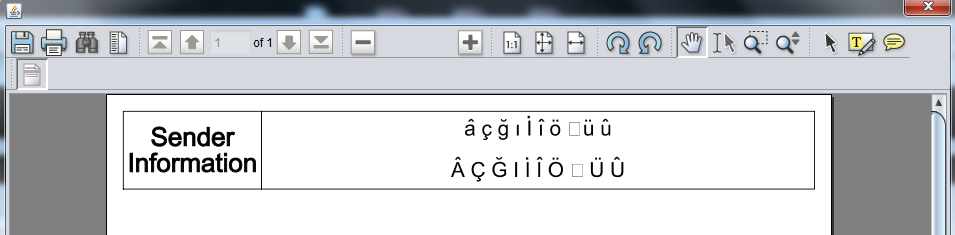
此外,我在Stackoverflow上读到了一些有关这方面的问题和答案,但没有一个得到接受的答案/帮助。
用于创建文件路径的代码:
File fUrl = new File(CreateAndViewPdf
                     .class
                     .getProtectionDomain()
                     .getCodeSource()
                     .getLocation()
                     .getPath()
            );

String path = fUrl
              .toString()
              .substring(0,fUrl.toString().lastIndexOf(File.separator))
.replace("%20", " ") + "\\hello.pdf";createPdf()方法的代码:
public void createPdf()throws DocumentException, IOException {
  BaseFont bf = BaseFont.createFont(BaseFont.HELVETICA, "ISO-8859-9", BaseFont.EMBEDDED);
  Document document = new Document(PageSize.A5);
  PdfWriter.getInstance(document, new FileOutputStream(path));
  document.setMargins(10, 10, 10, 10);
  document.setMarginMirroring(true);
  document.open();

  Font font = new Font( bf );
  PdfPCell cell;
  PdfPTable table = new PdfPTable(2);

  font = new Font( bf );
  font.setSize(15);
  font.setStyle("bold");
  cell = new PdfPCell(new Phrase("Sender\n"+"Information", font));
  cell.setPaddingBottom(7);
  cell.setHorizontalAlignment(Element.ALIGN_CENTER);
  cell.setVerticalAlignment(Element.ALIGN_MIDDLE);
  table.addCell(cell);

  font = new Font( bf );
  font.setSize(12);
  font.setStyle("normal");
  cell = new PdfPCell(new Phrase("â ç ğ ı İ î ö ş ü û\n\n"+"Â Ç Ğ I İ Î Ö Ş Ü Û",font));
  cell.setPaddingBottom(7);
  cell.setVerticalAlignment(Element.ALIGN_MIDDLE);
  cell.setHorizontalAlignment(Element.ALIGN_CENTER);
  table.addCell(cell);

  table.setWidths(new int[]{50,200});
  table.setWidthPercentage(100);
  table.setSpacingAfter(10);
  table.setSpacingBefore(10);

  document.add(table);
  document.close();
}viewPdf()方法的代码:
public void viewPdf(String fileP)throws IOException, InterruptedException {
  String filePath = fileP;
  SwingController controller = new SwingController();
  SwingViewBuilder factory = new SwingViewBuilder(controller);
  JPanel viewerComponentPanel = factory.buildViewerPanel();
  controller.getDocumentViewController().setAnnotationCallback(
      new org.icepdf.ri.common.MyAnnotationCallback(
              controller.getDocumentViewController()));
  Dimension screen = Toolkit.getDefaultToolkit().getScreenSize();
  CreateAndViewPdf.this.getContentPane().add(viewerComponentPanel);
  CreateAndViewPdf.this.setSize(new Dimension(screen.width/2,screen.height));
  CreateAndViewPdf.this.setLocationRelativeTo(null);
  controller.openDocument(filePath);
}回答 1
Stack Overflow用户
发布于 2015-12-14 18:46:27
--解决了--
首先,感谢路由器对@Mike 'Pomax' Kamermans的评论。
在阅读完他/她的评论后,在1-2天后,我发现了如下的解决方案:“我如何用iText嵌入特定的字体文件到PDF中”;
转到Control Panel\Appearance and Personalization\Fonts并将times.ttf (测试所有特殊字符支持的字体)文件复制到我的JavaApplicationresources容器中。
而不是将以下行添加到我的createPDF方法的顶部。
Font fontBase = FontFactory.getFont("/resources/times.ttf",
                                     BaseFont.IDENTITY_H,
                                     BaseFont.EMBEDDED,
                                     0.8f, Font.NORMAL,
                                     BaseColor.BLACK);
BaseFont bf = fontBase.getBaseFont();在此之后,viewPdf()方法可以让文档显示所有特殊字符的真实呈现。
https://stackoverflow.com/questions/34104669
复制相似问题
腾讯云开发者

Copyright © 2013 - 2026 Tencent Cloud. All Rights Reserved. 腾讯云 版权所有
深圳市腾讯计算机系统有限公司 ICP备案/许可证号:粤B2-20090059  粤公网安备44030502008569号
腾讯云计算(北京)有限责任公司 京ICP证150476号 | 京ICP备11018762号