
JasperReport iReport: JRException:错误从bean中检索更高粒度的字段值
我试图了解iReport是如何工作的,以及如何创建一个简单的jrxml文件。报告有一个标题和标题,数据应该在一个表中。当我尝试使用预览按钮检查报表的外观时,我可以看到标题和标题,但看不到表(请注意,我使用的是我为所有字段单击的“使用默认值”)。当我没有使用默认值时,我会得到这个错误。
Net.sf.jasperreports.engine.JRRuntimeException:在net.sf.jasperreports.components.table.fill.FillTable.prepare(FillTable.java:400)由于:java.lang.NoSuchMethodException:在.getFieldValue(JRAbstractBeanDataSource.java:96)类上的匿名性在org.apache.commons.beanutils.PropertyUtilsBean.getProperty(PropertyUtilsBean.java:846)中. Print =‘Print 2’>中性、中性.试着用EmptyDataSource..。
我想,也许这个问题与我如何输入列表的数据有关。可能格式是错的。我就是这样输入示例数据的
(myName,5,马尼拉)
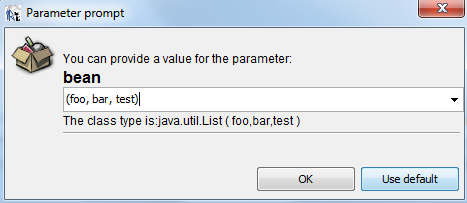
(根据截图,格式正确吗?我甚至试着将它封装在方括号中,但仍然会出现同样的错误。)
请注意,我有三栏名称,年龄,地址。
但在错误信息中我注意到
Unknown property 'name' on class 'class java.lang.String' 这让我觉得我在创建数据集时做错了什么。(对不起,如果我用错了词)。
总之,这是iReport生成的xml。
<?xml version="1.0" encoding="UTF-8"?>
<jasperReport xmlns="http://jasperreports.sourceforge.net/jasperreports" xmlns:xsi="http://www.w3.org/2001/XMLSchema-instance" xsi:schemaLocation="http://jasperreports.sourceforge.net/jasperreports http://jasperreports.sourceforge.net/xsd/jasperreport.xsd" name="firstReport" language="groovy" pageWidth="595" pageHeight="842" columnWidth="555" leftMargin="20" rightMargin="20" topMargin="20" bottomMargin="20" uuid="597c0716-df6b-42ec-a7c8-863eb1b7174a">
    <style name="table">
        <box>
            <pen lineWidth="1.0" lineColor="#000000"/>
        </box>
    </style>
    <style name="table_TH" mode="Opaque" backcolor="#7FFFD4">
        <box>
            <pen lineWidth="0.5" lineColor="#000000"/>
        </box>
    </style>
    <style name="table_CH" mode="Opaque" backcolor="#BFFFEA">
        <box>
            <pen lineWidth="0.5" lineColor="#000000"/>
        </box>
    </style>
    <style name="table_TD" mode="Opaque" backcolor="#FFFFFF">
        <box>
            <pen lineWidth="0.5" lineColor="#000000"/>
        </box>
    </style>
    <style name="table 1">
        <box>
            <pen lineWidth="1.0" lineColor="#000000"/>
        </box>
    </style>
    <style name="table 1_TH" mode="Opaque" backcolor="#7FFFD4">
        <box>
            <pen lineWidth="0.5" lineColor="#000000"/>
        </box>
    </style>
    <style name="table 1_CH" mode="Opaque" backcolor="#BFFFEA">
        <box>
            <pen lineWidth="0.5" lineColor="#000000"/>
        </box>
    </style>
    <style name="table 1_TD" mode="Opaque" backcolor="#FFFFFF">
        <box>
            <pen lineWidth="0.5" lineColor="#000000"/>
        </box>
    </style>
    <subDataset name="Table Dataset 2" uuid="208e382c-09df-484e-8d2d-a4eb4f4e48ba">
        <field name="name" class="java.lang.String"/>
        <field name="age" class="java.lang.String"/>
        <field name="address" class="java.lang.String"/>
    </subDataset>
    <parameter name="companyName" class="java.lang.String"/>
    <parameter name="date" class="java.util.Date"/>
    <parameter name="bean" class="java.util.List"/>
    <background>
        <band splitType="Stretch"/>
    </background>
    <title>
        <band height="32" splitType="Stretch">
            <staticText>
                <reportElement x="182" y="0" width="184" height="25" uuid="fe64d4b4-efb1-4ed2-ae06-772728fc8b65"/>
                <textElement>
                    <font fontName="Bookman Old Style" size="15" isBold="true"/>
                </textElement>
                <text><![CDATA[Chart Of Account List]]></text>
            </staticText>
        </band>
    </title>
    <pageHeader>
        <band height="58" splitType="Stretch">
            <staticText>
                <reportElement x="13" y="0" width="100" height="20" uuid="52ae4669-b47e-408c-aabc-e8f470a1d92b"/>
                <text><![CDATA[Company]]></text>
            </staticText>
            <staticText>
                <reportElement x="13" y="38" width="100" height="20" uuid="a27fe0e1-9fe6-423f-a006-46c51c7e3e5e"/>
                <text><![CDATA[Date Exported]]></text>
            </staticText>
            <textField>
                <reportElement x="113" y="0" width="100" height="20" uuid="1d600fa2-9de4-4999-9222-98a8bcb484f9"/>
                <textFieldExpression><![CDATA[$P{companyName}]]></textFieldExpression>
            </textField>
            <textField>
                <reportElement x="113" y="38" width="100" height="20" uuid="1147b818-90ae-4b41-a757-19a590db41d7"/>
                <textFieldExpression><![CDATA[$P{date}]]></textFieldExpression>
            </textField>
        </band>
    </pageHeader>
    <columnHeader>
        <band height="61" splitType="Stretch"/>
    </columnHeader>
    <detail>
        <band height="125" splitType="Stretch">
            <componentElement>
                <reportElement key="table 1" style="table 1" x="13" y="0" width="270" height="50" uuid="652523bf-b666-47bc-a1aa-fc20fb9e489a"/>
                <jr:table xmlns:jr="http://jasperreports.sourceforge.net/jasperreports/components" xsi:schemaLocation="http://jasperreports.sourceforge.net/jasperreports/components http://jasperreports.sourceforge.net/xsd/components.xsd">
                    <datasetRun subDataset="Table Dataset 2" uuid="6fcb9950-2d3f-4752-b56d-df7bff1e6991">
                        <dataSourceExpression><![CDATA[new net.sf.jasperreports.engine.data.JRBeanCollectionDataSource($P{bean})]]></dataSourceExpression>
                    </datasetRun>
                    <jr:column width="90" uuid="ee62967c-3669-49fe-a70d-a588ae47439d">
                        <jr:columnHeader style="table 1_CH" height="30" rowSpan="1">
                            <staticText>
                                <reportElement x="0" y="0" width="90" height="30" uuid="a0973bfe-815a-498e-8b25-c3320cfe0f62"/>
                                <text><![CDATA[Name]]></text>
                            </staticText>
                        </jr:columnHeader>
                        <jr:detailCell style="table 1_TD" height="20" rowSpan="1">
                            <textField>
                                <reportElement x="0" y="0" width="90" height="20" uuid="61d8309e-dd7d-4978-b171-9ae9144e2f5c"/>
                                <textFieldExpression><![CDATA[$F{name}]]></textFieldExpression>
                            </textField>
                        </jr:detailCell>
                    </jr:column>
                    <jr:column width="90" uuid="76a9e313-d134-420e-898b-7f5f444c4efb">
                        <jr:columnHeader style="table 1_CH" height="30" rowSpan="1">
                            <staticText>
                                <reportElement x="0" y="0" width="90" height="30" uuid="f79fdf71-a673-4d3a-8e10-b986d99b8e9b"/>
                                <text><![CDATA[Age]]></text>
                            </staticText>
                        </jr:columnHeader>
                        <jr:detailCell style="table 1_TD" height="20" rowSpan="1">
                            <textField>
                                <reportElement x="0" y="0" width="90" height="20" uuid="e4342bed-af9c-4541-9e57-a24485d0a94d"/>
                                <textFieldExpression><![CDATA[$F{age}]]></textFieldExpression>
                            </textField>
                        </jr:detailCell>
                    </jr:column>
                    <jr:column width="90" uuid="5c38c250-d74e-440c-93cb-3fef8ad38157">
                        <jr:columnHeader style="table 1_CH" height="30" rowSpan="1">
                            <staticText>
                                <reportElement x="0" y="0" width="90" height="30" uuid="4656a074-f345-483a-971b-b00c95746ec0"/>
                                <text><![CDATA[Address]]></text>
                            </staticText>
                        </jr:columnHeader>
                        <jr:detailCell style="table 1_TD" height="20" rowSpan="1">
                            <textField>
                                <reportElement x="0" y="0" width="90" height="20" uuid="f2cc3d1c-97ef-48c1-b6e4-a12acc4e67ad"/>
                                <textFieldExpression><![CDATA[$F{address}]]></textFieldExpression>
                            </textField>
                        </jr:detailCell>
                    </jr:column>
                </jr:table>
            </componentElement>
        </band>
    </detail>
</jasperReport>
1)我创建的jrxml有什么问题?我是否向表提供了错误的格式化数据?还是我的报告有点不对劲?
回答 1
Stack Overflow用户
发布于 2015-12-11 00:07:40
这是通过在数据源表达式中添加"new“关键字来修正的。通过右键单击报表检查器中的表,您将看到数据源表达式。“编辑表格数据资源”
https://stackoverflow.com/questions/34039325
复制相似问题
腾讯云开发者

Copyright © 2013 - 2026 Tencent Cloud. All Rights Reserved. 腾讯云 版权所有
深圳市腾讯计算机系统有限公司 ICP备案/许可证号:粤B2-20090059  粤公网安备44030502008569号
腾讯云计算(北京)有限责任公司 京ICP证150476号 | 京ICP备11018762号