
校验登录php日志系统
我试图做一个简单的登录系统,我对PHP和创建这样的东西非常陌生。我不知道为什么我的代码不重定向到我需要它去的网站。我认为我需要一套新的观点或想法,为什么它会遇到“服务器错误”。我试过这么多不同的方法,但是没有一个有效,或者我对改变什么的理解是错误的。我花了好几天的时间想弄清楚为什么这些都不适合我。
几个问题-请记住,我对此非常陌生:
- 如果我访问一个数据库来从php文件所在的服务器上提取用户名和密码,我可以离开"localhost“,对吗?
- 如果我没有得到一个“服务器错误”,而只是一个空白的白屏幕,这是否意味着我连接到服务器正确,只是没有信息显示?
- 我已经尝试了十几个不同的
checklogin文件,没有一个工作,我不知道为什么,这是在我的一端吗?
我的login.php页面
<form action="checklogin.php" method="POST">
   <p>Username: <input type="text" name="username" placeholder="Username"     required="required" /> <br/>
       <p>Password: <input type="password" name="password"     placeholder="Password" required="required" /> <br/><br>

       <input type="submit" value="Login"/>
       <input type="button" onclick="location.href='SeniorDB_Main.php';"     value="Return to Register" />
    </form>
校验登录#1 -收到服务器错误
<?php
    session_start();
    $username = mysql_real_escape_string($_POST['username']);
    $password = mysql_real_escape_string($_POST['password']);
    $bool = true;

    mysql_connect("localhost", "[username]", "[password]") or die (mysql_error()); //Connect to server
    mysql_select_db("[database_name]") or die ("Cannot connect to database"); //Connect to database

    $query = mysql_query("Select * from users WHERE username='$username'"); // Query the users table
    $exists = mysql_num_rows($query); //Checks if username exists
    $table_users = "test":
    $table_password = "test";

    if($exists > 0) //IF there are no returning rows or no existing username
    {
      while($row = mysql_fetch_assoc($query)) // display all rows from query
       {
          $table_users = $row['username']; // the first username row is passed on to $table_users, and so on until the query is finished
          $table_password = $row['password']; // the first password row is passed on to $table_password, and so on until the query is finished
       }
       if(($username == $table_users) && ($password == $table_password))// checks if there are any matching fields
       {
          if($password == $table_password)
          {
             $_SESSION['user'] = $username; //set the username in a session. This serves as a global variable
             header("location: SeniorDB_DBLibrary.php"); // redirects the user to the authenticated home page
          }
       }
?>
检查登录#2 -收到与空白白页
    if (isset($_POST['submit'])){
    $username=mysql_escape_string($_POST['username']);
    $password=mysql_escape_string($_POST['password']);
    if (!$_POST['username'] | !$_POST['password'])
     {
    echo ("<SCRIPT LANGUAGE='JavaScript'>
            window.alert('You did not complete all of the required fields')
            window.location.href='htmlogin.html'
            </SCRIPT>");
    exit();
         }


    $sql= mysql_query("SELECT * FROM `users` WHERE `username` = '$username' AND `password` = '$password'");
    if(mysql_num_rows($sql) > 0)
    {
    echo ("<SCRIPT LANGUAGE='JavaScript'>
            window.alert('Login Succesfully!.')
            window.location.href='SeniorDB_DBLibrary'
            </SCRIPT>");
    exit();
    }
    else{
    echo ("<SCRIPT LANGUAGE='JavaScript'>
            window.alert('Wrong username password combination.Please re-enter.')
            window.location.href='htmllogin.html'
            </SCRIPT>");
    exit();
       }
    }
    else{
    }
    ?>
校验登录#3 -登录,但调用用户输入,而不是从数据库-它可以调用数据库条目来匹配它与这一个吗?
    mysql_connect("localhost", "[username]", "[password]") or die (mysql_error()); //Connect to server
    mysql_select_db("[database_name]") or die ("Cannot connect to database"); //Connect to database

    if (empty($_SESSION['users'])) {

    $username = isset($_POST['username']) ? $_POST['username'] : '';
    $password = isset($_POST['password']) ? $_POST['password'] : '';

        if ($username == $_POST['username'] && $password == $_POST['password']) {

            // redirect to index.php to welcome the logged in user:
            header('Location: SeniorDB_DBLibrary.php');
            exit;
        }
        else {
            die("ERROR: Incorrect username or password!");
        }

    }
?>
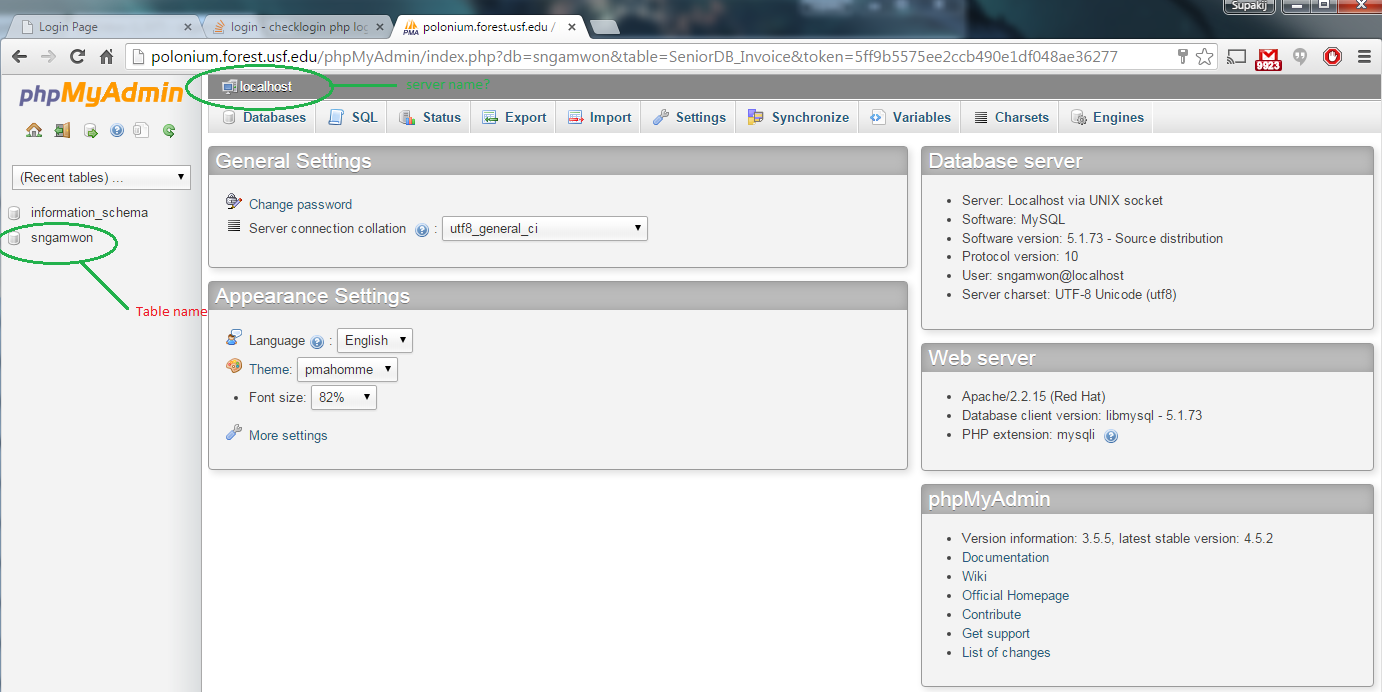
谢谢你拉斯克拉特-你帮我解决了一切。如果有人来这里看看是怎么解决的,请看他的答案。
回答 2
Stack Overflow用户
发布于 2015-11-30 05:18:03
首先,如果你正在接受这样的教育,你需要一个更好的老师。您需要使用一种安全的数据库连接方式,当涉及到这类事情时,您需要使用函数和/或类。此外,您不应该将密码存储为纯文本!尽管如此,看看这是否对您有效(我知道它有效,所以如果您有问题,您需要确保您的连接凭据是A-OK)!
您应该有一个更好的数据库连接,比如PDO或MySQLi。确保在此connect()方法中填写db凭据。
/classes/DatabaseConfig.php
<?php
// This class will store your database connection
// and make it available everywhere because it is being
// saved to a singleton (single instance)
class   DatabaseConfig
    {
        private static  $singleton;

        public  function __construct()
            {
                if(empty(self::$singleton))
                    self::$singleton    =   $this;

                return self::$singleton;
            }

        public  function connect($host = "localhost", $username = "username", $password = "password", $database = "database")
            {
                // Create connection options
                $opts   =   array(  PDO::ATTR_ERRMODE => PDO::ERRMODE_EXCEPTION,
                                    PDO::ATTR_EMULATE_PREPARES => false,
                                    PDO::ATTR_DEFAULT_FETCH_MODE => PDO::FETCH_ASSOC);
                $conn   =   new PDO('mysql:host='.$host.';dbname='.$database, $username, $password,$opts);

                return $conn;
            }
    }
返回关联数组的简单查询函数:
/functions/query.php
<?php
// You can query your database with this function alone
// You can use a bind array in the second parameter to send
// variables for a safe query
function query($sql,$bind = false)
    {
        // This assigns the database connection class
        $db     =   new DatabaseConfig();
        // This is the PDO Connection
        $con    =   $db->connect();
        // This gives the option to straight query or bind
        if(!empty($bind)) {
                $query  =   $con->prepare($sql);
                $query->execute($bind);
            }
        else
            $query  =   $con->query($sql);
        // This will make an associative array
        while($row  =   $query->fetch()){
                $result[]   =   $row;
            }
        // This will return the array OR 0 if no results
        return (!empty($result))? $result : 0;
}再次简单登录script....albeit,不是存储明文密码的好主意。您应该使用password_hash()和password_verify()函数:
checklogin.php
<?php
// Create session start
session_start();
include_once(__DIR__.'/classes/DatabaseConfig.php');
include_once(__DIR__.'/functions/query.php');
// If the user has submitted the form
if(!empty($_POST['username'])) {
        // Use the query function to validate the username
        $username   =   query("select * from `users` where `username` = :username",array(":username"=>$_POST['username']));
        // IF there are returned hits
        if($username != 0) {
                // Check the password against the post
                if($username[0]['password'] == $_POST['password']) {
                        // If matches, then unset the not-so-secure password
                        unset($username[0]['password']);
                        // Assign the user row to session
                        $_SESSION['user']   =   $username[0];
                        // Redirect
                        header("location: SeniorDB_DBLibrary.php");
                        // Put exit here so the script stops processing
                        exit;
                    }
            }
    }
// Redirect
header("location: login.php?error=invalid");
// Put exit here so the script stops processing
exit;
login.php
<style>
div.fancy input {
    font-size: 20px;
    padding: 5px;
}
div.fancy {
    display: inline-block;
    margin: 8px 0;
    width: 100%;
}
p,div.fancy {
    float: left;
}
div.fButton {
    display: inline-block;
    margin: 10px auto;
}
div.fButton input   {
    padding: 10px 20px;
    background-color: #CCC;
    text-shadow: 1px 1px 2px #FFF;
    cursor: pointer;
    border: 1px solid #444;
}
.btnWrap    {
    text-align: center;
    display: inline-block;
    float: left;
    width: 100%;
}
form    {
    max-width: 300px;
    padding: 30px;
    background-color: #EBEBEB;
    box-shadow: 1px 1px 10px #CCC;
    border: 1px solid #CCC;
    border-radius: 3px;
    display: inline-block;
}
</style>
    <form action="checklogin.php" method="POST">
        <p>Username:</p>
        <div class="fancy">
            <input type="text" name="username" placeholder="Username"     required="required" />
        </div>
        <p>Password:</p>
        <div class="fancy">
            <input type="password" name="password" placeholder="Password" required="required" />
        </div>
        <div class="btnWrap">
            <div class="fButton">
                <input type="submit" value="Login"/>
            </div>
        </div>
</form> Stack Overflow用户
发布于 2015-11-30 05:33:01
好的,以下是你的问题的直接答案:
1)不能将服务器名称保留为"localhost“,您必须找到正在使用的主机的服务器名称。
2)即使您没有得到服务器错误,但仍然有一个空白屏幕,这意味着PHP代码中出现了可怕的错误,它从一开始就阻止了整个页面的运行。PHP首先读取,然后处理。因此,如果语法或类似的任何错误,您只需得到一个空白页。
3)您使用的第一个登录文件是可以的,但是它不能工作,因为您将主机设置为"localhost“。一旦你把它放在一个实时网站上,它就需要更改到你所在的服务器名。我在一台计算机上,而您在另一台计算机上请求"localhost“将不是您想要的。完全没有。甚至都不起作用。
https://stackoverflow.com/questions/33990604
复制相似问题
腾讯云开发者

Copyright © 2013 - 2026 Tencent Cloud. All Rights Reserved. 腾讯云 版权所有
深圳市腾讯计算机系统有限公司 ICP备案/许可证号:粤B2-20090059  粤公网安备44030502008569号
腾讯云计算(北京)有限责任公司 京ICP证150476号 | 京ICP备11018762号