
多次将数组分解为象限
我的目标是我有一个图像,吐出一个位图。现在我想把图像的平均颜色显示为一个巨大的像素。这是一个相当简单的任务,只需使用bufferImage并获取位图,我取每一个红色、绿色和蓝色的值,将其全部加起来,然后除以图片的分辨率。
事情是这样做的,我想把图像分成四个象限,然后取每个象限的平均颜色,然后显示出来。再一次打破四个象限中的每一个,做同样的事情。我面临的问题是,我使用的是递归语句,它执行以下操作:
private static void getBlockAverage(int startHeight, int endHeight, int startWidth, int endWidth, BufferedImage img, BufferedImage blockImg, Color oldAvg) {
        if(endHeight <= startHeight || endWidth <= startWidth) {
           counter++;
           return;
        }
        // get quadrant pixel average and display, I deleted this portion of the code just to keep things compact

        getBlockAverage(startHeight, (startHeight + endHeight)/2, startWidth, (startWidth + endWidth)/2, img, blockImg, color);
        getBlockAverage((startHeight + endHeight)/2, endHeight, startWidth, (startWidth + endWidth)/2, img, blockImg, color);
        getBlockAverage(startHeight, (startHeight + endHeight)/2, (startWidth+endWidth)/2, endWidth, img, blockImg, color);
        getBlockAverage((startHeight+endHeight)/2, endHeight, (startWidth+endWidth)/2, endWidth, img, blockImg, color);
}很容易看出,这不是我想要的,因为递归语句将首先继续执行getBlockAverage(startHeight, (startHeight + endHeight)/2, startWidth, (startWidth + endWidth)/2, img, blockImg, color);,直到它完成,然后转移到下一个。这不是我想要的。我希望图像被分解成4个象限,然后每个象限被分解,直到所有象限被分解并继续。
例如:
从一个象限开始,分成4个象限。现在,把象限1分解成4个,现在是象限2,现在是4个象限,现在是象限3,现在是4个象限,现在是4个象限,现在是4个象限,4个象限。
现在我正在考虑这个问题,我觉得我应该用某种for循环来限制迭代次数,但我不知道如何做到这一点。
回答 1
Stack Overflow用户
发布于 2015-11-28 19:17:10
我倾向于同意你的观点。我想我也会把这个方法放进循环中,但也会让这个方法把每个象限的平均颜色返回到一个一维数组中,考虑到每个数组索引是一个象限数,而该索引的实际元素包含那个特定象限的颜色。通过这种方式,您可以处理稍后获得的所有相关信息。我至少会让它运行,然后优化它,一旦它按照我想要的方式工作。不管怎样,我就是这么做的:P
当然,在所有这些过程中,我假设象限解剖流与我在下面的图像中所显示的相似:
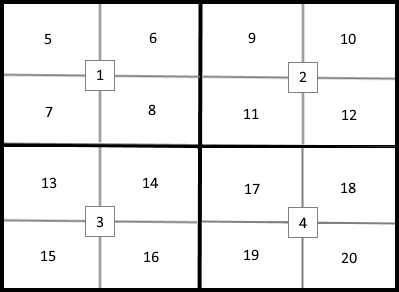
以下是我要做的事:
更改getBlockAverage()方法,使其返回颜色.
private static Color getBlockAverage(int startHeight, int endHeight, int startWidth,
            int endWidth, BufferedImage img, BufferedImage blockImg, Color oldAvg) {

    // get quadrant pixel average color and return it
    // with whatever code you've been using....

    return theQuadrantAverageColor;
}然后,我将创建另一个包含我们的循环的方法,图像象限分解维数,并调用getBlockAverage()方法,而循环是well...looping,对于每个循环,将从getBlockAverage()方法返回的颜色放入每个建立的颜色数组中:
private static void getQuadrantsColorAverages(Color[] quadrantColors, BufferedImage img) {
    // Decalre and Initialize required variables.
    BufferedImage wrkImg = img;
    BufferedImage blockImg = null; //?????
    int imgWidth = wrkImg.getWidth();
    int imgHeight = wrkImg.getHeight();
    int startHeight = 0;
    int endHeight = 0;
    int startWidth = 0;
    int endWidth = 0;
    Color oldAvg = null;
    int quadCount = 1;

    // Start our loop and and continue it until our counter
    // variable named quadCount goes over 20....
    while (quadCount <= 20) {
        // Handle dissectional dimensions (in pixels)
        // for quadrants 1 to 20 as layed out within
        // the supplied image to this forum post.
        switch (quadCount) {
            // Quadrant 1
            case 1:
                startHeight = 0; endHeight = (imgHeight / 2);
                startWidth = 0; endWidth = (imgWidth / 2);
            // Quadrant 2
            case 2:
                startWidth = (endWidth + 1); endWidth = imgWidth;
                break;
            // Quadrant 3
            case 3:
                startHeight = (endHeight + 1); endHeight = imgHeight;
                startWidth = 0; endWidth = (imgWidth / 2);
                break;
            // Quadrant 4
            case 4:
                startWidth = (endWidth + 1); endWidth = imgWidth;
                break;
            // Quadrant 5
            case 5:
                startHeight = 0; endHeight = (imgHeight / 4);
                startWidth = 0; endWidth = (imgWidth / 4);
                break;
            // Quadrant 6
            case 6:
                startWidth = (endWidth + 1); endWidth = (imgWidth / 2);
                break;
            // Quadrant 7
            case 7:
                startHeight = (endHeight + 1); endHeight = (imgHeight / 2);
                startWidth = 0; endWidth = (imgWidth / 4);
                break;
            // Quadrant 8
            case 8:
                startWidth = (endWidth + 1); endWidth = (imgWidth / 2);
                break;
            // Quadrant 9
            case 9:
                startHeight = 0; endHeight = (imgHeight / 4);
                startWidth = (endWidth + 1); endWidth = ((imgWidth / 4) * 3);
                break;
            // Quadrant 10
            case 10:
                startWidth = (endWidth + 1); endWidth = imgWidth;
                break;
            // Quadrant 11
            case 11:
                startHeight = (imgHeight / 4); endHeight = (imgHeight / 2);
                startWidth = (imgWidth / 2); endWidth = ((imgWidth / 4) * 3);
                break;
            // Quadrant 12
            case 12:
                startWidth = (endWidth + 1); endWidth = imgWidth;
                break;
            // Quadrant 13
            case 13:
                startHeight = (imgHeight / 2); endHeight = ((imgHeight / 4) * 3);
                startWidth = 0; endWidth = (imgWidth / 4);
                break;
            // Quadrant 14
            case 14:
                startWidth = (endWidth + 1); endWidth = (imgWidth / 2);
                break;
            // Quadrant 15
            case 15:
                startHeight = (endHeight + 1); endHeight = imgHeight;
                startWidth = 0; endWidth = (imgWidth / 4);
                break;
            // Quadrant 16
            case 16:
                startWidth = (endWidth + 1); endWidth = (imgWidth / 2);
                break;
            // Quadrant 17
            case 17:
                startHeight = (imgHeight / 2); endHeight = ((imgHeight / 4) * 3);
                startWidth = (imgWidth / 2); endWidth = ((imgWidth / 4) * 3);
                break;
            // Quadrant 18
            case 18:
                startWidth = (endWidth + 1); endWidth = imgWidth;
                break;
            // Quadrant 19
            case 19:
                startHeight = (endHeight + 1); endHeight = imgHeight;
                startWidth = (imgWidth / 2); endWidth = ((imgWidth / 4) * 3);
                break;
            // Quadrant 20
            case 20:
                startWidth = (endWidth + 1); endWidth = imgWidth;
                break;
        }

        // Maintain the oldAvg Color variable
        oldAvg = getBlockAverage(startHeight, endHeight, startWidth,
                                 endWidth, img, blockImg, oldAvg);
        // We subtract 1 from quadCount below to accomodate
        // our Array indexing which must start at 0.
        quadrantColors[quadCount - 1] = oldAvg;
        // increment our quadrant counter by 1.
        quadCount++;
    }
}
然后,在您的应用程序中的某个地方,我将启动以下所有这些:
// We declare our array to handle 20 elements since
// the image will be dissected into 20 quadrants.
Color[] quadrantColors = new Color[20];

BufferedImage img = null;

// Fill our Color Array...
getQuadrantsColorAverages(quadrantColors, img);

// Let's see what we managed to get....
for (int i = 0; i < quadrantColors.length; i++) {
    Color clr =  quadrantColors[i];
    int red = clr.getRed();
    int green = clr.getGreen();
    int blue = clr.getBlue();

    System.out.println("The average color for Quadrant #" +
       (i + 1) + " is: RGB[" + red + "," + green + "," + blue + "]");
}
好吧.这就是QQCompi。我希望这能帮你一点忙。
https://stackoverflow.com/questions/33970115
复制相似问题
腾讯云开发者

Copyright © 2013 - 2026 Tencent Cloud. All Rights Reserved. 腾讯云 版权所有
深圳市腾讯计算机系统有限公司 ICP备案/许可证号:粤B2-20090059  粤公网安备44030502008569号
腾讯云计算(北京)有限责任公司 京ICP证150476号 | 京ICP备11018762号