
Fabric.io解析与答案初始化
Fabric.io解析与答案初始化
提问于 2015-11-23 02:30:21
我已经在我的应用程序中包含了Crashlytics。我完成了注册向导,并按照我的[Fabric with:@[[Crashlytics class]]];在AppDelegate.m中的指示初始化了Crashlytics。
我需要做什么来初始化答案,以及在我的应用程序中做这些的最佳位置是什么?我只想要现在的基本初始化。
回答 1
Stack Overflow用户
回答已采纳
发布于 2015-11-23 04:33:24
对于基本的度量标准,您需要包含从插件中获得的答案工具包来使用答案!
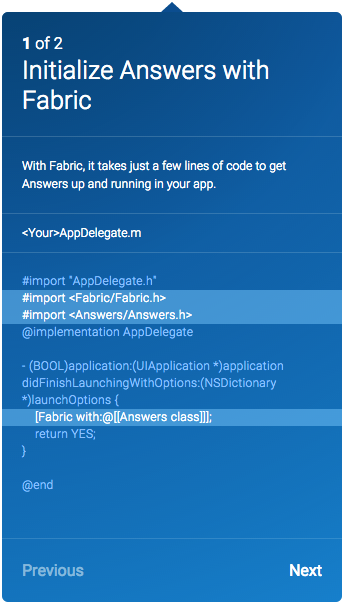
用于使用Fabric初始化答案的
//AppDelegate.m

#import "AppDelegate.h"
#import <Fabric/Fabric.h>
#import <Answers/Answers.h>
@implementation AppDelegate

- (BOOL)application:(UIApplication *)application didFinishLaunchingWithOptions:(NSDictionary *)launchOptions {
    [Fabric with:@[[Answers class]]];
    return YES;
}

@end
用于轨道键度量的
答案可以跟踪你的应用程序中的关键指标,比如写的推特、播放的歌曲和观看的视频。接下来,将代码复制到您的项目中,以检测应用程序的关键度量之一。
ViewController.m
#import "ViewController.h"
#import <Answers/Answers.h>

@interface ViewController ()

@end

@implementation ViewController

- (void)viewDidLoad {
    [super viewDidLoad];
    UIButton* button = [UIButton buttonWithType:UIButtonTypeRoundedRect];
    [button setTitle:@"Trigger Key Metric" forState:UIControlStateNormal];
    [button addTarget:self action:@selector(anImportantUserAction) forControlEvents:UIControlEventTouchUpInside];
    [button sizeToFit];
    button.center = self.view.center;
    [self.view addSubview:button];

}

- (void)anImportantUserAction {
    // TODO: Move this method and customize the name and parameters to track your key metrics
    //       Use your own string attributes to track common values over time
    //       Use your own number attributes to track median value over time
    [Answers logCustomEventWithName:@"Video Played" customAttributes:@{@"Category":@"Comedy",
                                                                       @"Length":@350}];
}


@end
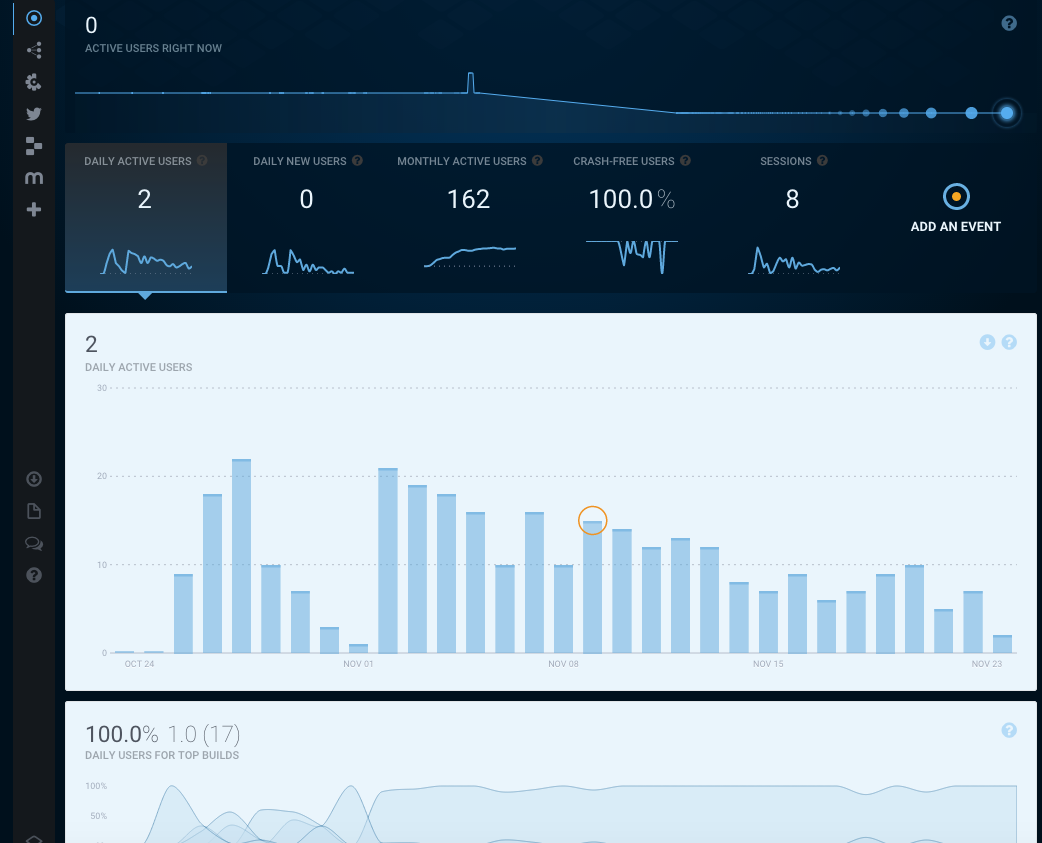
成功初始化后,“应答”选项卡显示应用程序和键度量
页面原文内容由Stack Overflow提供。腾讯云小微IT领域专用引擎提供翻译支持
原文链接:
https://stackoverflow.com/questions/33862885
复制相关文章
相似问题
腾讯云开发者

Copyright © 2013 - 2026 Tencent Cloud. All Rights Reserved. 腾讯云 版权所有
深圳市腾讯计算机系统有限公司 ICP备案/许可证号:粤B2-20090059  粤公网安备44030502008569号
腾讯云计算(北京)有限责任公司 京ICP证150476号 | 京ICP备11018762号