
可移动PictureBox透明在PictureBox上
我有两个PictureBoxes,一个是播放器控制(Pic1),另一个是非移动(Pic2).所以当pic1在pic2上时,pic1的背景是透明的,所以我们可以看到pic2。目前,这就是我所拥有的。
Private Sub Form1_KeyDown(ByVal sender As Object, ByVal e As System.Windows.Forms.KeyEventArgs) Handles Me.KeyDown
    pic2.BringToFront()
    pic1.BringToFront()
    If e.KeyData = Keys.D Then
        pic1.Left += 5
    End If
    If e.KeyData = Keys.A Then
        pic1.Left -= 5
    End If
    If e.KeyData = Keys.W Then
        pic1.Top -= 5
    End If
    If e.KeyData = Keys.S Then
        pic1.Top += 5
    End If
End Sub
有什么帮助吗?或者用我的编码方式是不可能的?
回答 1
Stack Overflow用户
发布于 2015-11-21 12:05:04
创建这样的游戏的最好方法是使用OpenGL、DirectX、XNA等,但也可以使用GDI+和Graphics.DrawImage。
但有一件事你应该知道,几乎没有什么是不可能的,当涉及到编程。:)
这是一个解决方案,我使用的图片盒与适当的透明背景。请记住,将picturebox移动到其他控件/图片框上可能会导致其滞后,因为它必须递归地重新绘制后面的所有内容:
1)首先,创建一个自定义组件(在VS/VB中的"Add“菜单中找到)。
2)给它一个你选择的名字(例如:TransparentPictureBox)。
3)使其继承原始PictureBox。
Public Class TransparentPictureBox
    Inherits PictureBox

End Class
4)在类中粘贴以下代码:
Protected Overrides Sub OnPaintBackground(e As System.Windows.Forms.PaintEventArgs)
    MyBase.OnPaintBackground(e)

    If Parent IsNot Nothing Then
        Dim index As Integer = Parent.Controls.GetChildIndex(Me)

        For i As Integer = Parent.Controls.Count - 1 To index + 1 Step -1
            Dim c As Control = Parent.Controls(i)
            If c.Bounds.IntersectsWith(Bounds) AndAlso c.Visible = True Then
                Dim bmp As New Bitmap(c.Width, c.Height, e.Graphics)
                c.DrawToBitmap(bmp, c.ClientRectangle)
                e.Graphics.TranslateTransform(c.Left - Left, c.Top - Top)
                e.Graphics.DrawImageUnscaled(bmp, Point.Empty)
                e.Graphics.TranslateTransform(Left - c.Left, Top - c.Top)
                bmp.Dispose()
            End If
        Next
    End If
End Sub此代码重写PictureBox的OnPaintBackground事件,从而通过将其后面的每个控件绘制到后台来绘制它自己的背景。
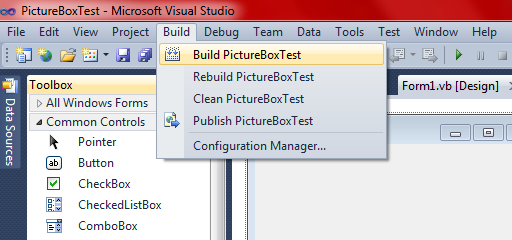
5)构建您的项目(如果您不知道如何构建项目,请参见下面的图片)。
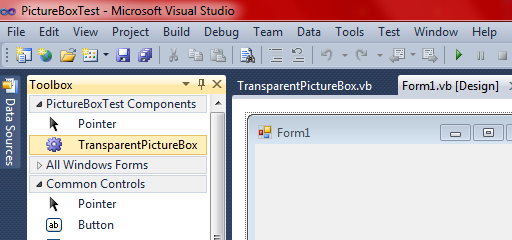
6)从ToolBox中选择组件并将其添加到表单中。
希望这能有所帮助!
构建您的项目
在Visual中打开Build菜单,然后按Build <your project name here>。
从ToolBox添加组件
https://stackoverflow.com/questions/33838948
复制相似问题
腾讯云开发者

Copyright © 2013 - 2026 Tencent Cloud. All Rights Reserved. 腾讯云 版权所有
深圳市腾讯计算机系统有限公司 ICP备案/许可证号:粤B2-20090059  粤公网安备44030502008569号
腾讯云计算(北京)有限责任公司 京ICP证150476号 | 京ICP备11018762号