
UIPopoverPresentationController错位
我有项目表(UITableViewController),在这里我使用可自定义的单元格表示项目。在每个单元格的左边,我有一个缩略图,当您单击它时(准确地说,在图像上方的一个按钮上),会出现一个弹出窗口,显示放大的图像。它只适用于第一个单元:
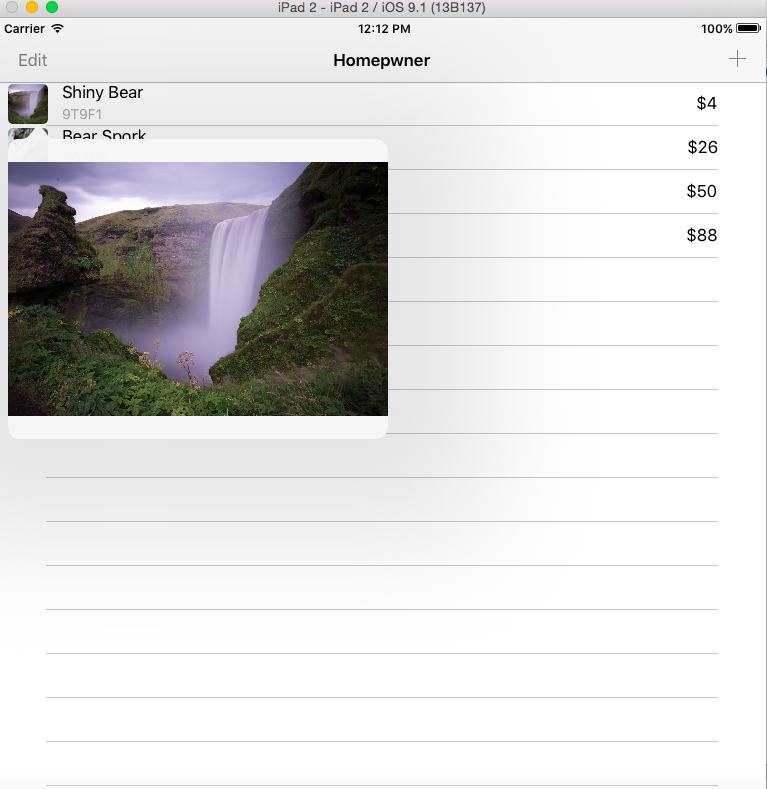
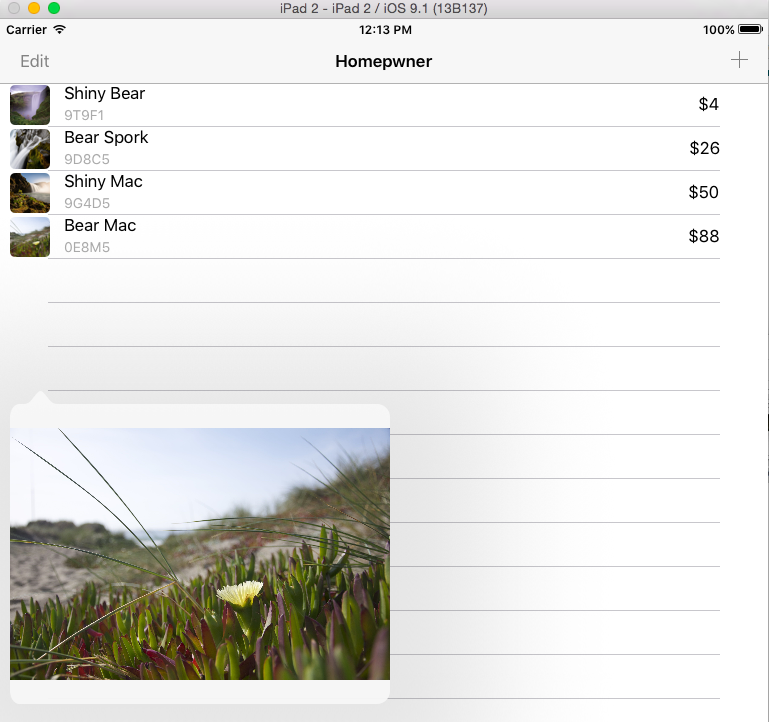
单击下面的单元格显示出错误地移动了弹出窗口,当您从表的顶部到底部时,错位增加:
我正在UITableViewController中设置每个单元的块
 - (UITableViewCell *)tableView:(UITableView *)tableView
     cellForRowAtIndexPath:(NSIndexPath *)indexPath
{
    // Get a new or recycled cell
BNRItemCell *cell =
    [tableView dequeueReusableCellWithIdentifier:@"BNRItemCell"
                                forIndexPath:indexPath];

// Set the text on the cell with the description of the item
// that is the nth index of items, where n = row this cell
// will appear in on the tableview
NSArray *items = [[BNRItemStore sharedStore] allItems];
BNRItem *item = items[indexPath.row];

// Configure the cell with the BNRItem
cell.nameLabel.text = item.itemName;
cell.serialNumberLabel.text = item.serialNumber;
cell.valueLabel.text = [NSString stringWithFormat:@"$%d", item.valueInDollars];

cell.thumbnailView.image = item.thumbnail;

cell.actionBlock = ^{
    NSLog(@"Going to show image for %@", item);

    if ([UIDevice currentDevice].userInterfaceIdiom == UIUserInterfaceIdiomPad){
        NSString *itemKey = item.itemKey;

        // if there is no image, we don't need to display anything
        UIImage *img = [[BNRImageStore sharedStore] imageForKey:itemKey];
        if (!img) {
            return;
        }

        BNRImageViewController *ivc = [[BNRImageViewController alloc] init];
        ivc.image = img;

        ivc.modalPresentationStyle = UIModalPresentationPopover;
        ivc.preferredContentSize = CGSizeMake(380, 300);
        CGRect frame = [self.view convertRect:cell.thumbnailView.bounds
                                     fromView:cell.thumbnailView];
        // frame.origin.y -= 150;

        UIPopoverPresentationController *popoverController = ivc.popoverPresentationController;
        popoverController.permittedArrowDirections = UIPopoverArrowDirectionUp;
        popoverController.sourceView = cell.thumbnailView;
        popoverController.sourceRect = frame;

        [self.navigationController presentViewController:ivc animated:YES completion:nil];


    }
};

return cell;
}
该块在单击可自定义UITableViewCell视图上的按钮时执行。
@implementation BNRItemCell

- (IBAction)showImage:(id)sender
{
if (self.actionBlock) {
    self.actionBlock();
}
}

@endactionBlock是property of BNRItemCell
任何帮助都将不胜感激。
回答 1
Stack Overflow用户
发布于 2015-11-18 20:55:00
试一试如下:
CGRect frame = [cell.view convertRect:cell.thumbnailView.frame toView:self.view];
这里的诀窍是bounds和frame之间的区别。在按钮的情况下,当您查看它的superview时,它的框架就是它所在的位置(例如,42,42)。但是,边界是按钮相对于自身和自己的坐标(0,0)的位置。
不要嘲笑我的画(我不是设计师),但这可能会有帮助:
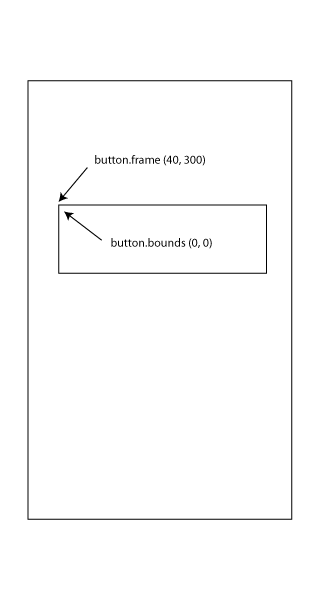
您正在询问按钮(或者在您的例子中是一个UIImage)“您相对于superview在哪里”(在本例中,超级视图基本上是整个屏幕)。你用convertRect: toView:来做这件事。将缩略图的框架(不是边界)转换为其坐标在superview上的位置。
https://stackoverflow.com/questions/33789841
复制相似问题
腾讯云开发者

Copyright © 2013 - 2026 Tencent Cloud. All Rights Reserved. 腾讯云 版权所有
深圳市腾讯计算机系统有限公司 ICP备案/许可证号:粤B2-20090059  粤公网安备44030502008569号
腾讯云计算(北京)有限责任公司 京ICP证150476号 | 京ICP备11018762号