
Matlab:当我放大一个图形时,yTicks不会自动更新
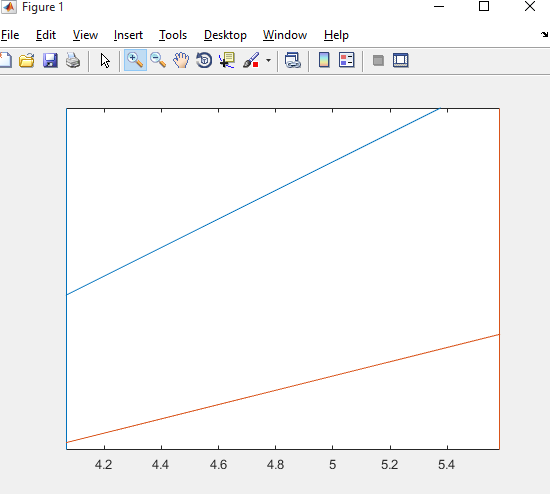
正如上面所写的,我想放大一个用plotyy创建的图形。当我这样做时,yTicks不会更新到可见的新限制。因此,如果你放大过大,你就不会看到任何yTicks。我找到了ActionPostCallback函数,但是我不能让它工作,尽管xTicks很好。
代码:
figure, plotyy(1:10,1:2:20,1:10,1:0.5:5.5)在以下方面的成果:
回答 3
Stack Overflow用户
发布于 2015-11-18 14:27:29
出于某种原因,平面图默认将轴的“Ytickmode”设置为手动。
当plotyy为两个数据集创建2组轴时,为每个轴设置“Ytickmode”应该可以解决这个问题。
这可以通过
AX=plotyy(...) %this will create an axis with 2 elements one for each axis
AX(1).YTickMode='auto';
AX(2).YTickMode='auto';Stack Overflow用户
发布于 2015-11-18 14:17:35
您可能希望将YTickMode属性设置为auto。
h = plotyy(1:10,1:2:20,1:10,1:0.5:5.5)
set(h, 'YTickMode','Auto')
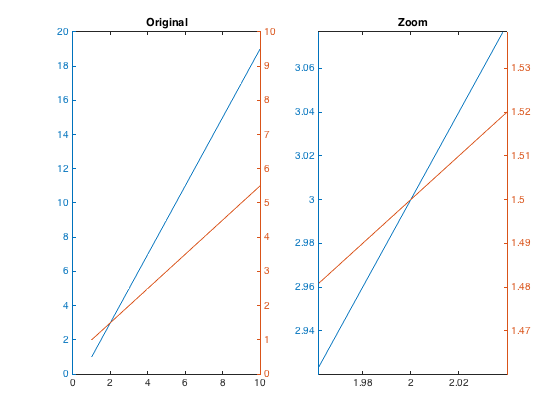
完整代码:
figure

subplot(121)
h1 = plotyy(1:10,1:2:20,1:10,1:0.5:5.5)
title('Original')

subplot(122)
h2 = plotyy(1:10,1:2:20,1:10,1:0.5:5.5)
title('Zoom')
set(h2, 'YTickMode','Auto')Stack Overflow用户
发布于 2015-11-18 13:45:19
因为这种行为似乎不存在于“正常”plot调用中,这看起来像是plotyy创建axes对象的内部错误。作为一种选择,您可以将多个轴叠加在一起,从而利用“默认”(因为没有更好的单词)的缩放行为。这种方法还允许您独立地完全控制两个轴的行为,并避免plotyy表面上的许多缺点。
对于这种情况,我稍微修改了one of my previous answers作为一个例子。
% Sample data
x = 1:10;
y1 = 1:2:20;
y2 = 1:0.5:5.5;

% Create axes & store handles
h.myfig = figure;
h.ax1 = axes('Parent', h.myfig, 'Box', 'off');

if ~verLessThan('MATLAB', '8.4')
    % MATLAB R2014b and newer
    h.ax2 = axes('Parent', h.myfig, 'Position', h.ax1.Position, 'Color', 'none', 'YAxisLocation', 'Right');
else
    % MATLAB 2014a and older
    ax1position = get(h.ax1, 'Position');
    h.ax2 = axes('Parent', h.myfig, 'Position', ax1position, 'Color', 'none', 'YAxisLocation', 'Right');
end

% Preserve axes formatting
hold(h.ax1, 'on');
hold(h.ax2, 'on');

% Plot data
plot(h.ax1, x, y1, 'b');
plot(h.ax2, x, y2, 'g');

linkaxes([h.ax1, h.ax2], 'x');
和一张样本图像:
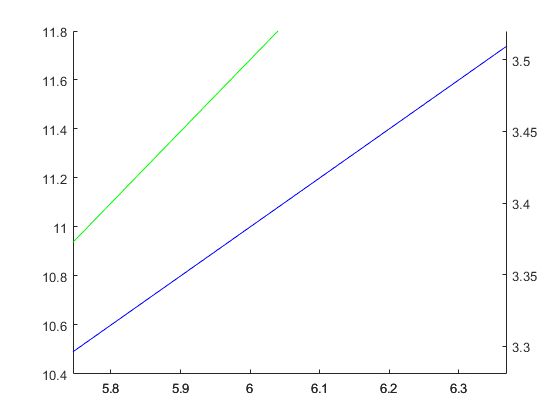
请注意,我只链接了x,但是您可以将x和y轴与linkaxes调用连接起来。
https://stackoverflow.com/questions/33780967
复制相似问题
腾讯云开发者

Copyright © 2013 - 2026 Tencent Cloud. All Rights Reserved. 腾讯云 版权所有
深圳市腾讯计算机系统有限公司 ICP备案/许可证号:粤B2-20090059  粤公网安备44030502008569号
腾讯云计算(北京)有限责任公司 京ICP证150476号 | 京ICP备11018762号