
在SignalR聊天中获取并发用户的化身
这是ChatHub代码:
using System;
using System.Collections.Concurrent;
using System.Collections.Generic;
using System.Linq;
using System.Threading.Tasks;
using System.Web;
using Microsoft.AspNet.SignalR;

namespace BIX
{
    public class ChatHub : Hub
    {
        static ConcurrentDictionary<string, string> dic = new ConcurrentDictionary<string, string>();
        public void Send(string name, string message)
        {
            Clients.All.broadcastMessage(name, message);
        }

        public void SendToSpecific(string name, string message, string to)
        {
            Clients.Caller.broadcastMessage(name, message);
            Clients.Client(dic[to]).broadcastMessage(name, message);
        }

        public void Notify(string name, string id)
        {
            if (dic.ContainsKey(name))
            {
                Clients.Caller.differentName();
            }
            else
            {
                dic.TryAdd(name, id);
                foreach (KeyValuePair<String, String> entry in dic)
                {
                    Clients.Caller.online(entry.Key);
                }
                Clients.Others.enters(name);
            }
        }

        public override Task OnDisconnected(bool stopCalled)
        {
            var name = dic.FirstOrDefault(x => x.Value == Context.ConnectionId.ToString());
            string s;
            dic.TryRemove(name.Key, out s);
            return Clients.All.disconnected(name.Key);
        }
    }
}
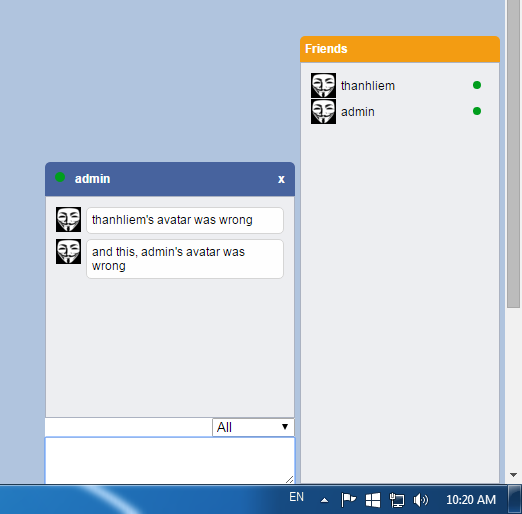
它运行良好,但问题是它只能在其他聊天者之间传递正确的用户名和消息,如果我使用用户的化身url,那么只有我们不能得到正确的化身。因此,我的问题是如何使用ConcurrentDictionary来传递多一个密钥(化身的网址),而不是只传递一个Tkey和一个TValue。请看我的照片:
聊天UI 1
Chat UI2
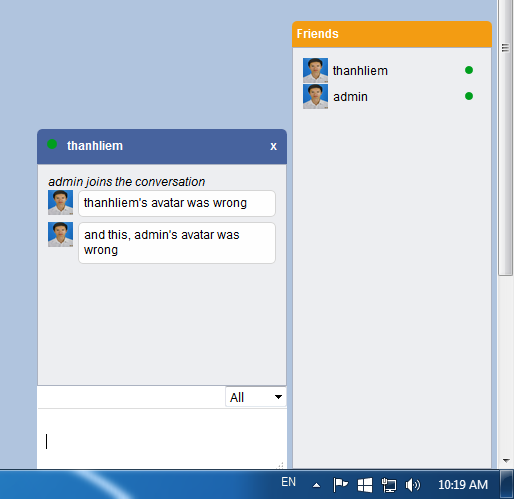
你可以看到我的聊天应用程序可以传递正确的信息,但它显示错误的化身。请帮帮我!
这就是剧本:
<script type="text/javascript">

    $(function() {
        startChatHub();
    });
    var nickname = "";
    var avatarurl = "";

    function startChatHub() {
        var chat = $.connection.chatHub;

        // Get the user name.
        nickname = "<%= userName %>";
        avatarurl = "<%= userImage %>";

        chat.client.online = function(name) {
            // Update list of users
            if (name == nickname) {
                $("#chat_body").append("<img src=" + avatarurl + " class=\"avatar\" /><div id=\"userlist\">" + name + "</div>");
                $("#msg_head").append("<div id=userchat>" + name + "</div>");

            } else {
                $("#chat_body").append("<img src=" + avatarurl + " class=\"avatar\" /><div id=\"userlist\">" + name + "</div>");
                $("#users").append("<option value=\"" + name + "\">" + name + "</option>");
            }
        };
        chat.client.enters = function(name) {
            $("#msg_body").append("<div ><i>" + name + " joins the conversation</i></div>");
            $("#users").append("<option value=\"" + name + "\">" + name + "</option>");
            //$("#chat_body").append("<div id=userlist>" + name + "</div>");
            $("#chat_body").append("<img src=" + avatarurl + " class=\"avatar\" /><div id=\"userlist\">" + name + "</div>");
        };
        // Create a function that the hub can call to broadcast chat messages.
        chat.client.broadcastMessage = function(name, message) {
            //Interpret smileys
            message = message.replace(":)", "<img src=\"/ChatJS/Images/Emoticons/smile-2.png\" class=\"smileys\" />");
            message = message.replace(":D", "<img src=\"/ChatJS/Images/Emoticons/smile-1.png\" />");
            message = message.replace(":o", "<img src=\"/ChatJS/Images/Emoticons/smile-6.png\" />");

            //display the message
            //$("#msg_body").append("<div class=\"border\"><span style=\"color:orange\">" + name + "</span>: " + message + "</div>");
            $("#msg_body").append("<img src=" + avatarurl + " class=\"avatar\" />", message);
        };

        chat.client.disconnected = function(name) {
            //Calls when someone leaves the page
            $("#msg_body").append("<div ><i>" + name + " leaves the conversation</i></div>");
            $("#chat_body div").remove(":contains('" + name + "')");
            jQuery(this).attr("src", "data:image/gif;base64,R0lGODlhAQABAIAAAP///////yH5BAEKAAEALAAAAAABAAEAAAICTAEAOw==");
            $("#users option").remove(":contains('" + name + "')");
        };
        //scroll bar
        $(".chat_head").click(function() {
            $("#chat_body").slideToggle("slow");
        });
        $("#msg_head").click(function() {
            $(".msg_wrap").slideToggle("slow");
        });

        $(".close").click(function() {
            $(".msg_box").hide();
        });

        $("#userlist").click(function() {

            $(".msg_wrap").show();
            $(".msg_box").show();
        });

        // Start the connection.
        $.connection.hub.start().done(function() {
            //Calls the notify method of the server
            chat.server.notify(nickname, $.connection.hub.id);
            $("#messagebox").keypress(function(e) {
                if (e.keyCode == 13) {
                    var msg = "<div id=msg_b>" + $("#messagebox").val() + "</div>";
                    $("#messagebox").val("");
                    if ($("#users").val() == "All") {
                        //Call the Send method on the hub.
                        chat.server.send(nickname, msg);
                        $("#msg_body").scrollTop($("#msg_body")[0].scrollHeight);
                    } else {
                        chat.server.sendToSpecific(nickname, msg, $("#users").val());
                        //Clear text box and reset focus for next comment.
                        $("#messagebox").val("").focus();
                        $("#msg_body").scrollTop($("#msg_body")[0].scrollHeight);
                    }
                }
            });
        });
    }
</script>回答 1
Stack Overflow用户
发布于 2022-05-17 17:00:27
在使用Blazor寻找.netCore 6解决方案时遇到了这种情况。因为我没有找到,所以我创造了一个。图像以bytes[]形式存储在SQL server AspNetUsers表中。这是你可以在这里找到的一个Github项目的扩展:https://github.com/enetstudio/SignalRServerIdentityAuthentication
- 创建一个服务来查询用户管理器。
public class UserProfileService
{
    private readonly UserManager<ApplicationUser> _userManager;
    private readonly AuthenticationStateProvider _authenticationStateProvider;

    public byte[] UserPicture { get; set; }

    public UserProfileService(UserManager<ApplicationUser> userManager, AuthenticationStateProvider authenticationStateProvider)
    {
    _authenticationStateProvider = authenticationStateProvider;
    _userManager = userManager;
    }
    public async Task GetProfilePicture()
    {
        try
        {
             var authState = await _authenticationStateProvider.GetAuthenticationStateAsync();
             var user = authState.User;
             var currentUser = await _userManager.GetUserAsync(user);
             UserPicture = currentUser.ProfilePicture;
         }
         catch (Exception ex)
         {
             Debug.WriteLine("Exception Message: " + ex.Message);
         }
    }
将其添加为startup.cs中的作用域服务
services.AddScoped<UserProfileService>();- 创建一个字典来保存图像bytes[]的用户名和字符串表示形式
public class ProfileMapping<T>
    {
        private readonly Dictionary<T, HashSet<string>> _profiles = new Dictionary<T, HashSet<string>>();

        public int Count
        {
            get
            {
                return _profiles.Count;
            }
        }

        public void Add(T key, string Avatar)
        {
            lock (_profiles)
            {
                HashSet<string> avatars;
                if (!_profiles.TryGetValue(key, out avatars))
                {
                    avatars = new HashSet<string>();
                    _profiles.Add(key, avatars);
                }

                lock (avatars)
                {
                    avatars.Add(Avatar);
                }
            }
        }

        public IEnumerable<string> GetAvatar(T key)
        {
            HashSet<string> avatars;
            if (_profiles.TryGetValue(key, out avatars))
            {
                return avatars;
            }

            return Enumerable.Empty<string>();
        }

        public IEnumerable<T> GetUsers()
        {
            return _profiles.Keys.ToList<T>();
        }

        public void Remove(T key, string Avatar)
        {
            lock (_profiles)
            {
                HashSet<string> avatars;
                if (!_profiles.TryGetValue(key, out avatars))
                {
                    return;
                }

                lock (avatars)
                {
                    avatars.Remove(Avatar);

                    if (avatars.Count == 0)
                    {
                        _profiles.Remove(key);
                    }
                }
            }
        }
    }
将其插入chat.razor组件中
@inject UserProfileService _profileService在chat.razor.cs类中初始化它。
private readonly static ProfileMapping<string> _profiles = new ProfileMapping<string>();
private byte[] _data;
将用户和化身添加/删除到字典/从字典中删除
private async Task OpenForm()
{
    var profile = _profileService.GetProfilePicture();
    string Avatar = Convert.ToBase64String(_profileService.UserPicture);
    _profiles.Add(userName, Avatar);
    await module.InvokeVoidAsync("openForm").AsTask();
}

private async Task CloseForm()
{
    var profile = _profileService.GetProfilePicture();
    string Avatar = Convert.ToBase64String(_profileService.UserPicture);
    _profiles.Remove(userName, Avatar);
    await module.InvokeVoidAsync("closeForm").AsTask();
}
然后在Chat.razor组件中获取它
@foreach (var message in messages)
{
    string Sender = message.Before(":");
    string messagecontent = message.After(":");
    var list = _profiles.GetAvatar(Sender);
    foreach (var profile in list)
    {
        _data = Convert.FromBase64String(profile);
    }
    <div class="d-flex align-items-center text-right justify-content-end ">
      <div class="pr-2">
        <span class="name">@Sender</span>
         <p class="msg">@messagecontent</p>
     </div>
      <div><img src="data:image/*;base64,@(Convert.ToBase64String(_data))" width="30" class="img1" />
     </div>
   </div>
}
其中hubconnection接收被定义为:
hubConnection.On<string, string>("ReceiveMessage", async (user, message) =>
{
    var encodedMsg = $"{user}:{message}";
    messages.Add(encodedMsg);
    await InvokeAsync(() => StateHasChanged());
});
希望这能帮上忙。
https://stackoverflow.com/questions/33771345
复制相似问题
腾讯云开发者

Copyright © 2013 - 2026 Tencent Cloud. All Rights Reserved. 腾讯云 版权所有
深圳市腾讯计算机系统有限公司 ICP备案/许可证号:粤B2-20090059  粤公网安备44030502008569号
腾讯云计算(北京)有限责任公司 京ICP证150476号 | 京ICP备11018762号