
Libstreaming:如何在Android中从SurfaceView屏幕(将Video+Audio流发送到wowza)导航到HTML
我正在创建一个phonegap应用程序,它使用用于视频和音频流的Libstreaming。我有登录和主屏幕。在主屏幕上,有一个按钮"Start WOWZA“,点击这个按钮就会启动摄像头启动流媒体,将音频和视频流发送到WOWZA媒体服务器。摄像机预览有一个表面视图来播放视频。
相机预览有一个后退按钮在SurfaceView上回到主屏幕上。我的问题是,在点击后退按钮相机预览应该被销毁,它应该重定向到主屏幕(导航从安卓SurfaceView到网页)。
<RelativeLayout xmlns:android="http://schemas.android.com/apk/res/android"
android:id="@+id/surface_layout"
android:layout_width="match_parent"
android:layout_height="match_parent"
android:layout_alignParentTop="true"
android:background="@android:color/black" >

<!-- Below surface view is used to to send rtsp audio+video stream to wowza server -->
<net.majorkernelpanic.streaming.gl.SurfaceView
    android:id="@+id/surface_view"
    android:layout_width="match_parent"
    android:layout_height="match_parent"
    android:layout_gravity="center" />


<!-- button to halt the camera preview and go back on to the main screen -->
<Button
    android:id="@+id/btnGoBack"
    android:layout_width="60dp"
    android:layout_height="40dp"
    android:visibility="visible"
    android:text="Back"
    android:layout_alignTop="@+id/surface_view"
    android:layout_alignParentLeft="true"
    android:textSize="14dp"
/></RelativeLayout>回答 1
Stack Overflow用户
发布于 2015-11-23 09:28:54
我自己也做过。看上去很大但很简单。您所需要做的就是在活动类中定义一个back按钮的单击方法(在SurfaceView上)(而不是MainActivity,如下所示)
public class LiveStreamingActivity extends Activity implements RtspClient.Callback, Session.Callback, SurfaceHolder.Callback {
private static SurfaceView mSurfaceView;
private Button btnGoBack;
private SurfaceHolder mHolder;

@Override
protected void onCreate(Bundle savedInstanceState) {
    super.onCreate(savedInstanceState);
    getWindow().addFlags(WindowManager.LayoutParams.FLAG_KEEP_SCREEN_ON);
    getWindow().addFlags(WindowManager.LayoutParams.FLAG_FULLSCREEN);
    requestWindowFeature(Window.FEATURE_NO_TITLE);

    setContentView(R.layout.activity_main);

    if (!LibsChecker.checkVitamioLibs(this))
        return;
    mSurfaceView = (SurfaceView) findViewById(R.id.surface_view);
    btnGoBack = (Button) findViewById(R.id.btnGoBack);
    mHolder = mSurfaceView.getHolder();
    mHolder.addCallback(this);
    /* click listener of back button */
    btnGoBack.setOnClickListener(new View.OnClickListener() {
        @Override
        public void onClick(View v) {
            // TODO Auto-generated method stub
            try {
                MainActivity.isFirstTime = true;
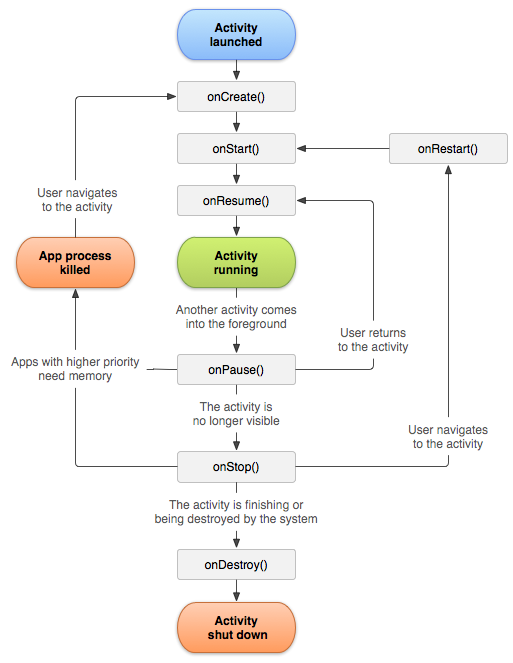
                /* on click of back button finish the current activity
                *  which will destroy the surfaceview and will go back on MainActivity
                *  by referring the Android Activity lifecycle, OnResume() method of MainActivity
                *  would be called where you can call javascript function directly.
                */
                finish();// callback lifecycle: "onPause", "onStop", and at last "onDestroy"

            } catch (Exception e) {
                e.printStackTrace();
            }
        }
    });
}}
MainActivity.java:
您必须声明一个字段("isFirstTime = false")以在OnResume()方法中放置调用javascript函数的逻辑。(要更好地理解,请参考Android活动生命周期)。
public class MainActivity extends CordovaActivity {
public static boolean isFirstTime = false;
@Override
public void onCreate(Bundle savedInstanceState) {
    super.onCreate(savedInstanceState);
    loadUrl(launchUrl);
}

@Override public void onResume(){
    super.onResume();
    System.out.println("onResume main activity");
    if(isFirstTime){System.out.println("Inside onResume");
        loadUrl("javascript:launchProfile()");
    }
}

@Override public void onPause(){
    super.onPause();
    System.out.println("onPause main activity");
    isFirstTime = false;
}}
Javascript函数:
我正在使用AngularJS。因此,我必须让$location对象注入profilePage的路径。
function launchProfile(){
var e = document.getElementById('loginScreen');/*'loginScreen' is login form id */
var $injector = angular.element(e).injector();

var $location = $injector.get('$location');
$location.path("/profilePage");}
app.js (安古拉杰路由):
vcApp = angular.module('VCMobApp', ['ngRoute']);vcApp.config(['$routeProvider', function ($routeProvider){
$routeProvider.when('/', {templateUrl: 'screens/login.html', controller: 'loginPageCntrl' });
$routeProvider.when('/profilePage', {templateUrl: 'screens/profilePage.html', controller: 'profilePageCntrl'});
$routeProvider.otherwise({ redirectTo: '/' });}]);如果不使用AngularJS,则可以在launchProfile()函数本身内直接使用window.location.href='../profilePage.html'调用html页面(然后跳过angularjs代码)。
https://stackoverflow.com/questions/33754628
复制相似问题
腾讯云开发者

Copyright © 2013 - 2026 Tencent Cloud. All Rights Reserved. 腾讯云 版权所有
深圳市腾讯计算机系统有限公司 ICP备案/许可证号:粤B2-20090059  粤公网安备44030502008569号
腾讯云计算(北京)有限责任公司 京ICP证150476号 | 京ICP备11018762号