
在Android中使用"File file = new file(filename)“保存该文件的位置
我正在编写一个android应用程序。在MainActivity.java,中,我创建了一个方法,用于编写并读取文件中的内容。这些代码运行成功,可以将数据存储在名为abc.txt的文件中,但我无法在ES文件资源管理器中找到写入的文件。
public void writeInIt(View view) {


        try {
            String Message = editText.getText().toString();
            final File myFile = new File("abc.txt");
            if (!myFile.exists()) {myFile.createNewFile(); }

            FileOutputStream outputStream = new FileOutputStream(myFile);

            outputStream.write(Message.getBytes());
            outputStream.close();

            editText.setText("");
            Toast.makeText(getApplicationContext(), "Message Saved", Toast.LENGTH_LONG).show();

        } catch (IOException e) {
            e.printStackTrace();
        }


}它在哪里保存文件?为什么我不能通过文件资源管理器搜索它?参考"http://developer.android.com/reference/java/io/File.html",如果我包括路径,它肯定会存储在路径位置。但是,如果我没有找到dir,它仍然可以存储在设备中,但是文件实际保存在哪里?
回答 3
Stack Overflow用户
发布于 2015-11-17 10:13:03
"File file =新文件(文件名)“
此代码不保存任何内容,它只保存文件或导演路径的类包装器。真正创建文件的最接近的方法是使用file.createNewFile方法。
有从google:保存文件编写文件的指南。
编辑
以下代码生成异常“打开失败: EROFS (只读文件系统)”:
    File fl = new File("test12.txt");
    try {
      fl.createNewFile();
    } catch (IOException e) {
      e.printStackTrace();
}Stack Overflow用户
发布于 2015-11-17 10:22:06
 In Android manifest:

<uses-permission android:name="android.permission.WRITE_EXTERNAL_STORAGE" />

this is the code :

public void generateNoteOnSD(String sFileName, String sBody){
try
{
    File root = new File(Environment.getExternalStorageDirectory(),  "Notes");
    if (!root.exists()) {
        root.mkdirs();
    }
    File gpxfile = new File(root, sFileName);
    FileWriter writer = new FileWriter(gpxfile);
    writer.append(sBody);
    writer.flush();
    writer.close();
    Toast.makeText(this, "Saved", Toast.LENGTH_SHORT).show();
}
catch(IOException e)
{
     e.printStackTrace();
     importError = e.getMessage();
     iError();
}
}
Stack Overflow用户
发布于 2022-04-20 07:06:27
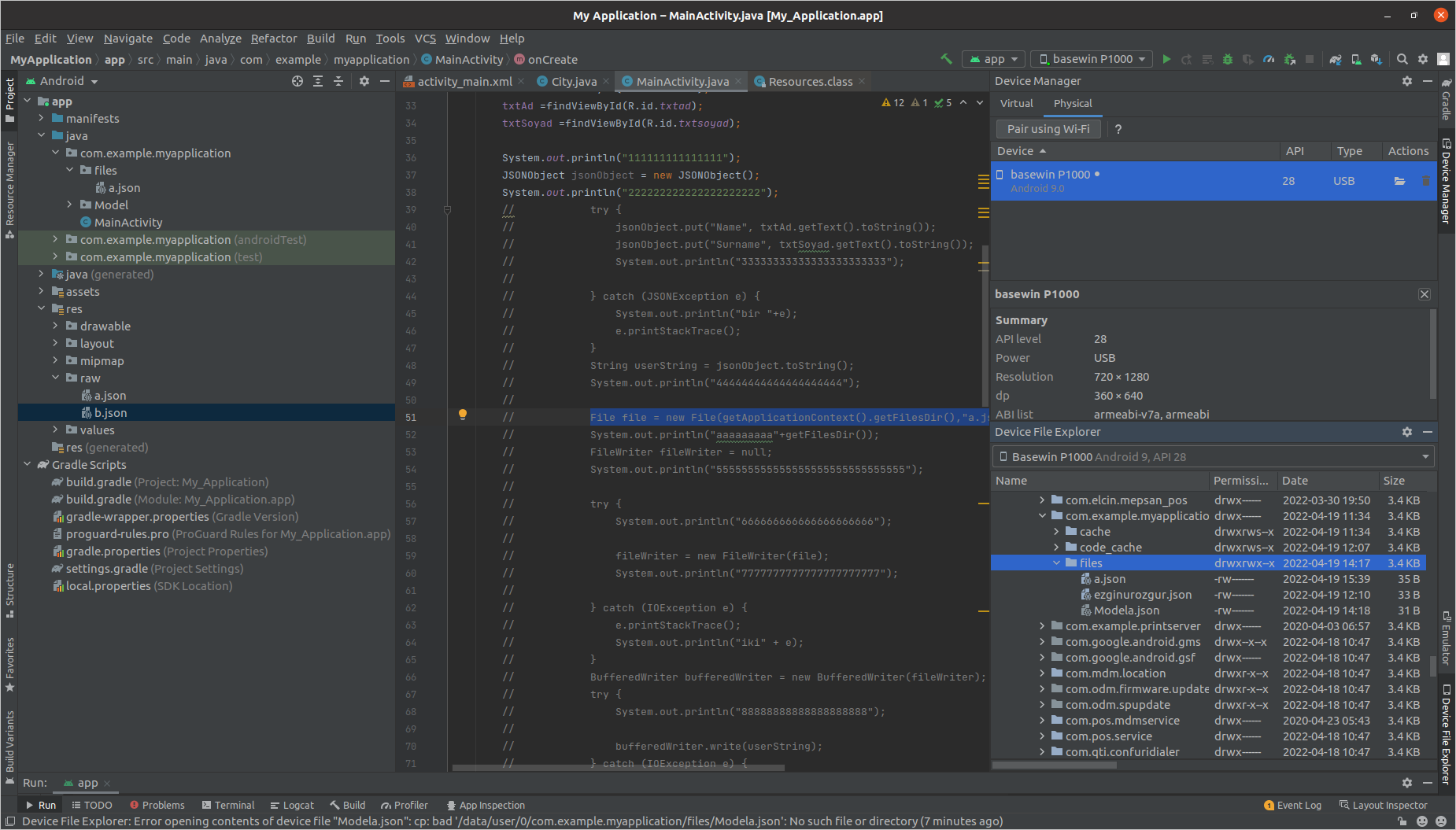
您可以在设备管理器中找到此文件。单击设备(文件符号)/data/user/0/com.example.myapplication/file,然后按此路径
https://stackoverflow.com/questions/33754141
复制相似问题
腾讯云开发者

Copyright © 2013 - 2026 Tencent Cloud. All Rights Reserved. 腾讯云 版权所有
深圳市腾讯计算机系统有限公司 ICP备案/许可证号:粤B2-20090059  粤公网安备44030502008569号
腾讯云计算(北京)有限责任公司 京ICP证150476号 | 京ICP备11018762号