
Windows 10通用合并词典
因此,我有一个WindowsUniversal类库,其中有一个资源字典,我想在App.xaml中与我的Windows10UniversalApplication的主资源字典合并。
我的App.xaml只是从同一个程序集中合并到主资源字典中。
<Application.Resources>
    <ResourceDictionary>

        <ResourceDictionary.MergedDictionaries>
            <ResourceDictionary Source="Styles/Styles.xaml"/>
        </ResourceDictionary.MergedDictionaries>

    </ResourceDictionary>
</Application.Resources>
然后,在我的主资源字典(Style/Styles.xaml)中,我将合并到来自同一个程序集的其他资源字典中。这就是我想从另一个程序集合并到资源字典中的地方:
<ResourceDictionary.MergedDictionaries>
    <ResourceDictionary Source="Fields.xaml"/>
    <ResourceDictionary Source="DataTemplates.xaml"/>
    <!--<ResourceDictionary Source="/{AssemblyName};component/Shared.xaml" />-->
    <!--<ResourceDictionary Source="pack://application:,,,/{AssemblyName};component/Shared.xaml" />-->
    <ResourceDictionary Source="ms-appx:///{AssemblyName}/Shared.xaml" />
</ResourceDictionary.MergedDictionaries>
我尝试将它添加到我的主资源字典中:
<ResourceDictionary Source="/{AssemblyName};component/Shared.xaml" />而这个..。
<ResourceDictionary Source="ms-appx:///{AssemblyName}/Shared.xaml" />基于关于Windows8.xStore应用程序的这篇文章,这似乎是应该如何工作的。但还是没用。
而这个..。
<ResourceDictionary Source="pack://application:,,,/{AssemblyName};component/Shared.xaml" />(我知道这是WPF的方式,但我想无论如何我还是要试一试!)
但似乎都不管用..。
我在应用程序集中拥有的资源字典的构建操作被设置为'Page‘。这些资源字典仅在合并中使用:
<ResourceDictionary Source="Styles/Styles.xaml"/>我得到了以下神秘错误:
未能将属性“Windows.UI.Xaml.ResourceDictionary.Source”分配给属性“Windows.Foundation.String”,因为不能将类型'Windows.Foundation.String‘分配给类型'Windows.Foundation.Uri’。线路:12个职位:37个
回答 2
Stack Overflow用户
发布于 2015-11-18 10:40:59
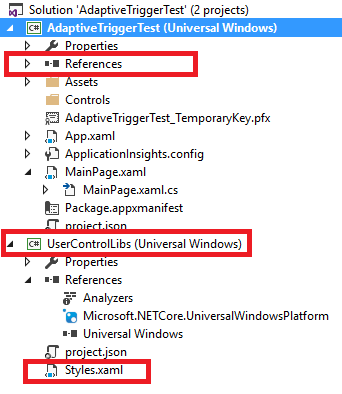
正如Romasz在注释中提到的,您需要引用包含样式的项目。然后使用下面的代码引用。
<Application.Resources>
    <ResourceDictionary>
        <ResourceDictionary.MergedDictionaries>
            <ResourceDictionary Source="ms-appx:///UserControlLibs/Styles.xaml"/>
        </ResourceDictionary.MergedDictionaries>
    </ResourceDictionary>
</Application.Resources>
Stack Overflow用户
发布于 2015-12-29 16:59:40
XAML合并词典比他们看上去要复杂得多。如果您引用的是本地项目,那么您的Source=路径就很好了。
如果引用的是外部 DLL (非在解决方案中),则引用的DLL文件夹还必须具有所有*.xml、*.xr.xml、*.xbf、*..jpg/png/gif等。
我遵循的步骤是: 1.包含合并字典(XAML样式表)的引用DLL。2.确保参考路径有所有所需的文件。3.将合并的字典引用添加到App.xaml
<Application.Resources>
    <ResourceDictionary>
        <ResourceDictionary.MergedDictionaries>
            <ResourceDictionary Source="ms-appx:///NAMESPACE_HERE/Styles.xaml"/>
        </ResourceDictionary.MergedDictionaries>
    </ResourceDictionary>
</Application.Resources>
此PostBuild.bat文件描述了在成功构建时VS如何复制所有必需的文件:
Echo Starting: PostBuildEvent: Call $(ProjectDir)PostBuild.Bat $(ProjectDir) $(OutDir) $(TargetPath) $(RootNameSpace)
Echo With Parameters: %1 %2 %3 %4

REM ***
REM *** Variables
REM ***
SET BuildLocationBin=..\..\..\..\..\..\..\..\bin

REM ***
Echo *** Publish to Bin
REM ***
MD %BuildLocationBin%
%WINDIR%\system32\attrib.exe %BuildLocationBin%\*.* -r /s
%WINDIR%\system32\xcopy.exe %1Properties\*.rd.xml %BuildLocationBin%\%4\Properties\*.* /s/r/y
%WINDIR%\system32\xcopy.exe %1%2*.png %BuildLocationBin%\%4\*.* /s/r/y
%WINDIR%\system32\xcopy.exe %1%2*.xbf %BuildLocationBin%\%4\*.* /s/r/y
%WINDIR%\system32\xcopy.exe %1%2*.xml %BuildLocationBin%\%4\*.* /s/r/y
%WINDIR%\system32\xcopy.exe %3 %BuildLocationBin%\*.* /s/r/y
%WINDIR%\system32\xcopy.exe %1%2*.pri %BuildLocationBin%\*.* /s/r/y

Echo *** Postbuild Complete ***
希望这能有所帮助!
https://stackoverflow.com/questions/33702809
复制相似问题
腾讯云开发者

Copyright © 2013 - 2026 Tencent Cloud. All Rights Reserved. 腾讯云 版权所有
深圳市腾讯计算机系统有限公司 ICP备案/许可证号:粤B2-20090059  粤公网安备44030502008569号
腾讯云计算(北京)有限责任公司 京ICP证150476号 | 京ICP备11018762号