
在Excel中调整单元格宽度
在Excel中调整单元格宽度
提问于 2015-11-12 06:57:30
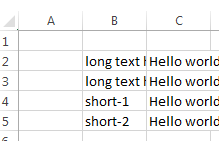
我正在使用xlsxwriter将其写入Excel表。我面临的问题是:当文本大于单元格大小时,就会隐藏起来。
import xlsxwriter

workbook = xlsxwriter.Workbook("file.xlsx")
worksheet1 = workbook.add_worksheet()

worksheet1.write(1, 1,"long text hidden test-1" )
worksheet1.write(2, 1,"long text hidden test-2")
worksheet1.write(3, 1,"short-1")
worksheet1.write(4, 1,"short-2")
worksheet1.write(1, 2,"Hello world" )
worksheet1.write(2, 2,"Hello world")
worksheet1.write(3, 2,"Hello world")
worksheet1.write(4, 2,"Hello world")

workbook.close()
我得到了什么,
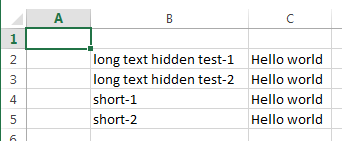
我期待的调整宽度
回答 4
Stack Overflow用户
发布于 2015-11-12 07:06:42
可以使用set_column,如下所示:
worksheet1.set_column(1, 1, 25)这方面的定义如下:
set_column(first_col, last_col, width, cell_format, options)您可能需要根据整个列中最长的文本长度来确定合适的宽度。不过,要根据所使用的字体和大小来考虑这一点是需要的。还请考虑是否使用比例字体或固定宽度字体。
如果您想自动安装所有列,而不管字体和大小如何,那么您需要使用win32com接口,如下所示:
import win32com.client as win32
excel = win32.gencache.EnsureDispatch('Excel.Application')
wb = excel.Workbooks.Open(r'file.xlsx')
ws = wb.Worksheets("Sheet1")
ws.Columns.AutoFit()
wb.Save()
excel.Application.Quit()
在您使用当前的xlsxwriter代码关闭文件之后,就可以很容易地做到这一点。注意,您可能需要为您的文件提供完整的路径。
Stack Overflow用户
发布于 2015-11-12 07:07:22
不幸的是,xlsxwriter没有提供自动适配选项。
但是,您可以跟踪每个列的最大项,然后使用set列命令在末尾设置列宽度。
set_column(first_col, last_col, width, cell_format, options)例如,在您的示例中,应该将B列的宽度设置为最大字符串的长度。
width= len("long text hidden test-1")
worksheet1.set_column(1, 1, width)Stack Overflow用户
发布于 2021-01-20 13:22:52
下面通过df为我工作-它找到每个列的最大宽度并相应地进行调整,如下面所建议的:Simulate autofit column in xslxwriter
def get_col_widths(dataframe):
    # First we find the maximum length of the index column
    idx_max = max([len(str(s)) for s in dataframe.index.values] + [len(str(dataframe.index.name))])
    # Then, we concatenate this to the max of the lengths of column name and its values for each column, left to right
    return [idx_max] + [max([len(str(s)) for s in dataframe[col].values] + [len(col)]) for col in dataframe.columns]

for i, width in enumerate(get_col_widths(dataframe)):
worksheet.set_column(i, i, width)页面原文内容由Stack Overflow提供。腾讯云小微IT领域专用引擎提供翻译支持
原文链接:
https://stackoverflow.com/questions/33665865
复制相关文章
相似问题
腾讯云开发者

Copyright © 2013 - 2026 Tencent Cloud. All Rights Reserved. 腾讯云 版权所有
深圳市腾讯计算机系统有限公司 ICP备案/许可证号:粤B2-20090059  粤公网安备44030502008569号
腾讯云计算(北京)有限责任公司 京ICP证150476号 | 京ICP备11018762号