
即使细节视图插入失败,应用程序仍在发送电子邮件。
我有一个细节视图,它附加到sql数据源。当插入新的工作订单时,我将发送一封电子邮件。现在,我的程序有一些问题,用户无法从我的应用程序中插入数据,但是如果数据被插入,电子邮件仍然会被发送。
这是我的详细信息视图插入方法:
protected void DetailsView1_ItemInserted(object sender, DetailsViewInsertedEventArgs e)
{
if (successfull == true && Page.IsValid && e.AffectedRows ==1)
{
//TextBox TextBoxWorkOrderNumber = (TextBox)(DetailsView1.FindControl("TextBox11"));
TextBox TextBoxRequestor = (TextBox)(DetailsView1.FindControl("TextBox3"));
TextBox TextBoxDate = (TextBox)(DetailsView1.FindControl("TextBox1"));
//TextBoxDate.Text = DateTime.Now.ToShortDateString();
TextBox TextBoxDepartment = (TextBox)(DetailsView1.FindControl("TextBox4"));
TextBox TextBoxCompletionDate = (TextBox)(DetailsView1.FindControl("TextBox16"));
TextBox TextBoxMachineDescription = (TextBox)(DetailsView1.FindControl("TextBox5"));
TextBox TextBoxMachineLocation = (TextBox)(DetailsView1.FindControl("TextBox6"));
TextBox TextBoxWorkRequired = (TextBox)(DetailsView1.FindControl("TextBox7"));
// DropDownList status = (DropDownList)(DetailsView1.FindControl("DropDownList2"));
TextBox TextBoxStatus = (TextBox)(DetailsView1.FindControl("TextBox12"));
TextBoxStatus.Text = "Open";
DropDownList list = (DropDownList)(DetailsView1.FindControl("DropDownList1"));
TextBox9.Text = list.SelectedValue;
DropDownList lists = (DropDownList)(DetailsView1.FindControl("DropDownList2"));
TextBox14.Text = lists.SelectedValue;
if (TextBoxRequestor.Text.Length <= 0)
{
TextBoxRequestor.Text = "Not Applicable";
}
if (TextBox14.Text.Length <= 0)
{
TextBoxDepartment.Text = "Not Provided";
}
if (TextBoxCompletionDate.Text.Length <= 0)
{
TextBoxCompletionDate.Text = "Not Provided";
}
if (TextBoxMachineDescription.Text.Length <= 0)
{
TextBoxMachineDescription.Text = "Not Provided";
}
if (TextBoxMachineLocation.Text.Length <= 0)
{
TextBoxMachineLocation.Text = "Not Provided";
}
if (TextBoxWorkRequired.Text.Length <= 0)
{
TextBoxWorkRequired.Text = "Not Provided";
}
if (TextBox9.Text == "Safety" && e.AffectedRows==1)
{
{
bool isLocal = HttpContext.Current.Request.IsLocal;
if (isLocal == true)
{
string id = TextBox13.Text.ToString();
System.Net.Mail.MailMessage mm = new System.Net.Mail.MailMessage();
mm.From = new System.Net.Mail.MailAddress("no_reply_workorder@.com");//who send
mm.To.Add(new System.Net.Mail.MailAddress("abc@.com"));
//abc@abc.com
mm.Subject = "WorkOrders Type Safety";
mm.Body = "DO NOT REPLY TO THIS EMAIL" + "<br><br/>" + "WorkOrderNumber"
+ ": " + "<a href=\"http://localhost:49695/SafetyReport.aspx?WorkOrderNum=" + TextBox13.Text + "\">"
+ TextBox13.Text + "</a>" + "<-Click on the Work Order Number For Report"
+ "<br><br/>" + "WorkOrderNumber" + ": " +
"<a href=\"http://localhost:49695/Safety.aspx?WorkOrderNum=" +
TextBox13.Text + "\">" + TextBox13.Text + "</a>" +
"<-Click on this Work Order Number To Enter Data" +
"<br><br/>" + "Requestor" + ": " + TextBoxRequestor.Text +
"<br><br/>" + "Date" + ": " + TextBoxDate.Text +
"<br><br/>" + "Department" + ": " + TextBox14.Text +
"<br><br/>" + "Machine Description" + ": " +
TextBoxMachineDescription.Text + "<br><br/>" +
"Machine Location" + ": " +
TextBoxMachineLocation.Text + "<br><br/>" +
"Work Required" + ": " + TextBoxWorkRequired.Text + "<br><br/>"
mm.IsBodyHtml = true;
System.Net.Mail.SmtpClient client = new System.Net.Mail.SmtpClient();
client.Host = ConfigurationManager.AppSettings["smtpServer"];
client.Send(mm);
captureuseremail();
}
}
}
} 我看到一个DetailsView1_Item插入,如何检查它是否插入到sql数据库中??如果插入成功,我喜欢将布尔值设置为true,如果为true,则执行插入的Details_View1并发送电子邮件,否则取消插入。
我也使用了插入按钮,其中附带的详细信息视图。请向我索取额外的代码,如果您的困惑和我非常乐意提供它.
请帮助:(
添加了其他代码:
  INSERT INTO Master(Requestor, Date, Department, CompletionDate, MachineDescription,
MachineLocation, [Type of Work Order], [Work Required], Status)
VALUES (@Requestor, @Date, @Department, @CompletionDate,
@MachineDescription, @MachineLocation, @Type_of_Work_Order,
@Work_Required, @Status); SET @NewId = Scope_Identity()
我只是获得了一个bool的成功;在Item_Inserting方法()的末尾,我将其设置为true。
当用户在details视图上单击submit (仅为命令按钮insert )时,代码点击item_inserting,获取详细信息视图的所有值 Item_Inserting:
受保护的空DetailsView1_ItemInserting(对象发送方,DetailsViewInsertEventArgs e) {
        if (Page.IsValid)
        {

            //TextBox TextBoxWorkOrderNumber = (TextBox)(DetailsView1.FindControl("TextBox11"));
            TextBox TextBoxRequestor = (TextBox)(DetailsView1.FindControl("TextBox3"));
            TextBox TextBoxDate = (TextBox)(DetailsView1.FindControl("TextBox1"));
            //TextBoxDate.Text = DateTime.Now.ToShortDateString();
            TextBox TextBoxDepartment = (TextBox)(DetailsView1.FindControl("TextBox4"));
            TextBox TextBoxCompletionDate = (TextBox)(DetailsView1.FindControl("TextBox16"));
            TextBox TextBoxMachineDescription = (TextBox)(DetailsView1.FindControl("TextBox5"));
            TextBox TextBoxMachineLocation = (TextBox)(DetailsView1.FindControl("TextBox6"));
            TextBox TextBoxWorkRequired = (TextBox)(DetailsView1.FindControl("TextBox7"));
            // DropDownList status = (DropDownList)(DetailsView1.FindControl("DropDownList2"));
            TextBox TextBoxStatus = (TextBox)(DetailsView1.FindControl("TextBox12"));
            TextBoxStatus.Text = "Open";
            DropDownList list = (DropDownList)(DetailsView1.FindControl("DropDownList1"));
            TextBox9.Text = list.SelectedValue;
            DropDownList lists = (DropDownList)(DetailsView1.FindControl("DropDownList2"));
            TextBox14.Text = lists.SelectedValue;

            if (TextBoxRequestor.Text.Length <= 0)
            {
                TextBoxRequestor.Text = "Not Applicable";
            }
            if (TextBox14.Text.Length <= 0)
            {
                TextBoxDepartment.Text = "Not Provided";
            }
            if (TextBoxCompletionDate.Text.Length <= 0)
            {
                TextBoxCompletionDate.Text = "Not Provided";
            }
            if (TextBoxMachineDescription.Text.Length <= 0)
            {
                TextBoxMachineDescription.Text = "Not Provided";
            }

            if (TextBoxMachineLocation.Text.Length <= 0)
            {
                TextBoxMachineLocation.Text = "Not Provided";
            }

            if (TextBoxWorkRequired.Text.Length <= 0)
            {
                TextBoxWorkRequired.Text = "Not Provided";
            }

        successfull = true;
    }
    else
        {
            e.Cancel = true;
          successfull = false;
        }


    }
这是进行实际插入的地方,这是我的sql数据源:
** item_inserting中的所有值都是在这里插入的,其标识值为**
protected void RequestorSource_Inserted(object sender, SqlDataSourceStatusEventArgs e)
        {
            if (successfull == true)
            {
                try
                {
                    int newid = (int)e.Command.Parameters["@NewId"].Value;
                    TextBox13.Text = newid.ToString();
                }
                catch
                {
                    successfull = false;
                }
               if (e.AffectedRows == 1 && successfull == true)
               {
                   successfull = true;
               }
               else
               {
                   successfull = false;
               }
            }
            else
            {
                successfull = false;
            }


        }
问题是,当我停止程序时,电子邮件仍在发送,我如何创建一个糟糕的插入,就像我希望它失败一样--与我无法重新创建问题的用户相似--例如,我尝试在insert语句中添加一个新字段,但是没有给它任何值,它抛出的错误是,您有更多的列而不是值。
这是我的详细信息视图的图片:
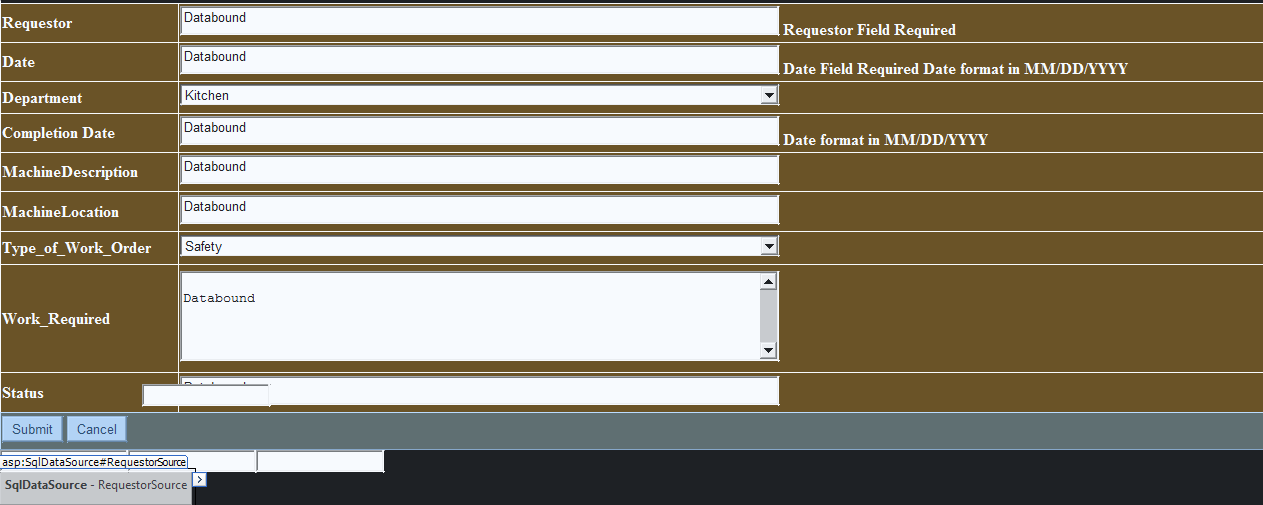
**所有的.cs代码在http://pastebin.com/6VC6FZK7,.aspx代码在http://pastebin.com/QhjWNNt0 *希望这会有所帮助。
回答 1
Stack Overflow用户
发布于 2015-11-10 21:54:40
如果您只是在插入后将bool successful设置为true,并且没有进行任何错误检查,那么它可能会失败并仍然发送电子邮件。我建议要么将insert代码包装在TRY..CATCH..中,然后在catch中将succssful状态设置为false,要么运行IF...ELSE..来检查数据是否正确插入,然后在那里设置successful状态。
https://stackoverflow.com/questions/33637119
复制相似问题
腾讯云开发者

Copyright © 2013 - 2026 Tencent Cloud. All Rights Reserved. 腾讯云 版权所有
深圳市腾讯计算机系统有限公司 ICP备案/许可证号:粤B2-20090059  粤公网安备44030502008569号
腾讯云计算(北京)有限责任公司 京ICP证150476号 | 京ICP备11018762号