
未存储的IBM MobileFirst服务器7.1 PushNotification订阅者ID(USERID)
未存储的IBM MobileFirst服务器7.1 PushNotification订阅者ID(USERID)
提问于 2015-11-04 15:17:39
我在IBM7.1Push通知SubscriberID(USERID)中有一个问题
我已经成功地在MobileFirst服务器7.1自由配置文件中部署了推送通知示例应用程序
我配置了WRKLGHT数据库以存储pushdevices和subscriber id
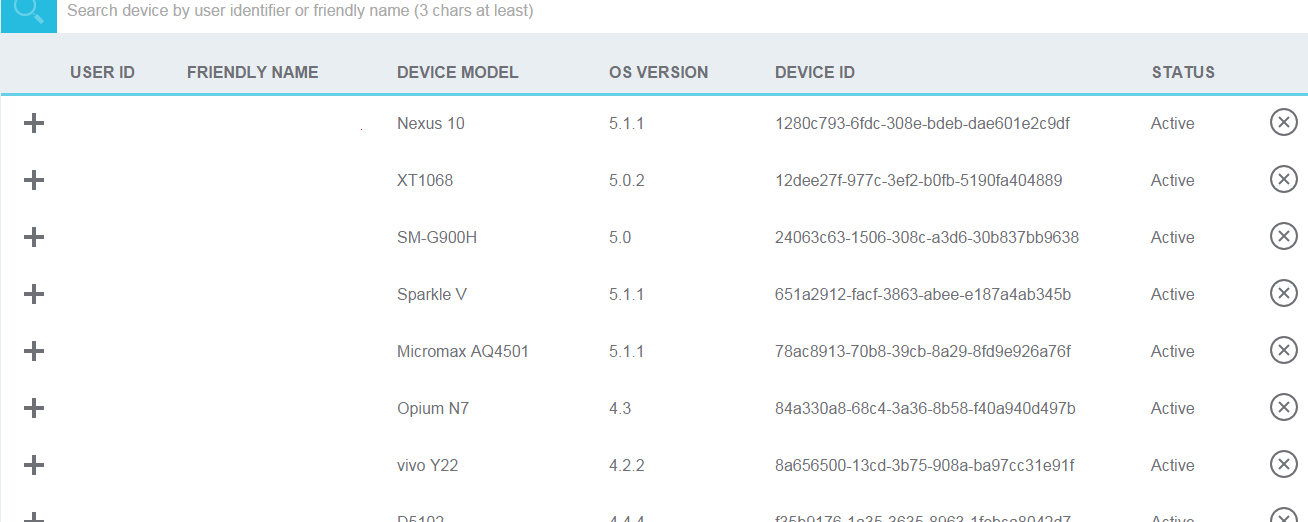
而登录进程用户标识没有存储在设备表中。在该设备表中,用户In 字段存储为NUL。因此,用户in 没有显示在设备选项卡中,移动第一控制台。
在应用程序描述符. file文件中正确配置了GCM密匙和pushsenderid
在worklight.properties中,设置以下两个属性
wl.device.tracking.enabled=true
wl.device.enableAccessManagement=true在application-descriptor.xml中
<userIdentityRealms>PushAppRealm</userIdentityRealms>我在我的authenticationConfig.xml中为真实性做了以下配置
 <?xml version="1.0" encoding="UTF-8"?>
<tns:loginConfiguration xmlns:tns="http://www.worklight.com/auth/config"     xmlns:xsi="http://www.w3.org/2001/XMLSchema-instance">
<!--
  COPYRIGHT LICENSE: This information contains sample code provided in source code form. You may copy, modify, and distribute
these sample programs in any form without payment to IBM® for the purposes of developing, using, marketing or distributing
application programs conforming to the application programming interface for the operating platform for which the sample code is written.
Notwithstanding anything to the contrary, IBM PROVIDES THE SAMPLE SOURCE CODE ON AN "AS IS" BASIS AND IBM DISCLAIMS ALL WARRANTIES,
EXPRESS OR IMPLIED, INCLUDING, BUT NOT LIMITED TO, ANY IMPLIED WARRANTIES OR CONDITIONS OF MERCHANTABILITY, SATISFACTORY QUALITY,
FITNESS FOR A PARTICULAR PURPOSE, TITLE, AND ANY WARRANTY OR CONDITION OF NON-INFRINGEMENT. IBM SHALL NOT BE LIABLE FOR ANY DIRECT,
INDIRECT, INCIDENTAL, SPECIAL OR CONSEQUENTIAL DAMAGES ARISING OUT OF THE USE OR OPERATION OF THE SAMPLE SOURCE CODE.
IBM HAS NO OBLIGATION TO PROVIDE MAINTENANCE, SUPPORT, UPDATES, ENHANCEMENTS OR MODIFICATIONS TO THE SAMPLE SOURCE CODE.
    -->


     <staticResources>
        <!--
        <resource id="logUploadServlet" securityTest="LogUploadServlet">
            <urlPatterns>/apps/services/loguploader*</urlPatterns>
        </resource>
        -->
           <resource id="subscribeServlet" securityTest="SubscribeServlet">
              <urlPatterns>/subscribeSMS*;/receiveSMS*;/ussd*</urlPatterns>
           </resource>
       </staticResources>
    <!--  Sample security tests
         Even if not used there will be some default webSecurityTest and           mobileSecurityTest

         Attention: If you are adding an app authenticity realm to a security test,
         you must also update the application-descriptor.xml. Please refer to the user documentation
         on application authenticity for environment specific guidelines. -->
    <securityTests>
        <!--
        <mobileSecurityTest name="mobileTests">
            <testAppAuthenticity/>
            <testDeviceId provisioningType="none" />
            <testUser realm="myMobileLoginForm" />
            <testDirectUpdate mode="perSession" />
        </mobileSecurityTest>

        <webSecurityTest name="webTests">
            <testUser realm="myWebLoginForm"/>
        </webSecurityTest>

        <customSecurityTest name="customTests">
            <test realm="wl_antiXSRFRealm" step="1"/>
            <test realm="wl_authenticityRealm" step="1"/>
            <test realm="wl_remoteDisableRealm" step="1"/>
            <test realm="wl_directUpdateRealm" mode="perSession" step="1"/>
            <test realm="wl_anonymousUserRealm" isInternalUserID="true" step="1"/>
            <test realm="wl_deviceNoProvisioningRealm" isInternalDeviceID="true" step="2"/>
        </customSecurityTest>

        <customSecurityTest name="LogUploadServlet">
            <test realm="wl_anonymousUserRealm" step="1"/>
            <test realm="LogUploadServlet" isInternalUserID="true"/>
        </customSecurityTest>
        -->
        <webSecurityTest name="PushApplication-web-securityTest">
            <testUser realm="PushAppRealm"/>
        </webSecurityTest>
        <mobileSecurityTest name="PushApplication-strong-mobile-securityTest">
            <testUser realm="PushAppRealm"/>
            <testDeviceId provisioningType="none"/>
        </mobileSecurityTest>
        <customSecurityTest name="SubscribeServlet">
            <test realm="wl_directUpdateRealm" step="1"/>
            <test isInternalUserID="true" realm="SubscribeServlet"/>
        </customSecurityTest>
    </securityTests>
    <realms>
        <realm loginModule="StrongDummy" name="SampleAppRealm">
            <className>com.worklight.core.auth.ext.FormBasedAuthenticator</className>
        </realm>
        <realm loginModule="rejectAll" name="SubscribeServlet">
            <className>com.worklight.core.auth.ext.HeaderAuthenticator</className>
        </realm>
        <!-- For client logger -->
        <!-- <realm name="LogUploadServlet" loginModule="StrongDummy">
            <className>com.worklight.core.auth.ext.HeaderAuthenticator</className>
        </realm -->
        <!-- For websphere -->
        <!-- realm name="WASLTPARealm" loginModule="WASLTPAModule">
            <className>com.worklight.core.auth.ext.WebSphereFormBasedAuthenticator</className>
            <parameter name="login-page" value="/login.html"/>
            <parameter name="error-page" value="/loginError.html"/>
        </realm -->
        <!-- For User Certificate Authentication -->
        <!-- realm name="wl_userCertificateAuthRealm" loginModule="WLUserCertificateLoginModule">
            <className>com.worklight.core.auth.ext.UserCertificateAuthenticator</className>
            <parameter name="dependent-user-auth-realm" value="WASLTPARealm" />
            <parameter name="pki-bridge-class" value="com.worklight.core.auth.ext.UserCertificateEmbeddedPKI" />
            <parameter name="embedded-pki-bridge-ca-p12-file-path" value="/opt/ssl_ca/ca.p12"/>
            <parameter name="embedded-pki-bridge-ca-p12-password" value="capassword" />
        </realm -->
        <!-- For Trusteer Fraud Detection -->
        <!-- Requires acquiring Trusteer SDK -->
        <!-- realm name="wl_basicTrusteerFraudDetectionRealm" loginModule="trusteerFraudDetectionLogin">


<className>com.worklight.core.auth.ext.TrusteerAuthenticator</className>


 <parameter name="rooted-device" value="block"/>
            <parameter name="device-with-malware" value="block"/>
            <parameter name="rooted-hiders" value="block"/>
            <parameter name="unsecured-wifi" value="alert"/>
            <parameter name="outdated-configuration" value="alert"/>
        </realm -->
        <realm loginModule="PushAppLoginModule" name="PushAppRealm">


<className>com.worklight.core.auth.ext.FormBasedAuthenticator</className>
        </realm>
    </realms>
    <loginModules>
        <loginModule name="PushAppLoginModule">


<className>com.worklight.core.auth.ext.NonValidatingLoginModule</className>
        </loginModule>
        <loginModule name="StrongDummy">


<className>com.worklight.core.auth.ext.NonValidatingLoginModule</className>
        </loginModule>
        <loginModule name="requireLogin">


<className>com.worklight.core.auth.ext.SingleIdentityLoginModule</className>
        </loginModule>
        <loginModule name="rejectAll">


<className>com.worklight.core.auth.ext.RejectingLoginModule</className>
        </loginModule>
        <!-- Required for Trusteer - wl_basicTrusteerFraudDetectionRealm -->
        <!-- loginModule name="trusteerFraudDetectionLogin">


<className>com.worklight.core.auth.ext.TrusteerLoginModule</className>
        </loginModule-->
        <!-- For websphere -->
        <!-- loginModule name="WASLTPAModule">


<className>com.worklight.core.auth.ext.WebSphereLoginModule</className>
        </loginModule -->
        <!-- Login module for User Certificate Authentication -->
        <!-- <loginModule name="WLUserCertificateLoginModule">


<className>com.worklight.core.auth.ext.NonValidatingLoginModule</className>
        </loginModule> -->
        <!-- For enabling SSO with auto-provisioning device authentication -->
        <!-- <loginModule name="MySSO" ssoDeviceLoginModule="WLDeviceAutoProvisioningLoginModule">


<className>com.worklight.core.auth.ext.NonValidatingLoginModule</className>
        </loginModule> -->
    </loginModules>
</tns:loginConfiguration>
MobileFirst控制台
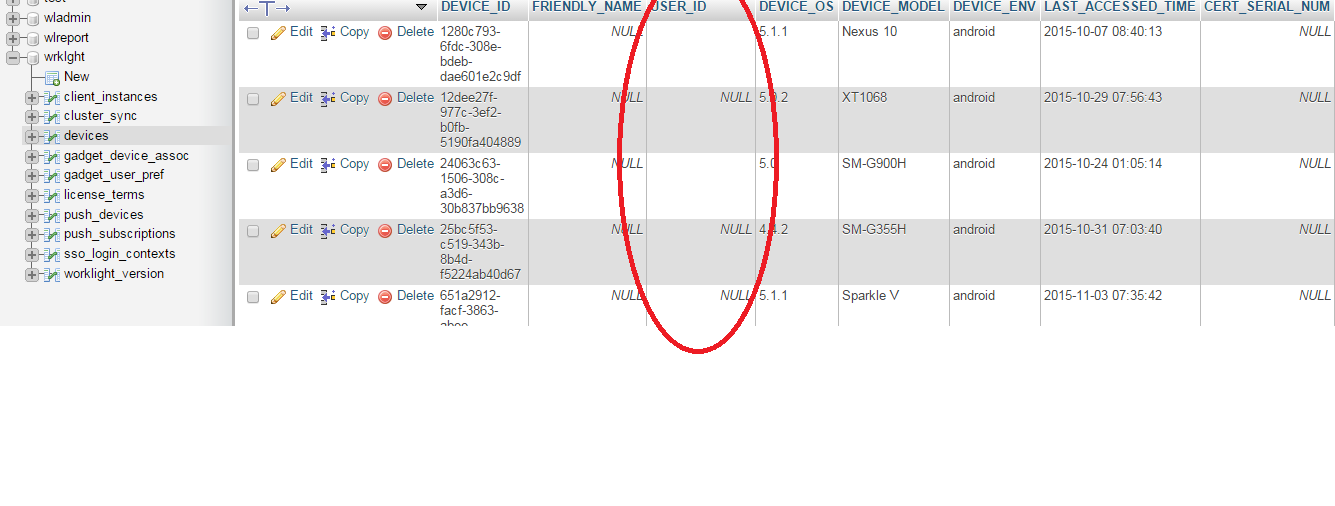
设备数据库表
回答 1
Stack Overflow用户
发布于 2015-11-28 11:14:29
这是由于用户错误而发生的:
我在一个版本中做了一个Mistake...Developed,在另一个修复包版本中部署了应用程序
页面原文内容由Stack Overflow提供。腾讯云小微IT领域专用引擎提供翻译支持
原文链接:
https://stackoverflow.com/questions/33525427
复制相关文章
相似问题
腾讯云开发者

Copyright © 2013 - 2026 Tencent Cloud. All Rights Reserved. 腾讯云 版权所有
深圳市腾讯计算机系统有限公司 ICP备案/许可证号:粤B2-20090059  粤公网安备44030502008569号
腾讯云计算(北京)有限责任公司 京ICP证150476号 | 京ICP备11018762号