
如何从GridView列中删除/替换子字符串?
如何从GridView列中删除/替换子字符串?
提问于 2015-10-27 06:27:41
下面是GridView:
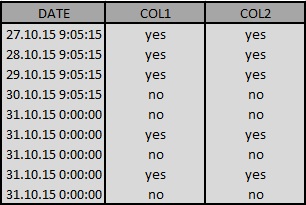
如果存在,我希望从date列中删除0:00:00。我更改了dataformatstring,但这也删除了9:09:15。
我对auto-generate fields文件和DataBind文件使用.cs和DataBind。
我尝试了Replace,但没有工作:
e.Row.Cells[0].Text = e.Row.Cells[0].Text.Replace("0:00:00"," ");我怎么能这么做?
Gridview:
<asp:GridView ID="GridView4" runat="server" BackColor="White"
    BorderColor="#999999" BorderStyle="None" BorderWidth="1px" CellPadding="3"
    GridLines="Vertical" Width="98%"
    Height="100%" onrowdatabound="GridView4_RowDataBound" RowStyle-HorizontalAlign="Center" >
    <AlternatingRowStyle BackColor="#DCDCDC" />
    <FooterStyle BackColor="#CCCCCC" ForeColor="Black" />
    <HeaderStyle BackColor="#000084" Font-Bold="True" ForeColor="White" />
    <PagerStyle BackColor="#999999" ForeColor="Black" HorizontalAlign="Center" />
    <RowStyle BackColor="#EEEEEE" ForeColor="Black" />
    <SelectedRowStyle BackColor="#008A8C" Font-Bold="True" ForeColor="White" />
    <SortedAscendingCellStyle BackColor="#F1F1F1" />
    <SortedAscendingHeaderStyle BackColor="#0000A9" />
    <SortedDescendingCellStyle BackColor="#CAC9C9" />
    <SortedDescendingHeaderStyle BackColor="#000065" />
</asp:GridView>
代码:
protected void Page_Load(object sender, EventArgs e)
    {
        try
        {
            OleDbConnection Connection6;
            using (Connection6 = new OleDbConnection("Provider=MSDAORA.1;Data Source=XXXXXX:1521/orcl;Persist Security Info=True;Password=XXXXXXX;User ID=XXXXXX;"))
            {
            string sqlQuery = "select * from db.user";

            using (OleDbDataAdapter cmd = new OleDbDataAdapter(sqlQuery, Connection6))
            {
                Connection6.Open();
                DataTable dt = new DataTable();
                cmd.Fill(dt);
                GridView4.DataSource = dt;
                GridView4.DataBind();

                Connection6.Close();
            }
        }
    }
        catch (Exception)
        {
        }
}回答 1
Stack Overflow用户
回答已采纳
发布于 2015-10-27 06:37:51
您可以使用RowDataBound事件,然后使用findcontrol标记控件。
<asp:GridView ID="GridView1" AutoGenerateColumns="false" runat="server"
        onrowdatabound="GridView1_RowDataBound">
  <Columns>
    <asp:TemplateField HeaderText="Date">
      <ItemTemplate>
         <asp:Label ID="lblDate" Text='<%# Eval("Date") %>' runat="server"></asp:Label>
 .....
 </Columns>
</asp:GridView>

protected void GridView1_RowDataBound(object sender, GridViewRowEventArgs e)
{
  if (e.Row.RowType == DataControlRowType.DataRow)
   {
    var lbl =  e.Row.FindControl("lblDate") as Label;
    lbl.Text = lbl.Text.Replace("0:00:00", "");
   }
}
如果没有模板字段并使用绑定字段,则使用
protected void GridView1_RowDataBound(object sender, GridViewRowEventArgs e)
{
  if (e.Row.RowType == DataControlRowType.DataRow)
  {
    if(e.Row.Cells[0].Text.Contains("0:00:00"))
       e.Row.Cells[0].Text = e.Row.Cells[0].Text.Replace("0:00:00", "");
  }
}页面原文内容由Stack Overflow提供。腾讯云小微IT领域专用引擎提供翻译支持
原文链接:
https://stackoverflow.com/questions/33361226
复制相关文章
相似问题
腾讯云开发者

Copyright © 2013 - 2026 Tencent Cloud. All Rights Reserved. 腾讯云 版权所有
深圳市腾讯计算机系统有限公司 ICP备案/许可证号:粤B2-20090059  粤公网安备44030502008569号
腾讯云计算(北京)有限责任公司 京ICP证150476号 | 京ICP备11018762号