
LeanFT与硒的相容性?
我想知道Selenium和LeanFT能否很好地结合在一起。我不知道是否有人尝试过这样做,但我认为如果它能够工作,LeanFT可以为selenium框架提供一些补充好处。
据我目前所知,硒的局限性是:
- Selenium必须打开初始浏览器才能识别它。
- Selenium必须打开所有弹出窗口才能识别它们。
- 硒WebDriver在等待非硒程序时可能会变得陈旧.
我尝试过针对HP的建议模型和我自己的想法来使用对象流UML。
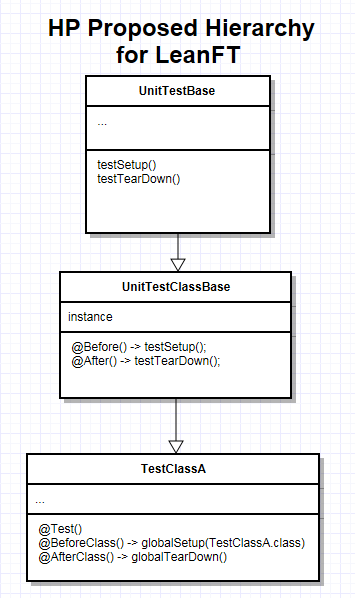
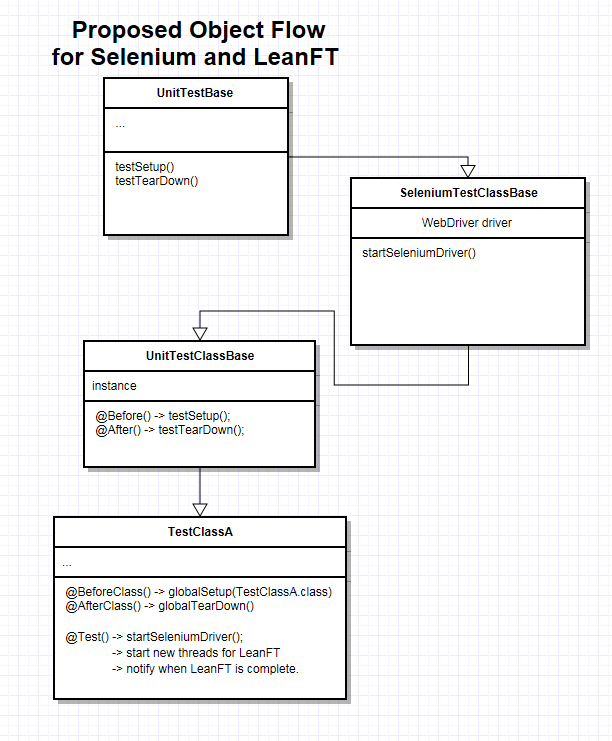
控制流应该类似于:
- @init -> globalSetup (LeanFT init)
- @BeforeClass -> testSetup (LeanFT init)
- @BeforeClass -> getSeleniumDriver (Selenium)
- @Test ->一些硒程序/****,以防止硒死亡。*/
- @Test ->新线程->运行leanFTsnippet1()
- @Test ->恢复selenium的最后步骤。
- @在->报告之后,关闭网站驱动程序
下面是我来自一个示例测试类的一些当前代码。
@BeforeClass
public static void beforeLFTClass() throws Exception {
    globalSetup(CoreFunctionality.class);
}

@AfterClass
public static void afterLFTClass() throws Exception {
    globalTearDown();
}

@Test
public void runLeanFtThread() {
    // put selenium code here
             // ...
             // begin leanft part of test
    Thread leanftThread = new Thread( new Runnable() {

        @Override
        public void run() {
            try {
                test();
            } catch (Exception e) {
                // TODO Auto-generated catch block
                e.printStackTrace();
            }
        }
    });
    leanftThread.start();
    try {
        leanftThread.join();
    } catch (InterruptedException e) {
        // TODO Auto-generated catch block
        e.printStackTrace();
    }
}


public void test() throws Exception {

    //Starting Browser
    Browser browser = BrowserFactory.attach(new BrowserDescription.Builder().title(driver.getTitle()).build());
    Assert.assertEquals(browser.getTitle(), driver.getTitle());
}
不管怎样,这是个很有趣的问题。很想看看你们怎么想的。
谢谢!
回答 3
Stack Overflow用户
发布于 2015-12-09 16:10:09
他们确实在一起玩得很好。我一直在我的脚本中使用它们,我喜欢使用每个工具的功能。我所做的就是创建一个LeanFT测试模板,并将Selenium库添加到其中。
下面是一个示例代码:
using System;
using Microsoft.VisualStudio.TestTools.UnitTesting;
using HP.LFT.SDK;
using HP.LFT.SDK.Web;
using Search_Regression_Test;
using TestAutomationReporting;
using UnifiedFramework;
using System.Configuration;
using System.Diagnostics;
using OpenQA.Selenium;
using OpenQA.Selenium.Chrome;
using OpenQA.Selenium.Support.UI;
using Selenium = OpenQA.Selenium;
namespace Search_Regression_Test
{
    [TestClass]
    public class LeanFtTest : UnitTestClassBase<LeanFtTest>
    {
        static IBrowser browser;
        static IWebDriver chromeDriver;

        [ClassInitialize]
        public static void ClassInitialize(TestContext context)
        {

            GlobalSetup(context);
            ChromeOptions CO = new ChromeOptions();
            CO.AddExtension(@"C:\Program Files (x86)\HP\LeanFT\Installations\Chrome\Agent.crx");
            chromeDriver = new ChromeDriver(CO);
            chromeDriver.Manage().Window.Maximize();

            browser = BrowserFactory.Attach(new BrowserDescription
            {
                Type = BrowserType.Chrome
            });
……诸若此类。
Stack Overflow用户
发布于 2017-02-17 07:51:34
LeanFT (14)的新版本甚至带来了一些显式的Selenium集成:您可以在项目创建向导中选择Selenium作为自动化SDK,有一个Selenium特定的对象标识中心,以及一些附加的定位器和实用程序。这里是完整的故事:硒的LeanFT。
Stack Overflow用户
发布于 2017-08-25 06:41:44
我不完全确定为什么这个问题还没有被接受的答案,但我将尝试用一个示例来回答这个问题,这个示例再次强调了LeanFT和Selenium在上玩得很好
它是用Java写的。也许可以对其进行一些优化,但它应该清楚地说明如何实现与同一浏览器的同时交互。
( Java是从LeanFT模板创建的。UnitTestClassBase类就是从那里来的。它基本上是在幕后初始化LeanFT和记者。为了绕开它,如果你不想使用它,你必须按需要调用SDK.init()__、Reporter.init()__、Reporter.generateReport()和SDK.cleanup() - https://leanft-help.saas.hpe.com/en/14.01/HelpCenter/Content/HowTo/CustomFrameworks.htm)
使用的AUT是优势购物:http://advantageonlineshopping.com/
package com.demo;

import static org.junit.Assert.*;

import java.io.File;
import java.util.Calendar;
import java.util.concurrent.TimeUnit;

import org.junit.After;
import org.junit.AfterClass;
import org.junit.Before;
import org.junit.BeforeClass;
import org.junit.Test;
import org.openqa.selenium.support.ui.ExpectedCondition;
import org.openqa.selenium.support.ui.ExpectedConditions;
import org.openqa.selenium.support.ui.WebDriverWait;
import org.openqa.selenium.Keys;
import org.openqa.selenium.chrome.*;
import org.openqa.selenium.firefox.*;
import org.openqa.selenium.remote.DesiredCapabilities;

import com.hpe.leanft.selenium.By;
import com.hp.lft.report.Reporter;
import com.hp.lft.report.Status;
import com.hp.lft.sdk.web.*;
import com.hp.lft.verifications.Verify;


public class SeleniumTest extends UnitTestClassBase {
    private ChromeDriver chromeDriver;
    private Browser browser;
    public SeleniumTest() {

        System.setProperty("webdriver.chrome.driver",this.getClass().getResource("/chromedriver.exe").getPath());

    }

    @BeforeClass
    public static void setUpBeforeClass() throws Exception {
        instance = new SeleniumTest();
        globalSetup(SeleniumTest.class);
    }

    @AfterClass
    public static void tearDownAfterClass() throws Exception {
        globalTearDown();
    }

    @Before
    public void setUp() throws Exception {
        // SELENIUM: Construct and launch the browser with LeanFT agent
        ChromeOptions options = new ChromeOptions();
        File paths = new File("C:\\Program Files (x86)\\HP\\LeanFT\\Installations\\Chrome\\Agent.crx");
        options.addExtensions(paths);

        DesiredCapabilities capabilities = new DesiredCapabilities();
        capabilities.setCapability(ChromeOptions.CAPABILITY, options);

        chromeDriver = new ChromeDriver(options);

    }

    @After
    public void tearDown() throws Exception {
        // LEANFT: close the browser opened by selenium
        browser.close();
    }

    @Test
    public void test() throws Exception {

        // SELENIUM: Go to the Advantage shopping website and maximize it
        chromeDriver.get("http://156.152.164.67:8080/#/");
        chromeDriver.manage().window().maximize();

        // LEANFT: Attach to the browser
        browser = BrowserFactory.attach(new BrowserDescription.Builder()
                .type(BrowserType.CHROME).openTitle(" Advantage Shopping")
                .build());


        // LEANFT: Click on tablets button
        browser.describe(WebElement.class, new WebElementDescription.Builder()
                .className("categoryCell").tagName("DIV").innerText("TABLETS Shop Now ").build()).click();

        // SELENIUM: Expand the display section after it was seen
        (new WebDriverWait(chromeDriver, 10))
          .until(new ExpectedCondition<org.openqa.selenium.WebElement>(){
            @Override
            public org.openqa.selenium.WebElement apply(org.openqa.selenium.WebDriver d) {
                return d.findElement(By.cssSelector("h4#accordionAttrib0"));
            }}).click();


        // LEANFT: select the preferred display size, click the preferred tablet and add the tablet to the cart
        browser.describe(CheckBox.class, new CheckBoxDescription.Builder()
                .type("checkbox").role("").accessibilityName("").tagName("INPUT").name("").index(1).build()).set(true);

        browser.describe(Image.class, new ImageDescription.Builder()
                .alt("").type(com.hp.lft.sdk.web.ImageType.NORMAL).tagName("IMG").index(1).build()).click();

        browser.describe(Button.class, new ButtonDescription.Builder()
                .buttonType("submit").tagName("BUTTON").name("ADD TO CART").build()).click();

        // SELENIUM: go to cart
        chromeDriver.get("http://156.152.164.67:8080/#/shoppingCart");

        // LEANFT: checkout
        browser.describe(Button.class, new ButtonDescription.Builder()
                .buttonType("submit").tagName("BUTTON").name("CHECKOUT ($1,009.00)").build()).click();

        // SELENIUM: Register as a new user after the button was seen
        (new WebDriverWait(chromeDriver, 10))
          .until(new ExpectedCondition<org.openqa.selenium.WebElement>(){
            @Override
            public org.openqa.selenium.WebElement apply(org.openqa.selenium.WebDriver d) {
                return d.findElement(By.xpath("//DIV[@id=\"newClient\"]/DIV[1]/SEC-FORM[1]/SEC-SENDER[1]/BUTTON[@role=\"button\"][1]"));
            }}).click();


        // LEANFT: fill in the user name and email
        String username = "U" + Calendar.getInstance().getTimeInMillis(); // unique name each time
        browser.describe(EditField.class, new EditFieldDescription.Builder()
                .type("text").tagName("INPUT").name("userName").build()).setValue(username);

        browser.describe(EditField.class, new EditFieldDescription.Builder()
                .type("text").tagName("INPUT").name("userEmail").build()).setValue("myuser_email@emailsite.org");

        // SELENIUM: Set password and confirm password
        chromeDriver.findElementByXPath("//SEC-VIEW/DIV[normalize-space()=\"*Password\"]/INPUT[1]").sendKeys("Password1");
        chromeDriver.findElementByXPath("//SEC-VIEW/DIV[normalize-space()=\"*Confirm password\"]/INPUT[1]").sendKeys("Password1");

        // LEANFT: check the 'I agree' checkbox and register, then click on next shipping details.
        browser.describe(CheckBox.class, new CheckBoxDescription.Builder()
                .type("checkbox").tagName("INPUT").name("registrationAgreement").build()).set(true);

        browser.describe(Button.class, new ButtonDescription.Builder()
                .buttonType("button").tagName("BUTTON").name("REGISTER").build()).click();

        browser.describe(Button.class, new ButtonDescription.Builder()
                .buttonType("submit").tagName("BUTTON").name("NEXT").build()).click();

        // SELENIUM: confirm the user name and pass
        chromeDriver.findElementByXPath("//DIV[@id=\"paymentMethod\"]/DIV/DIV/SEC-FORM/SEC-VIEW/DIV[normalize-space()=\"*SafePay username\"]/INPUT[1]").sendKeys(username);
        chromeDriver.findElementByXPath("//DIV[@id=\"paymentMethod\"]/DIV/DIV/SEC-FORM/SEC-VIEW/DIV[normalize-space()=\"*SafePay password\"]/INPUT[1]").sendKeys("Password1");

        // LEANFT: click "Pay now" and confirm payment was done
        browser.describe(Button.class, new ButtonDescription.Builder()
                .buttonType("button").role("button").accessibilityName("").tagName("BUTTON").name("PAY NOW").index(0).build()).click();
        Verify.isTrue(
                browser.describe(WebElement.class, new WebElementDescription.Builder()
                        .tagName("SPAN").innerText("Thank you for buying with Advantage").build())
                            .exists());
    }
}https://stackoverflow.com/questions/33353365
复制相似问题
腾讯云开发者

Copyright © 2013 - 2026 Tencent Cloud. All Rights Reserved. 腾讯云 版权所有
深圳市腾讯计算机系统有限公司 ICP备案/许可证号:粤B2-20090059  粤公网安备44030502008569号
腾讯云计算(北京)有限责任公司 京ICP证150476号 | 京ICP备11018762号