
安卓系统中的9补丁图像为CheckBox
安卓系统中的9补丁图像为CheckBox
提问于 2015-10-21 12:06:21
我对9个补丁非常陌生,我仍然试图弄清楚它是如何工作的。我试着用9个补丁来制作CheckBox,但是它们没有适当的扩展。因此,我的XML文件如下所示:
<?xml version="1.0" encoding="utf-8"?>
<selector xmlns:android="http://schemas.android.com/apk/res/android">
    <item android:drawable="@drawable/checkbox_cases_checked" android:state_checked="true" />
    <item android:drawable="@drawable/checkbox_cases_default" android:state_checked="false"  />
    <item android:drawable="@drawable/checkbox_cases_default" />
</selector>
在draw9patch.bat 9 9path中,对我来说很好:
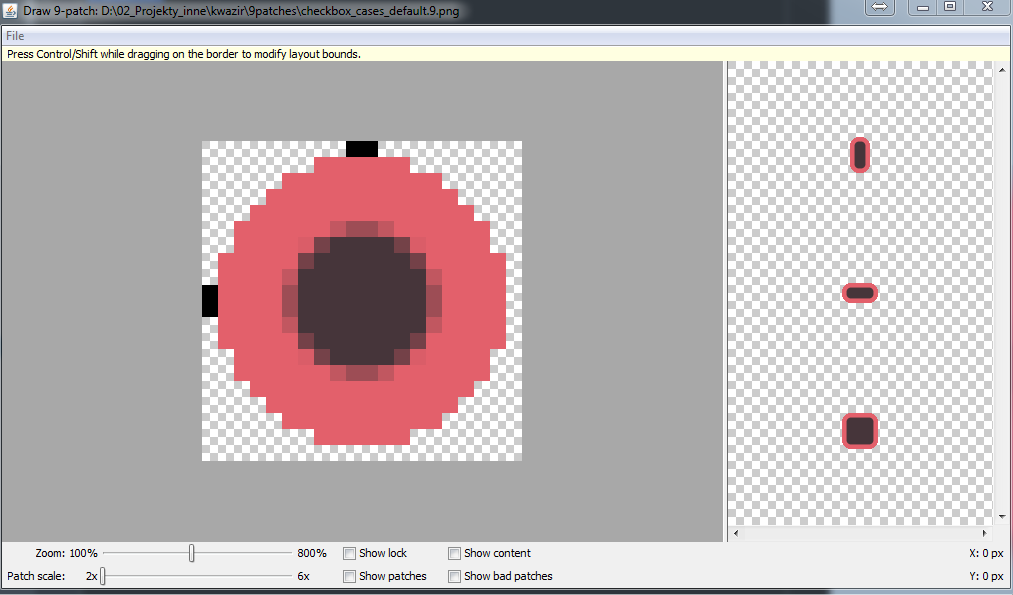
但在prewiev,它没有规模:

在CheckBox的布局代码中如下所示:
<android.support.v7.widget.AppCompatCheckBox
                android:id="@+id/stepCheckBox1"
                android:layout_width="48dp"
                android:layout_height="48dp"
                android:button="@drawable/checkbox_cases" />
我真的不知道为什么这张图片不放大到48 up到48 up。感谢您的帮助:)谢谢!
回答 2
Stack Overflow用户
回答已采纳
发布于 2016-02-23 19:56:38
深入研究这一点,CheckBox本身似乎不支持9修补程序Drawable的扩展。onDraw()方法在CompoundDrawable (从中派生CheckBox )中,似乎从内部可绘制大小(而不是从容器大小设置边界)设置可绘制边界-这意味着它不缩放。
背景(由View本身绘制)能够正确地缩放,因此您只需设置可绘制的选择器即可。
但是(像我一样),如果您想要一个单独的背景和可绘制的“检查”(而且您对自定义视图很满意),那么您可以只需子类ImageView,然后将其设置为Checkable:
public class StyledCheckBox extends ImageView implements Checkable, View.OnClickListener {
    private static final int[] CHECKED_STATE = { android.R.attr.state_checked };

    private boolean mChecked;

    public StyledCheckBox(Context context) {
        this(context, null, 0);
    }

    public StyledCheckBox(Context context, AttributeSet attrs) {
        this(context, attrs, 0);
    }

    public StyledCheckBox(Context context, AttributeSet attrs, int defStyle) {
        super(context, attrs);

        setFocusable(true);
        setOnClickListener(this);

        // Other constructor stuff...
    }

    @Override
    public void onClick(View v) {
        toggle();
    }

    @Override
    public boolean isChecked() {
        return mChecked;
    }

    @Override
    public void setChecked(boolean checked) {
        if (mChecked == checked) return;
        mChecked = checked;
        refreshDrawableState();
    }

    @Override
    public void toggle() {
        setChecked(!mChecked);
    }

    @Override
    public int[] onCreateDrawableState(int extraSpace) {
        if (isChecked()){
            int[] state = super.onCreateDrawableState(extraSpace + 1);
            mergeDrawableStates(state, CHECKED_STATE);
            return state;
        } else {
            return super.onCreateDrawableState(extraSpace);
        }
    }
}Stack Overflow用户
发布于 2015-10-21 12:19:09
使用ImageView并使用scalyType centerCrop
<FrameLayout
    android:layout_width="48dp"
    android:layout_height="48dp">

    <ImageView
        android:src="@drawable/checkbox_cases"
        android:scaleType="centerCrop"
        android:layout_width="match_parent"
        android:layout_height="match_parent"/>

    <android.support.v7.widget.AppCompatCheckBox
        android:id="@+id/stepCheckBox1"
        android:layout_width="match_parent"
        android:layout_height="match_parent" />

</FrameLayout>
这样,它将放大图像,填补整个空间。
页面原文内容由Stack Overflow提供。腾讯云小微IT领域专用引擎提供翻译支持
原文链接:
https://stackoverflow.com/questions/33258871
复制相关文章
相似问题
腾讯云开发者

Copyright © 2013 - 2026 Tencent Cloud. All Rights Reserved. 腾讯云 版权所有
深圳市腾讯计算机系统有限公司 ICP备案/许可证号:粤B2-20090059  粤公网安备44030502008569号
腾讯云计算(北京)有限责任公司 京ICP证150476号 | 京ICP备11018762号