
"adjustPan“不太好用
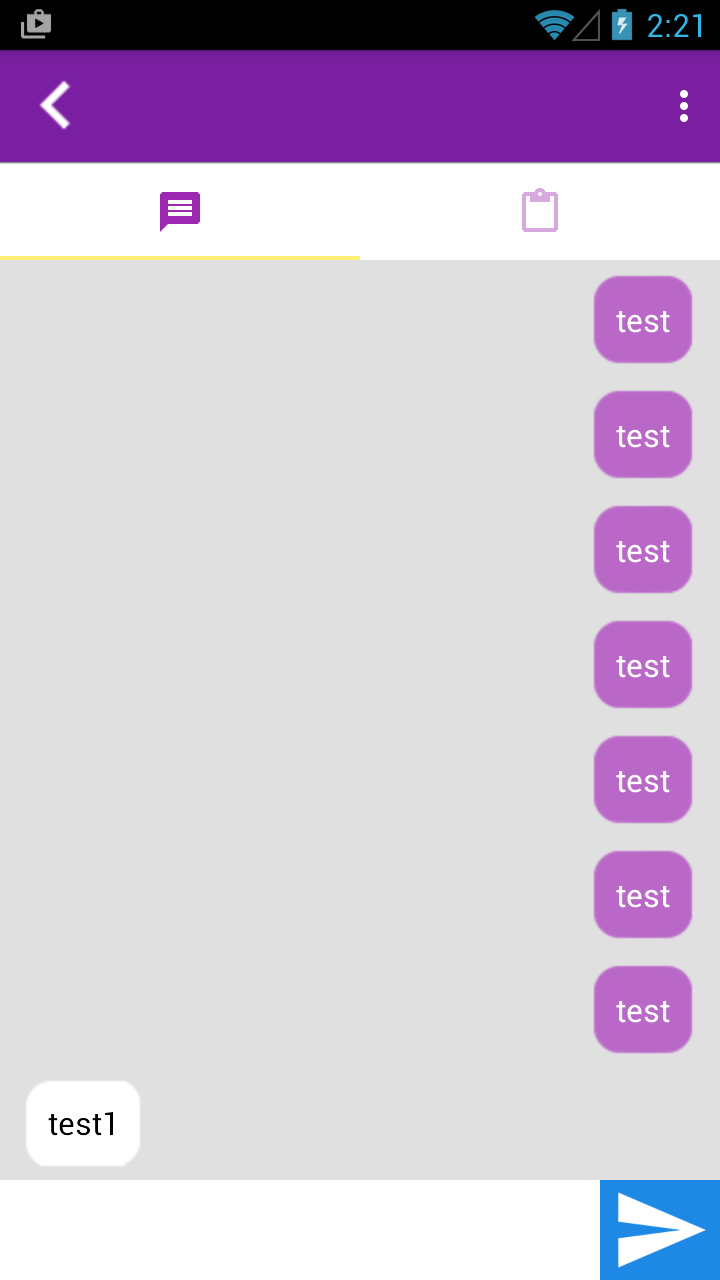
我正在创建android聊天应用程序。
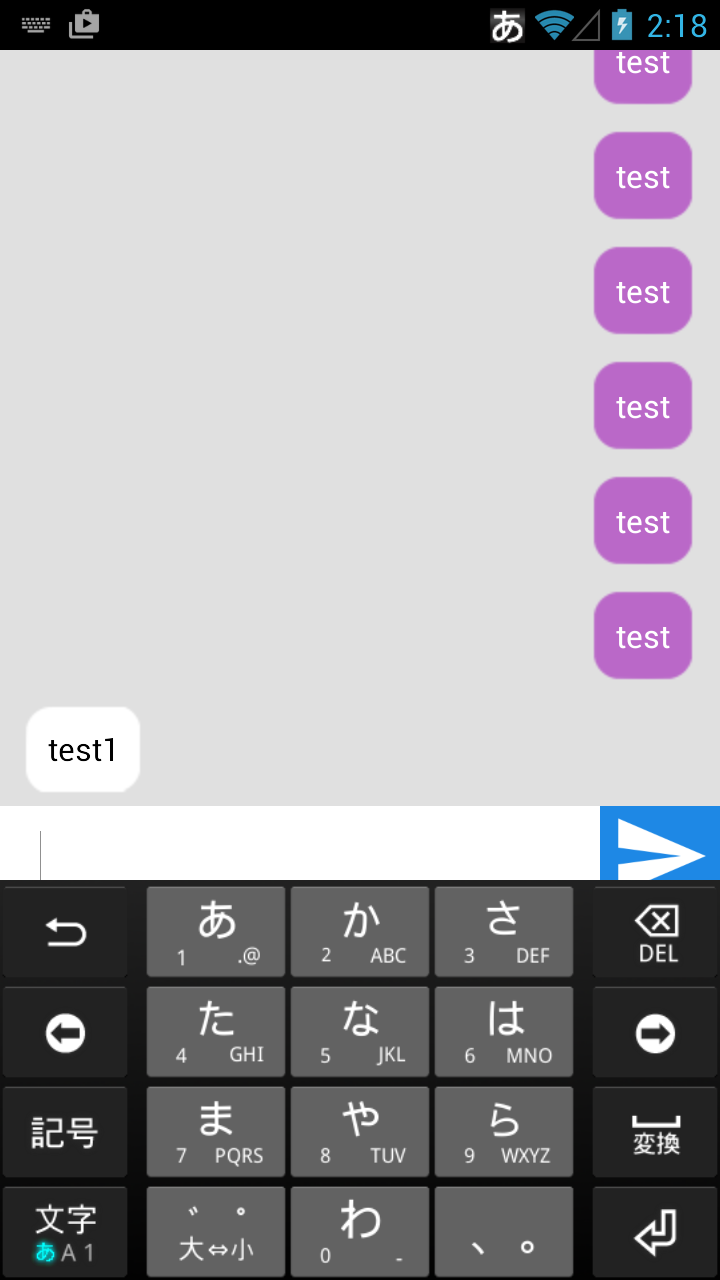
然而,当键盘打开时,它很少覆盖EditText。
如果我使用"adjustResize“,它不会覆盖EditText,而是覆盖ListView。
清单:
android:windowSoftInputMode="stateAlwaysHidden|adjustPan“
布局:
<RelativeLayout xmlns:android="http://schemas.android.com/apk/res/android"
    android:layout_width="match_parent"
    android:layout_height="match_parent"
    android:fitsSystemWindows="true">


    <ListView
        android:layout_width="match_parent"
        android:layout_height="match_parent"
        android:id="@+id/lV_chat"
        android:layout_alignParentLeft="true"
        android:layout_alignParentStart="true"
        android:layout_above="@+id/linearLayout3"
        android:background="@color/gray"
        android:layout_below="@+id/toolbarChat"
        android:divider="@null"
        android:paddingRight="@dimen/space_6dp"
        android:paddingLeft="@dimen/space_6dp" />

    <LinearLayout
        android:orientation="horizontal"
        android:layout_width="match_parent"
        android:layout_height="@dimen/chat_text_input_height"
        android:layout_alignParentBottom="true"
        android:layout_alignParentLeft="true"
        android:layout_alignParentRight="true"
        android:layout_alignParentEnd="true"
        android:layout_alignParentStart="true"
        android:id="@+id/linearLayout3"
        android:background="@color/white">

        <EditText
            android:layout_width="wrap_content"
            android:layout_height="match_parent"
            android:inputType="textMultiLine"
            android:ems="10"
            android:id="@+id/eT_chat"
            android:layout_weight="1"
            android:background="@color/transparency"
            android:layout_marginLeft="@dimen/space_20dp"
            android:textCursorDrawable="@null" />

        <ImageButton
            android:layout_width="@dimen/chat_send_button_width"
            android:layout_height="match_parent"
            android:id="@+id/iB_send"
            android:background="@color/light_blue"
            android:src="@drawable/ic_send"
            android:scaleType="centerInside" />
    </LinearLayout>

</RelativeLayout>
回答 2
Stack Overflow用户
发布于 2015-10-18 03:45:26
试着做这样的事
<RelativeLayout xmlns:android="http://schemas.android.com/apk/res/android"
    android:layout_width="fill_parent"
    android:layout_height="match_parent"
    >

    <RelativeLayout
        android:id="@+id/mainLayout"
        android:layout_width="fill_parent"
        android:layout_height="match_parent"
        android:layout_marginBottom="50dp"
        android:fitsSystemWindows="true">


        <ListView
            android:layout_width="match_parent"
            android:layout_height="match_parent"
            android:id="@+id/lV_chat"
            android:divider="@null"
             />


    </RelativeLayout>

    <RelativeLayout
        android:layout_width="match_parent"
        android:layout_height="wrap_content"
        android:layout_alignParentBottom="true"
        >
        <LinearLayout
            android:layout_width="match_parent"
            android:layout_height="wrap_content"
            android:layout_alignParentBottom="true"
            >

        <EditText
            android:layout_width="wrap_content"
            android:layout_height="match_parent"
            android:inputType="textMultiLine"
            android:ems="10"
            android:id="@+id/eT_chat"
            android:layout_weight="1"
            android:textCursorDrawable="@null" />

        <ImageButton
            android:layout_width="wrap_content"
            android:layout_height="match_parent"
            android:id="@+id/iB_send"
            android:src="@mipmap/ic_launcher"
            android:scaleType="centerInside" />
    </LinearLayout>

</RelativeLayout>
</RelativeLayout>您可以让android:layout_marginBottom="your edittext's layout's width"到您的main layout,其中包含listview,然后它应该使用Relative layout和该Linear layout内部修复您的问题。
记住不要将这些行添加到您的linear layout中
android:layout_alignParentBottom="true"
        android:layout_alignParentLeft="true"
        android:layout_alignParentRight="true"
        android:layout_alignParentEnd="true"
android:layout_alignParentStart="true"相对布局应该有android:layout_alignParentBottom="true",其中包含EditText和发送icon。
Stack Overflow用户
发布于 2015-10-18 04:03:24
在我看来,"adjustResize“是您最好的选择,.This将调整列表视图的大小以适应键盘。您可以在列表中使用bottomPadding。"adjustPan“不会有太大的帮助,因为它会改变整个布局,而且看起来也不太好。
https://stackoverflow.com/questions/33193725
复制相似问题
腾讯云开发者

Copyright © 2013 - 2026 Tencent Cloud. All Rights Reserved. 腾讯云 版权所有
深圳市腾讯计算机系统有限公司 ICP备案/许可证号:粤B2-20090059  粤公网安备44030502008569号
腾讯云计算(北京)有限责任公司 京ICP证150476号 | 京ICP备11018762号