
如何只在“表列表”中显示一次表标题,以便将表拆分为多个页
我使用R包(xtable和knitr)和Latex包(longtable和hyperref)来编写文档。
我的一张桌子很长,分成多个页面。原来,“列表表”显示了这个表出现的每一个页码,但是所有的超链接都会把我带到这个表的开头。
我的问题是,在“表的列表”中,我如何才能显示这个表出现的第一个页码。
\documentclass{article}
\usepackage{longtable}
\usepackage{hyperref}

<<setup, include=FALSE, cache=FALSE>>=
library(knitr)
library(xtable)
@

\begin{document}
\listoftables
\newpage

<<echo=FALSE,results='asis'>>=
## some customerized settings for "longtable"
addtorow          <- list()
addtorow$pos      <- list()
addtorow$pos[[1]] <- c(0)
addtorow$command  <- c(paste("\\hline \n",
                             "\\endhead \n",
                             "\\hline \n",
                             "{\\footnotesize Continued on next page} \n",
                             "\\endfoot \n",
                             "\\endlastfoot \n",sep=""))
## create a long table
d <- data.frame(ID=rep(1:300), LAB=rnorm(300))

## execute "xtable"
dTab <- xtable(d, caption="This is Table 1")

print(dTab,
      tabular.environment = "longtable",
      floating = FALSE,
      include.colnames = TRUE,
      include.rownames = FALSE, #addtorow substitute default row names
      add.to.row = addtorow,    # make the substitution here
      hline.after=c(-1),        # addtorow substitute default hline for first row
      caption.placement="top"
)
@

\end{document}回答 1
Stack Overflow用户
发布于 2015-10-16 09:06:41
这个问题需要分两部分来回答:
- 哪些LaTeX代码只需要将表的第一部分包含在LOF (数字列表)中?
- 如何使
xtable生成该代码?
第一部分已经给出了一个关于tex.stackexchange: How to use a longtable with only one entry in the list of tables的答案。它归结为在表的第一个标题中使用\caption{…},在下面的标题中使用\caption*{…}。
包括问题中的页脚,所需的LaTeX如下所示:
\begin{longtable}{rr}
    \caption{This is Table 1} \\ \hline
  \endfirsthead
    \caption*{This is Table 1} \\ \hline
    ID & LAB \\
    \hline
  \endhead
    \hline
    {\footnotesize Continued on next page}
  \endfoot
  \endlastfoot
ID & LAB \\
\hline
1 & 1.08 \\
2 & -0.99 \\
3 & 1.64 \\ (注意,\endlastfoot之后的\endlastfoot也可以进入第一个标头部分,但上面的结构更易于使用xtable生成。)
第二部分有点棘手。默认情况下,xtable在表头中包含一个\caption命令。使用add.to.row选项print.xtable,我们可以在表正文前面添加内容,但不能在\caption命令之前添加内容(据我所知)。
因此,为了实现上述结构,我们尽可能地抑制自动生成的LaTeX代码,并手动添加正确的表头。
这可以用选项only.contents of print.xtable来完成。关于表的元数据(latex.environment、floating等)的所有参数都过时了,因为我们自己编写表头:
<<echo=FALSE, results='asis'>>=

  ## create a long table
  d <- data.frame(ID=rep(1:300), LAB=rnorm(300))

  ## execute "xtable"
  dTab <- xtable(d)

  cat(sprintf("
  \\begin{longtable}{rr}
    \\caption{%1$s} \\\\ \\hline
    \\endfirsthead
    \\caption*{%s} \\\\ \\hline
    %2$s \\\\
    \\hline
    \\endhead
    \\hline
    {\\footnotesize %3$s}
    \\endfoot
    \\endlastfoot",
  "This is Table 1",
  paste(colnames(dTab), collapse = " & "),
  "Continued on next page"))

  print(dTab,
        include.colnames = TRUE,
        include.rownames = FALSE,
        only.contents = TRUE
  )

  cat("\\end{longtable}")
@
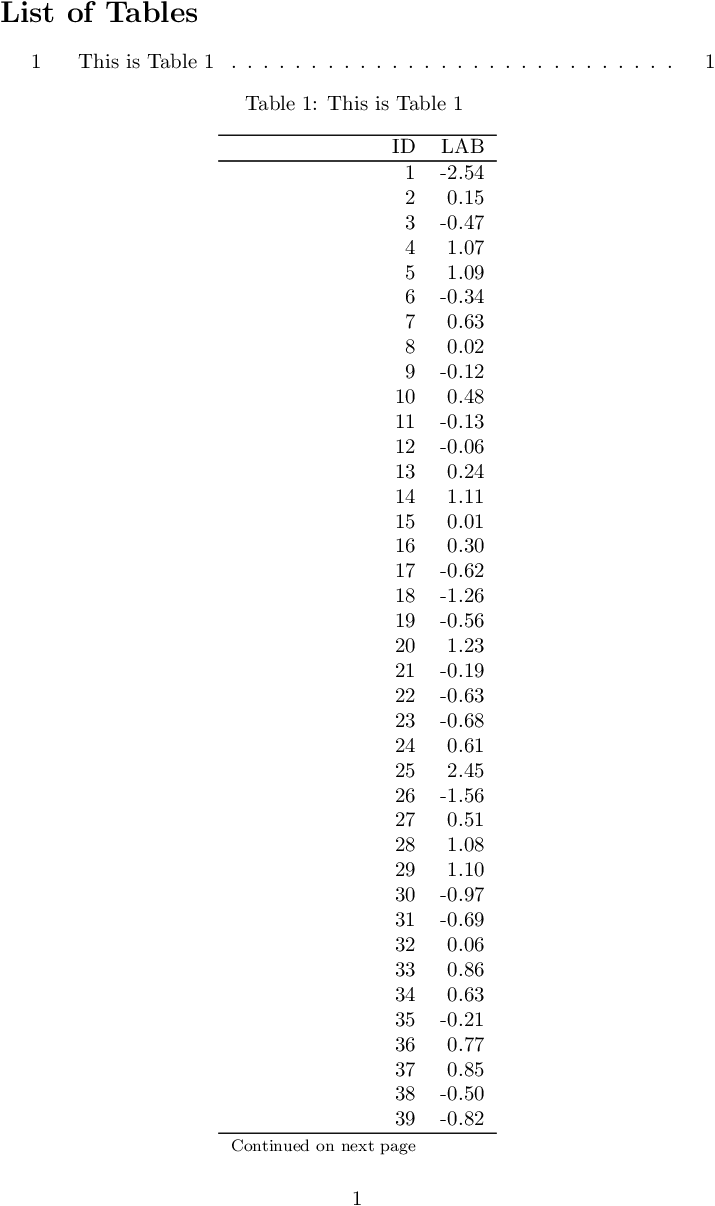
根据请求,LOF只包含一个条目:
完整代码:
\documentclass{article}
\usepackage{longtable}
\usepackage{hyperref}

<<setup, include=FALSE, cache=FALSE>>=
  library(knitr)
  library(xtable)
@

\begin{document}
\listoftables

<<echo=FALSE, results='asis'>>=

  ## create a long table
  d <- data.frame(ID=rep(1:300), LAB=rnorm(300))

  ## execute "xtable"
  dTab <- xtable(d)

  cat(sprintf("
  \\begin{longtable}{rr}
    \\caption{%1$s} \\\\ \\hline
    \\endfirsthead
    \\caption*{%s} \\\\ \\hline
    %2$s \\\\
    \\hline
    \\endhead
    \\hline
    {\\footnotesize %3$s}
    \\endfoot
    \\endlastfoot",
  "This is Table 1",
  paste(colnames(dTab), collapse = " & "),
  "Continued on next page"))

  print(dTab,
        include.colnames = TRUE,
        include.rownames = FALSE,
        only.contents = TRUE
  )

  cat("\\end{longtable}")
@

\end{document}
附录
要解决如何旋转列名的additional question,请执行以下操作:
- 在序言中添加
\usepackage{rotating}。 - 使用
paste(paste("\\begin{sideways}", colnames(dTab), "\\end{sideways}"), collapse = " & ")而不是paste(colnames(dTab), collapse = " & ")。 - 将
rotate.colnames = TRUE添加到print.xtable调用中。
https://stackoverflow.com/questions/33159114
复制相似问题
腾讯云开发者

Copyright © 2013 - 2026 Tencent Cloud. All Rights Reserved. 腾讯云 版权所有
深圳市腾讯计算机系统有限公司 ICP备案/许可证号:粤B2-20090059  粤公网安备44030502008569号
腾讯云计算(北京)有限责任公司 京ICP证150476号 | 京ICP备11018762号