
将复杂svg形状转换为圆抽象
SVG很难看,请查看我的:
HTML:
<svg version="1.1" class="overlap-svg" id="alaska"></svg>
<svg version="1.1" class="overlap-svg" id="grid"></svg>
CSS:
.overlap-svg {
    position: absolute;
    left:0;
    top: 0;
}
问题:
如果我们重叠这两个svg,JS函数将只突出显示其中包含阿拉斯加部分(红色)的svg圆圈吗?
查看下面的说明以获得更多信息
- 假设你有一个复杂的形状,就像阿拉斯加的轮廓。
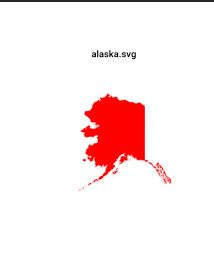
- 假设您有另一个由圆圈组成的网格的svg:
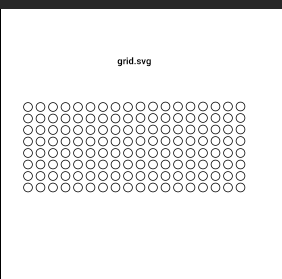
如何转换这个:
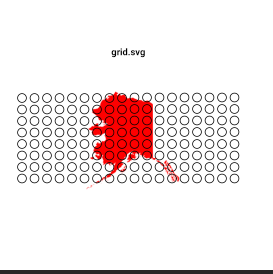
成了这样的东西:
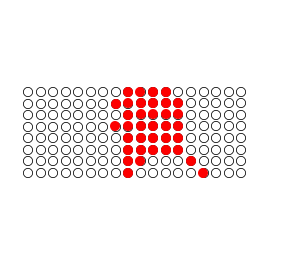
如果阿拉斯加的任何部分(红色)在圆圈的区域内,圆圈应该是红色的。
再次请查看我的JSFiddle链接以上。
回答 3
Stack Overflow用户
发布于 2015-10-17 22:29:58
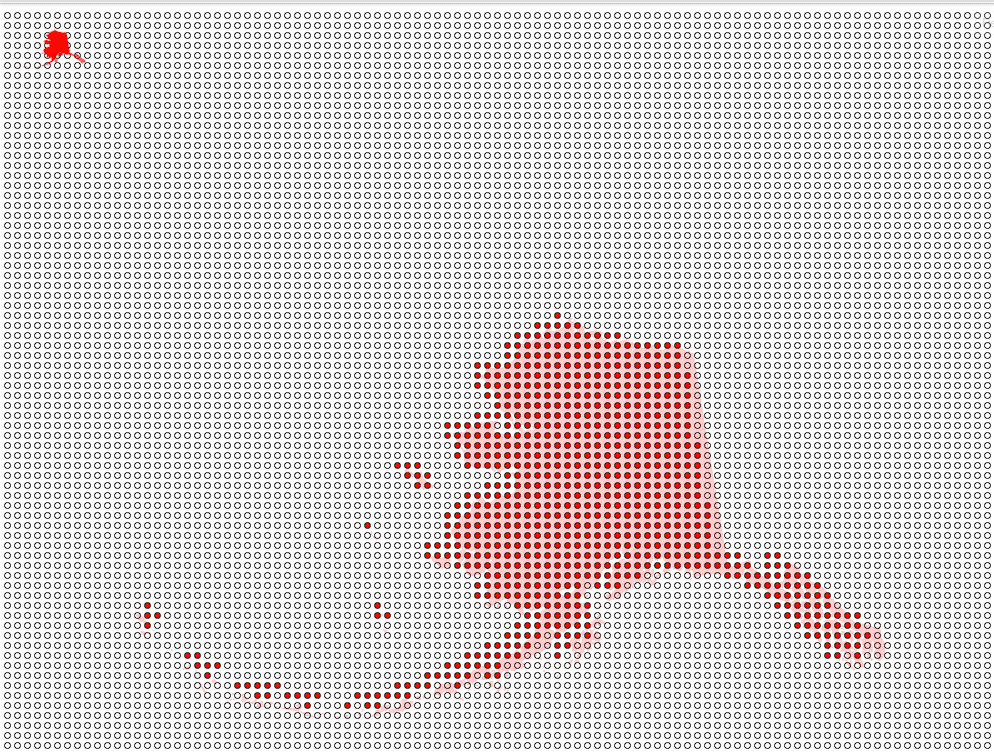
您可以使用svg并将其加载到一个画布元素中。以元素为例,因为它是一个画布元素,所以您可以得到它的像素数组。
可以通过适当调整画布大小的像素构建网格来构建圆圈抽象。
首先是一个助手:网格管理器。
function GridManager(configIn) {
  var gm_ = {};

  gm_.config = {
    'gridWidth': 10,
    'gridHeight': 10,
    'gridCellWidth': 10,
    'gridCellHeight': 10,
    'gridHeight': 100,
    'dataSrc': []
  };

  // Load new config over defaults
  for (var property in configIn) {
    gm_.config[property] = configIn[property];
  }

  /**
    * Creates an array using the module's config building a 2d data array
    * from a flat array. Loops over GridManager.config.dataSrc
    *
    * Render a checkerboard pattern:
    *   GridManager.config.dataSrc = ["#"," "]
    *
    * Render you can load a image by passing in its full pixel array,
    * provided image height and width match GridManager.config.gridHeight
    * and GridManager.config.gridWidth.
    */
  gm_.createGridSrc = function() {
    var height = this.config.gridHeight;
    var width = this.config.gridWidth;
    var output = [];

    for (var i = 0; i < height; i++) {
      output[i] = [];

      for (var ii = 0; ii < width; ii++) {
        if (this.config.dataSrc !== undefined) {
          var dataSrc = this.config.dataSrc;
          output[i][ii] = dataSrc[i*width + ii % dataSrc.length];
        }
      }
    }
    return output;
  };

  /**
    * Creates a SVG with a grid of circles based on
    * GridManager.config.dataSrc.
    *
    * This is where you can customize GridManager output.
    */
  gm_.createSvgGrid = function() {
    var cellWidth = this.config.gridCellWidth;
    var cellHeight = this.config.gridCellHeight;
    var svgWidth = 1000;
    var svgHeight = 1000;
    var radius = 3
    var cellOffset = radius / 2;

    //create svg
    var xmlns = 'http://www.w3.org/2000/svg';
    var svgElem = document.createElementNS (xmlns, 'svg');
    svgElem.setAttributeNS (null, 'viewBox', '0 0 ' + svgWidth + ' ' + svgHeight);
    svgElem.setAttributeNS (null, 'width', svgWidth);
    svgElem.setAttributeNS (null, 'height', svgHeight);
    svgElem.style.display = 'block';

    //create wrapper path
    var g = document.createElementNS (xmlns, 'g');
    svgElem.appendChild (g);

    //create grid
    var data = this.createGridSrc();
    var count = 0;
    for (var i = data.length - 1; i >= 0; i--) {
      for (var ii = data[i].length - 1; ii >= 0; ii--) {

        // This svgHeight and svgWidth subtraction here flips the image over
        // perhaps this should be accomplished elsewhere.
        var y = svgHeight - (cellHeight * i) - cellOffset;
        var x = svgWidth - (cellWidth * ii) - cellOffset;

        var cell = document.createElementNS (xmlns, 'circle');
        var template = data[i][ii];

        // Machine has averaged the amount of fill per pixel
        // from 0 - 255, so you can filter just the red pixels like this
        // over a certain strength.
        if (template[0] > 10 ) {
          cell.setAttributeNS (null, 'fill', '#ff0000');
          // Consider stashing refs to these in this.groups['red'] or something
          // similar
        } else {
          cell.setAttributeNS (null, 'fill', 'none');
        }

        cell.setAttributeNS (null, 'stroke', '#000000');
        cell.setAttributeNS (null, 'stroke-miterlimit', '#10');
        cell.setAttributeNS (null, 'cx', x);
        cell.setAttributeNS (null, 'cy', y);
        cell.setAttributeNS (null, 'r', radius);

        g.appendChild (cell);
      }
    }
    return svgElem;
  }
  return gm_;
}
然后在main.js
var wrapper = document.getElementById('wrapper');

var mySVG = document.getElementById('alaska').outerHTML;

mySVG = mySVG.slice(0, 4) + ' height="100" ' + mySVG.slice(4);

// Create a Data URI based on the #alaska element.
var mySrc = 'data:image/svg+xml;base64,' + window.btoa(mySVG);

// Create a new image to do our resizing and capture our pixel data from.
var source = new Image();
source.onload = function() {

  var svgRasterStage = document.createElement('canvas');
  svgRasterStage.width = 1000;
  svgRasterStage.height = 1000;

  svgRasterStage.classList.add('hidden');

  // You may not need this at all, I didn't test it.
  wrapper.appendChild(svgRasterStage);

  // Get drawing context for the Canvas
  var svgRasterStageContext = svgRasterStage.getContext('2d');

  // Draw the SVG to the stage.
  svgRasterStageContext.drawImage(source, 0, 0);

  // We can now get array of rgba pixels all concatinated together:
  //    [ r, g, b, a, r, g, b, a,  (...)  r, g, b, a, r, g, b, a]
  var rgbaConcat = svgRasterStageContext.getImageData(0, 0, 100, 100).data;

  // Which sucks, so here's a way to convert them to pixels that we can
  // use with GridManager.createSvgGrid.
  var pixels = [];
  var count = 0;

  // NOTE: this is a for with a weird step: i=i-4. i-4 is an infinte loop.
  // anything else just jumbles the pixels.
  for (var i = rgbaConcat.length - 1; i >= 0; i=i-4) {
    var r = rgbaConcat[i - 0];
    var g = rgbaConcat[i - 1];
    var b = rgbaConcat[i - 2];
    var a = rgbaConcat[i - 3];
    pixels.push([r, g, b, a]);
  }

  // We create our GridManager (finally).
  var gm = new GridManager({
    'gridWidth': 100,
    'gridHeight': 100,
    'dataSrc': pixels
  });

  // And let her rip!
  wrapper.appendChild(gm.createSvgGrid());
}Stack Overflow用户
发布于 2015-10-16 13:50:02
我试着快速解决这个问题,并做了一些研究,但是还没有完成/完成(您可以在fina实现中完成它)。
您需要有一个函数来检查某个点是否在路径中。我在JS中找到了两个库:Raphael和SnapSVG。
我对你的JSFiddle进行了分叉和编辑,并试图快速解决它。我的第一次尝试是在SnapSVG函数,但它给了我一个低于预期的结果比拉斐尔函数。
打开小提琴,检查:https://jsfiddle.net/edmundo096/7sjLb956/4/。请注意,2的规模会减慢浏览器的,尽管我使用它来查看正确的结果,但看到一些东西需要时间(移动浏览器可能挂起)。
var alaska = $('#alaska');
var grid = $('#grid');
var path =  alaska.find('path').first().attr('d');

grid.children().each(function(){
    var circle = $(this);
    var scale = 2;

    // SnapSVG version: var isInside = Snap.path.isPointInside(path,
    var isInside = Raphael.isPointInsidePath(path,
                        circle.attr('cx') * scale,
                        circle.attr('cy') * scale);
    if (isInside) {
        circle.attr('fill', 'blue');
    }
});
(我使用了jQuery和两个外部资源:来自Cloudflare CDN的Raphael和SnapSvg )
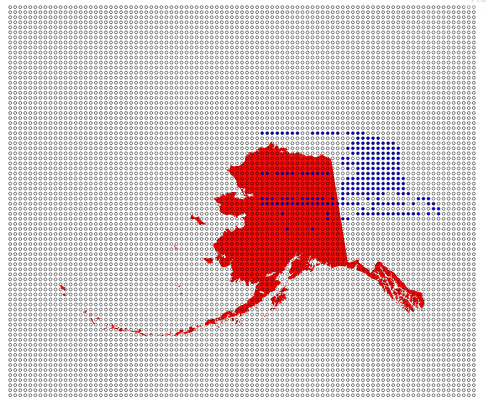
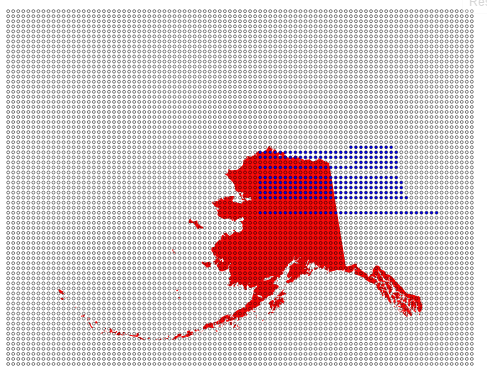
正如你在下一张图像上看到的,它生成了一种点地图,但你仍然需要纠正路径的映射、位置、比例等。
Raphael第一次快速测试结果:
SnapSVG first快速尝试结果:
您可以缓存结果;将结果映射保存在JSON对象中,然后分别加载,以保存此复杂路径中的计算时间。
希望它能帮到你。
Stack Overflow用户
发布于 2015-10-16 05:25:30
您可以获取圆心坐标,并使用类似于Raphael的isPointInsidePath()函数来测试它是否在地图路径内。
http://raphaeljs.com/reference.html#Raphael.isPointInsidePath
https://stackoverflow.com/questions/33158918
复制相似问题
腾讯云开发者

Copyright © 2013 - 2026 Tencent Cloud. All Rights Reserved. 腾讯云 版权所有
深圳市腾讯计算机系统有限公司 ICP备案/许可证号:粤B2-20090059  粤公网安备44030502008569号
腾讯云计算(北京)有限责任公司 京ICP证150476号 | 京ICP备11018762号