
MMORPG游戏中的自动空间机器人
有人能帮我吗?我用Visual 2010编写了一个简单的自动按空格键程序。它运行并工作,它通过记事本发送空间,但不幸的是它不能在在线游戏中工作(因为空格键是获取项目的控件)。
我关心的是:有人能帮我让它在游戏中直接工作吗?
这是简单的代码。
Public Class Form1
    Private Sub Timer1_Tick(ByVal sender As System.Object, ByVal e As System.EventArgs) Handles Timer1.Tick
        SendKeys.Send(TextBox1.Text) 'Sends the message you typed in the textbox1
        SendKeys.Send(" ") 'presses the SPACE key from your keyboard
    End Sub

    Private Sub Button1_Click(ByVal sender As System.Object, ByVal e As System.EventArgs) Handles Button1.Click
        Timer1.Interval = TextBox2.Text
        Timer1.Enabled = True

    End Sub

    Private Sub Button2_Click(ByVal sender As System.Object, ByVal e As System.EventArgs) Handles Button2.Click
        Timer1.Interval = TextBox2.Text
        Timer1.Enabled = False
    End Sub

End Class
提前谢谢!:d
回答 1
Stack Overflow用户
发布于 2015-10-15 14:49:00
我认为问题在于你并没有把注意力转移到游戏窗口。所以你的程序是把空格发送到你写的vb.net程序,而不是游戏。
你需要做一些事情来改变焦点到游戏窗口。查看this question,因为它拥有使用Win32 API更改哪个窗口具有焦点的信息。
编辑
根据您的请求,下面是如何将其写入代码中。请注意,编写此代码所需的所有信息都在我提供的链接中。请阅读在将来有人回答你的问题时提供的资料。我留下了大量的评论,以帮助您了解每一行做什么。
Imports System.Runtime.InteropServices 'Needed to import the Win32 API functions

Public Class Form1
    'Make sure the programTitle const is set to the _EXACT_ title of the
    'program you are trying to set focus to or this won't work.
    Private Const programTitle As String = "Title of program"
    Private zero As IntPtr = 0 'Required for FindWindowByCaption first parameter

    'Import the SetForegroundWindow Function
    <DllImport("user32.dll")> _
    Private Shared Function SetForegroundWindow(ByVal hWnd As IntPtr) As <MarshalAs(UnmanagedType.Bool)> Boolean
    End Function

    'Import the FindWindowByCaption Function, called as a parameter to SetForegroundWindow
    <DllImport("user32.dll", EntryPoint:="FindWindow", SetLastError:=True, CharSet:=CharSet.Auto)> _
    Private Shared Function FindWindowByCaption( _
      ByVal zero As IntPtr, _
      ByVal lpWindowName As String) As IntPtr
    End Function

    Private Sub Timer1_Tick(sender As Object, e As EventArgs) Handles Timer1.Tick
        'Call SetForegroundWindow whenever you want to send keys to the specified window.
        SetForegroundWindow(FindWindowByCaption(zero, programTitle))

        SendKeys.Send(TextBox1.Text) 'Sends the message you typed in the textbox1
        SendKeys.Send(" ") 'presses the SPACE key from your keyboard
    End Sub

    Private Sub Button1_Click(ByVal sender As System.Object, ByVal e As System.EventArgs) Handles Button1.Click
        Timer1.Interval = TextBox2.Text
        Timer1.Enabled = True
    End Sub

    Private Sub Button2_Click(ByVal sender As System.Object, ByVal e As System.EventArgs) Handles Button2.Click
        Timer1.Interval = TextBox2.Text
        Timer1.Enabled = False
    End Sub

End Class请注意:我测试了这段代码,并验证了它是否可以设置窗口焦点,并按需要发送空格键和任何其他密钥。如果这段代码不适用于您,那么programTitle常量中的名称是错误的。例如,如果我想将焦点设置到此记事本窗口:
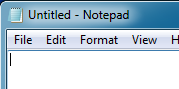
如果我将programTitle设置为"Notepad",试图让它将键发送到记事本窗口,这是行不通的。那是因为“记事本”只是标题的一部分。要使它工作,应该将programTitle设置为"Untitled - Notepad"。
https://stackoverflow.com/questions/33146567
复制相似问题
腾讯云开发者

Copyright © 2013 - 2026 Tencent Cloud. All Rights Reserved. 腾讯云 版权所有
深圳市腾讯计算机系统有限公司 ICP备案/许可证号:粤B2-20090059  粤公网安备44030502008569号
腾讯云计算(北京)有限责任公司 京ICP证150476号 | 京ICP备11018762号