
在自定义UIView上添加子视图不像预期的那样工作
在自定义UIView上添加子视图不像预期的那样工作
提问于 2015-10-15 05:09:50
我对一个名为:UIView的类进行了子类:AURTabView。然后,我拖动3个视图(白色背景)到故事板,以自动布局他们的1/3屏幕宽度的每个。然后,我在UIButton方法上添加了一个init,它运行得很好,如下所示:
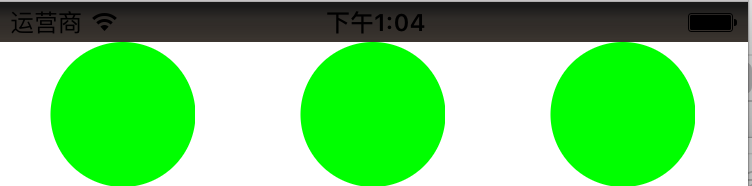
然后,我想在它们上再添加两个UIView。奇怪的是,第一个和第三个AUTRabView按预期工作,但中间的一个没有。
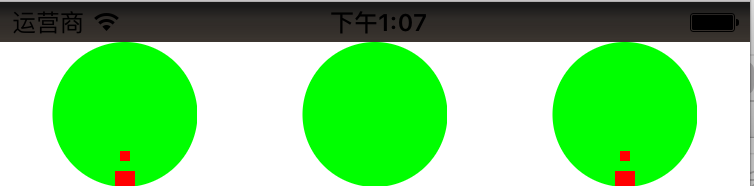
这真的很奇怪。我检查了UIView层次结构,如下所示:
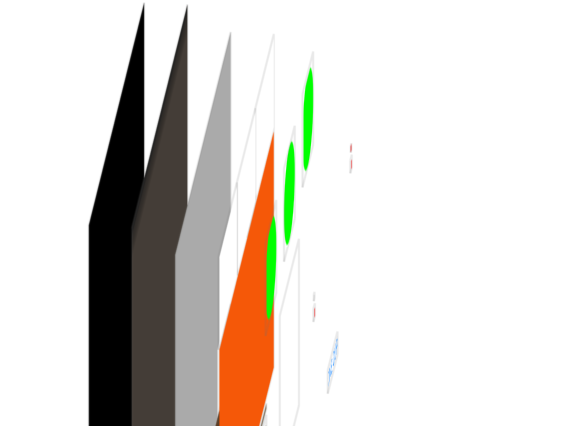
有什么意思吗?
以下是代码:
class AURTabView: UIView {

    let tabButton   = UIButton()
    let smallCircle = UIView()
    let largeCircle = UIView()

    required init?(coder aDecoder: NSCoder) {
        super.init(coder: aDecoder)

        self.addSubview(tabButton)
        self.addSubview(smallCircle)
        self.addSubview(largeCircle)
    }

    override func layoutSubviews() {
        super.layoutSubviews()

        let height = self.frame.height
        tabButton.frame = CGRect(x: (self.frame.width-height)/2, y: 0, width: height, height: height)
        tabButton.backgroundColor = UIColor.greenColor()

        smallCircle.frame = CGRect(x: CGRectGetMidX(self.frame)-2.5, y: height-10-8, width: 5, height: 5)
        smallCircle.backgroundColor = UIColor.redColor()
        largeCircle.frame = CGRect(x: CGRectGetMidX(self.frame)-5, y: height-8, width: 10, height: 10)
        largeCircle.backgroundColor = UIColor.redColor()
        print(smallCircle)
        print(largeCircle)
    }

    override func drawRect(rect: CGRect) {
        tabButton.layer.cornerRadius = tabButton.frame.width/2
    }
}回答 1
Stack Overflow用户
回答已采纳
发布于 2015-10-15 06:06:46
使用这个
import UIKit类AURTabView: UIView {
let tabButton   = UIButton()
let smallCircle = UIView()
let largeCircle = UIView()

required init?(coder aDecoder: NSCoder) {
    super.init(coder: aDecoder)

    self.addSubview(tabButton)
    self.addSubview(smallCircle)
    self.addSubview(largeCircle)
}

override func layoutSubviews() {
    super.layoutSubviews()

    let height = self.frame.height
    tabButton.frame = CGRect(x: (self.frame.width-height)/2, y: 0, width: height, height: height)
    tabButton.backgroundColor = UIColor.greenColor()

    smallCircle.frame = CGRect(x: self.frame.width/2 - 2.5, y: height-10-8, width: 5, height: 5)
    smallCircle.backgroundColor = UIColor.blackColor()
    largeCircle.frame = CGRect(x:  self.frame.width/2 - 5, y: height-8, width: 10, height: 10)
    largeCircle.backgroundColor = UIColor.redColor()
    print(smallCircle)
    print(largeCircle)
}

override func drawRect(rect: CGRect) {
    tabButton.layer.cornerRadius = tabButton.frame.width/2
}
}
页面原文内容由Stack Overflow提供。腾讯云小微IT领域专用引擎提供翻译支持
原文链接:
https://stackoverflow.com/questions/33140299
复制相关文章
相似问题
腾讯云开发者

Copyright © 2013 - 2026 Tencent Cloud. All Rights Reserved. 腾讯云 版权所有
深圳市腾讯计算机系统有限公司 ICP备案/许可证号:粤B2-20090059  粤公网安备44030502008569号
腾讯云计算(北京)有限责任公司 京ICP证150476号 | 京ICP备11018762号