
在c#中用颜色填充视觉形状
嗨,我正在用visio2013 c# .Now创建形状,我需要用c#填充这个形状,我尝试了以下代码,但是没有任何意义:(:)
   Visio.Cell cqellname;
            cqellname = shape.get_CellsSRC(
            (short)Visio.VisSectionIndices.visSectionObject,
            (short)Visio.VisRowIndices.visRowFill,
            (short)Visio.VisCellIndices.visFillBkgnd);
cqellname.FormulaU = "rgb(255,0,0)";当单元格被保护时,上面的代码抛出一个错误。
  shape.get_CellsSRC((short)Visio.VisSectionIndices.visSectionObject,
        (short)Visio.VisRowIndices.visRowFill,
   (short)Visio.VisCellIndices.visFillBkgnd).FormulaForceU = "RGB(" + R + "," + G + "," + B + ")";
尝试以上方法,它不会抛出任何异常,但没有改变形状。
我已经尝试过这个解决方案-- 从堆叠溢出,它太不起作用了。
我可以看到我在变形表FillForeGnd和FillBkGnd中指定的值,但是这个形状并没有填充我给出的颜色。
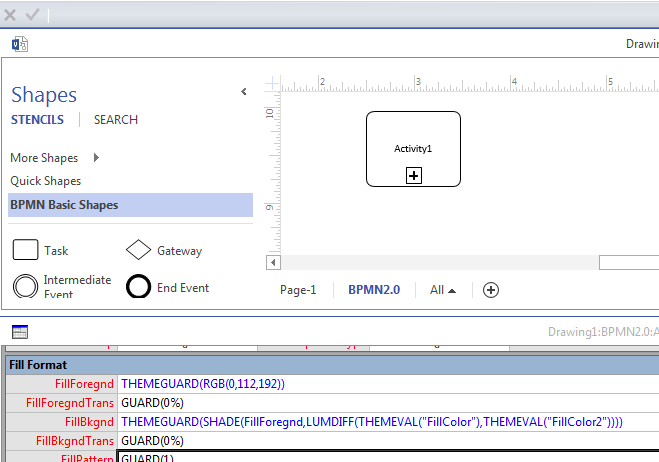
有谁能告诉我怎么做吗?
回答 2
Stack Overflow用户
发布于 2015-10-20 11:09:02
正如我在上面的答案中提到的(您已经标记为无用),您的目标是错误的形状。
现在你已经准备好了你的问题,包括更多的细节,这是清楚的,你正在处理的形状。
您所针对的形状似乎是"BPMN基本形状“模板中的”折叠子进程“。这是一组形状,顶层没有几何图形,所以改变它的颜色,就像你在问题中所做的那样,没有视觉上的变化。要解决这个问题,您需要找到用于显示背景的子形状。在这个特定的母版中,包含目标填充的子形状的索引大于父级,所以您可以在代码中使用它。该形状缺乏任何其他明确的功能(如用户单元格),以使一个更好的候选人,所以请注意,这个方法只是这个特定的形状。
考虑到你似乎对这个模板做了相当多的工作,我的方法是创建一个模板副本,并对模板进行一些修改,以使这种交互更容易一些,但同时我希望下面的代码能够回答您的问题。
如果是这样的话,请把它标记成答案。
public void OnCheckFillBPMN()
{
    Color fillColor = Color.FromArgb(1, 255, 0, 0);
    CollapsedSubProcessFill(this.Application.ActiveWindow.Selection.PrimaryItem, fillColor);
}

private void CollapsedSubProcessFill(Visio.Shape vShpIn, Color fillColor)
{
    if (vShpIn != null && vShpIn.Master != null && vShpIn.Master.NameU.StartsWith("Collapsed Sub-Process"))
    {
        //The sub-shape that provides the fill colour in
        //the 'Collapsed Sub-Process' master is the first index
        //after the group shape.
        //If you want to use a different method to locate the
        //correct sub-shape then do that here.
        var targetSubShpId = vShpIn.ID + 1;
        var targetShp = TryGetShapeInCollection(vShpIn.Shapes, targetSubShpId);
        if (targetShp != null)
        {
            var targetCell = targetShp.get_CellsSRC(
                (short)Visio.VisSectionIndices.visSectionObject,
                (short)Visio.VisRowIndices.visRowFill,
                (short)Visio.VisCellIndices.visFillForegnd);
            targetCell.FormulaU = "RGB(" + fillColor.R
                                    + ',' + fillColor.G
                                    + ',' + fillColor.B + ')';
        }
    }
}


private Visio.Shape TryGetShapeInCollection(Visio.Shapes vShps, int shpId)
{
    try
    {
        if (vShps != null)
        {
           var targetShp = vShps.ItemFromID[shpId];
           return targetShp;
        }
    }
    catch (System.Runtime.InteropServices.COMException ex)
    {
        if (ex.ErrorCode == -2032465756) //Invalid sheet identifier
        {
            return null;
        }
    }
    return null;
}Stack Overflow用户
发布于 2015-10-15 14:55:35
如果FormulaForceU可以工作,但是没有视觉上的改变,那么我假设您没有设置正确的单元格。通常,您会设置FillForegnd单元格(visFillForegnd),除非有不同的模式集。还请注意(对于Visio 2013+),如果FillGradientEnabled设置为true,这将覆盖纯色。
最后要记住的一点是,你所瞄准的形状可能没有几何学,或者它的NoFill单元格设置为真,你真的应该瞄准一个子/子形状。
在这两种情况下,您都应该裂纹打开ShapeSheet并查看形状处于何种状态。
https://stackoverflow.com/questions/33139939
复制相似问题
腾讯云开发者

Copyright © 2013 - 2026 Tencent Cloud. All Rights Reserved. 腾讯云 版权所有
深圳市腾讯计算机系统有限公司 ICP备案/许可证号:粤B2-20090059  粤公网安备44030502008569号
腾讯云计算(北京)有限责任公司 京ICP证150476号 | 京ICP备11018762号