
AngularJS on WKWebView:处理文件的任何解决方案://在iOS 9上?
我正在将一个巨大的angularJS应用程序移植到iOS 9,并希望从WKWebView (从UIWebView迁移)中获益。该应用程序是本地自包含的,因此所有文件都是使用文件:// protocol为应用程序主包服务的。
不幸的是,这听起来像WKWebView最初破坏了iOS 8.x上的文件://协议,但是当我看到全新的iOS 9 loadFileURL(basePath:,allowingReadAccessToURL:) API时,它发出了一些亮光。
let readAccessPath = NSURL(string:"app", relativeToURL:bundleURL)?.absoluteURL
webView.loadFileURL(basePath!, allowingReadAccessToURL:readAccessPath!)
唉,当我将allowingReadAccessToURL设置为包(app/)中的根文件夹时,我只得到了“索引文件”,没有加载异步文件。
有人在这个问题上有经验吗?
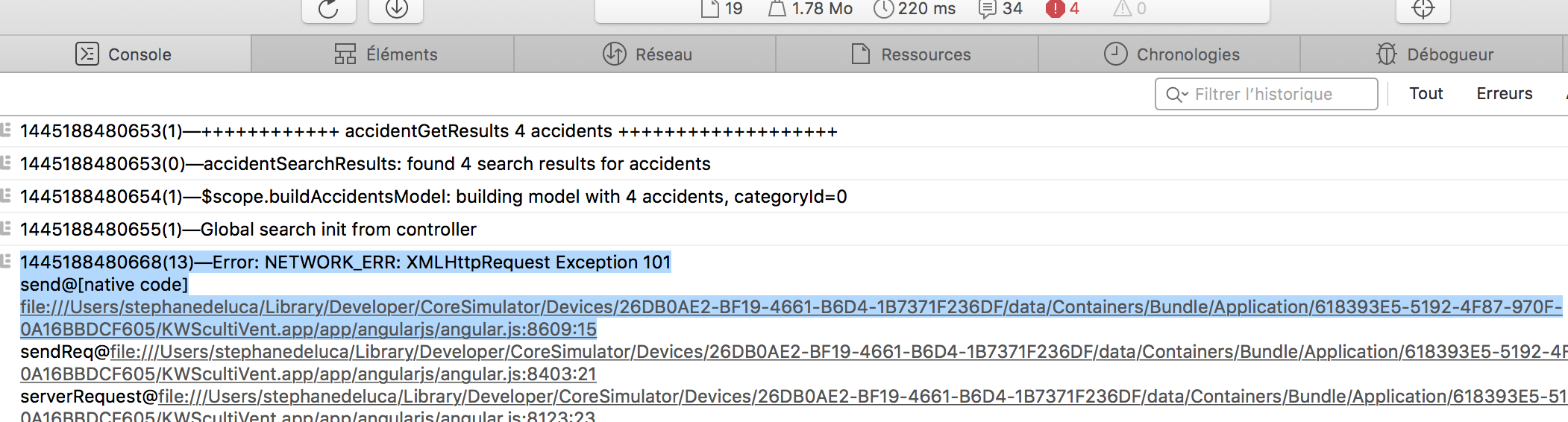
我看到我最初的问题描述不够准确。我确实在运行我的HTML。但是我的异步angularJS调用实际上被WebKit框架中的安全监视狗阻塞了。
回答 2
Stack Overflow用户
发布于 2015-11-03 21:40:20
虽然我没有一个快速的答案(我指的是快速修复),但我确实有一个解决方案。
这包括放弃文件:// protocol并切换到http://。
短答案
以下是几个步骤:
1)在您自己的应用程序中使用- Install本地Web服务器;
2) - Setup本地Web服务器,在您选择的特定端口从本地主机服务;
3)根据适当的mime类型,从应用程序资源中提取实际服务文件的委托;
4) - Authorize绕过iOS9 ATS来处理http (而不仅仅是https )。
然后瞧!
详细答案
1)在您自己的应用程序中安装本地Web服务器;
安装GCDWebServer从它的Github:https://github.com/swisspol/GCDWebServer
2)设置本地服务器,以便在给定的端口上从本地主机提供服务
考虑到您的angularjs或HTML应用程序文件位于资源文件夹中的文件夹" app“。
在vc ViewDidLoad中:
@implementation ViewController

GCDWebServer* _webServer;

- (void)viewDidLoad
{
    [super viewDidLoad];
    self.webView = [[WKWebView alloc] initWithFrame:self.view.frame];
    [self.view addSubview:self.webView];

    self.webView.navigationDelegate = self;

    NSURL *bundleURL = [NSBundle mainBundle].bundleURL;
    NSURL *basePath = nil;

    // Init WebServer

    [self initWebServer:[[NSURL URLWithString:@"app" relativeToURL:bundleURL] absoluteURL]];

    basePath = [NSURL URLWithString:@"http://localhost:8080/page.html#/home" relativeToURL:nil];
    NSURLRequest *request = [[NSURLRequest alloc] initWithURL:basePath];
    [self.webView loadRequest:request];
}
3)根据适当的mime类型设置来自应用程序资源的实际服务文件的委托;
-(void)initWebServer:(NSURL *)basePath {
    // Create server
    _webServer = [[GCDWebServer alloc] init];

    #define GCDWebServer_DEBUG 0
    #define GCDWebServer_VERBOSE 1
    #define GCDWebServer_INFO 2
    #define GCDWebServer_WARNING 3
    #define GCDWebServer_ERROR 4
    #define GCDWebServer_EXCEPTION 5

    [GCDWebServer setLogLevel:GCDWebServer_ERROR];
    // Add a handler to respond to GET requests on any URL
    [_webServer addDefaultHandlerForMethod:@"GET"
                              requestClass:[GCDWebServerRequest class]
                              processBlock:^GCDWebServerResponse *(GCDWebServerRequest* request) {


                                  //NSLog([NSString stringWithFormat:@"WS: loading %@", request]);
                                  NSString * page = request.URL.lastPathComponent;
                                  NSString * path = request.URL.path;
                                  NSString * file = path;

                                  //NSLog(@"WS: loading %@", file);

                                  NSString * fullPath = [NSString stringWithFormat:@"%@%@", basePath, path];
                                  NSString * sFullPath = [fullPath substringFromIndex:7];

                                  BOOL isText = NO;

                                  if([page.lastPathComponent hasSuffix:@"html"]) {
                                      isText = YES;
                                  }


                                  if (isText) {
                                      NSError * error = nil;
                                      NSString * html = [NSString stringWithContentsOfFile:sFullPath encoding:NSUTF8StringEncoding error: &error];
                                      return [GCDWebServerDataResponse responseWithHTML:html];
                                  }
                                  else {
                                      NSData * data = [NSData dataWithContentsOfFile:sFullPath];
                                      if (data !=nil) {

                                          NSString * type = @"image/jpeg";

                                          if      ([page.lastPathComponent hasSuffix:@"jpg"]) type = @"image/jpeg";
                                          else if ([page.lastPathComponent hasSuffix:@"png"]) type = @"image/png";
                                          else if ([page.lastPathComponent hasSuffix:@"css"]) type = @"text/css";
                                          else if ([page.lastPathComponent hasSuffix:@"js" ]) type = @"text/javascript";


                                          return [GCDWebServerDataResponse responseWithData:data contentType:type];
                                      }
                                      else {

                                          return [GCDWebServerDataResponse responseWithHTML:[NSString stringWithFormat:@"<html><body><p>404 : unknown file %@ World</p></body></html>", sFullPath]];
                                      //return [GCDWebServerDataResponse responseWithHTML:@"<html><body><p>Hello World</p></body></html>"];
                                      }
                                  }
                              }];

    // Start server on port 8080
    [_webServer startWithPort:8080 bonjourName:nil];
    NSLog(@"Visiting %@", _webServer.serverURL);
}
4)授权绕过iOS9 ATS来处理http (而不仅仅是https )
在Xcode中的info.plist文件中,必须添加一个名为“”的字典,其中包含一个键值,如下所示:
NSAllowsArbitraryLoads =真
希望能帮上忙。任何人偶然发现更简单的东西,欢迎回答!
Stack Overflow用户
发布于 2017-10-12 17:56:11
我建议您使用GCDWebServer,您可以以http://localhost的形式运行本地web服务器。
Swift 3.0
- 添加GCDWebServer pod
pod "GCDWebServer", "~> 3.0" - 单击并将您的AngularJS web文件夹拖到Xcode中,并在提示时选择“复制项目(如果需要)”和“创建文件夹引用”。
- 在控制器中使用此代码可以运行本地主机web服务器。 MainViewController类: UIViewController,WKNavigationDelegate,WKScriptMessageHandler,WKUIDelegate,GIDSignInUIDelegate { var webView : WKWebView!var var服务器:GCDWebServer?覆盖func viewDidLoad() { super.viewDidLoad() self.webView.load(URLRequest(url: loadDefaultIndexFile()!)) }私有func loadDefaultIndexFile() -> URL?{ self.webServer = GCDWebServer()让mainBundle = Bundle.main / my index.html的路径为www/index.html。如果使用默认的公用文件夹,那么它可以是public/index.html,让folderPath = mainBundle.path(forResource:"www",ofType: nil) self.webServer?.addGETHandler(forBasePath:"/",directoryPath: folderPath!,indexFilename:"index.html",cacheAge: 0,allowRangeRequests: true)做{ try self.webServer?.start(选项:"Port":3000,"BindToLocalhost":true );}catch{ print(错误)} // Path应该是http://localhost:3000/index.html返回self.webServer?.serverURL }
https://stackoverflow.com/questions/33097019
复制相似问题
腾讯云开发者

Copyright © 2013 - 2026 Tencent Cloud. All Rights Reserved. 腾讯云 版权所有
深圳市腾讯计算机系统有限公司 ICP备案/许可证号:粤B2-20090059  粤公网安备44030502008569号
腾讯云计算(北京)有限责任公司 京ICP证150476号 | 京ICP备11018762号