
音频事件侦听器被不间断地调用
音频事件侦听器被不间断地调用
提问于 2015-10-11 08:39:17
我最初注意到了仅在火狐上发生的timeupdate事件的问题,但发现它也适用于其他事件侦听器(到目前为止,我在canplay上已经看到了)。
基本上,我在一个角指令中创建了一个元素;我将一个函数绑定到ontimeupdate,即使currentTime值为0,该事件也会被不间断地触发。
守则摘要:
// angular directive controller function
...

DOMAudioObject = createAudioObject(src);
DOMAudioObject.audio.ontimeupdate = onTimeUpdate;

function createAudioObject(src) {
    return {
        audio: new Audio(src),
        playback: $scope.playback,
        name: $scope.name
    };
}

function onTimeUpdate() {
    var currentTime = DOMAudioObject.audio.currentTime;
    console.log(currentTime);
    $scope.currentTime = currentTime;
    $scope.audio.currentTime = currentTime;
    $scope.$apply();
}
完全控制器代码:
    function audioCtrl($scope) {

        // private reference to the DOM object that plays the audio
        var DOMAudioObject,
            watchers = {unbind: {}};

        // register watchers once the model is available, we need at least the id field
        watchers.unbind.model = $scope.$watch('model', init);
        // remove watchers when the user navigates away
        $scope.$on('$destroy', destroyWatchers);

        function applyAudioPropertiesAsync() {
            DOMAudioObject.audio.volume = $scope.volume;
            DOMAudioObject.audio.currentTime = $scope.currentTime;
            $scope.audio.duration = DOMAudioObject.audio.duration;
        }

        function applyAudioMetaProperties() {
            $scope.audio = $scope.audio || {};
            $scope.audio.id = $scope.model.id;
            $scope.audio.playback = $scope.playback;
            $scope.audio.name = $scope.model.name;
            $scope.audio.volume = $scope.volume;
            $scope.audio.currentTime = $scope.currentTime;
            $scope.audio.duration = DOMAudioObject.audio.duration || 0;
        }

        // fired when the audio object has been loaded from src
        function bindAudio(src, oldSrc) {
            if (src === undefined) {
                return;
            }

            // now safe to register watchers since they rely on the audio object
            registerWatchers();

            // if there is already a stored audio object associated with this visual, use it
            DOMAudioObject = $audio.get($scope.model.id);

            // audio src has been updated, reflect by pausing and creating a new audio object
            if (oldSrc && src !== oldSrc) {
                $scope.playback.play = false;
                $scope.currentTime = 0.0;
                pause(DOMAudioObject);
                DOMAudioObject = null;
            }

            // create a new audio object or use stored values instead of reinitializing each time
            if (!DOMAudioObject) {
                DOMAudioObject = createAudioObject(src);
                // set in $audio service for persistence across views and controllers
                $audio.set($scope.model.id, DOMAudioObject);
            } else {
                $scope.playback = DOMAudioObject.playback || $scope.playback;
                $scope.currentTime = DOMAudioObject.audio.currentTime || $scope.currentTime;
                $scope.volume = DOMAudioObject.audio.volume || $scope.volume;
            }

            // only bind meta properties, binding actual Audio object causes problems in some browsers
            applyAudioMetaProperties();

            // add values that must be calculated after initial load
            DOMAudioObject.audio.oncanplay = applyAudioPropertiesAsync;
            // tell playback progress indicator to move on timeupdate event by firing a digest cycle
            DOMAudioObject.audio.ontimeupdate = onTimeUpdate;
            // tell animate directive to stop scrolling when the audio has ended
            DOMAudioObject.audio.onended = onAudioEnded;

            // tell parent this directive is ready when the audio has fully loaded
            watchers.unbind.duration = $scope.$watch('audio.duration', function (val) {
                if (val > 0) {
                    $scope.$emit('audio.ready', {id: $scope.model.id, audio: $scope.audio});
                    watchers.unbind.duration();
                }
            });
        }

        // create a dom audio object
        function createAudioObject(src) {
            return {
                audio: new Audio(src),
                playback: $scope.playback,
                name: $scope.model.name
            };
        }

        function destroyWatchers() {
            if (watchers.unbind.audio) {
                watchers.unbind.audio();
            }
            if (watchers.unbind.playback) {
                watchers.unbind.playback();
            }
            if (watchers.unbind.progress) {
                watchers.unbind.progress();
            }
            if (watchers.unbind.volume) {
                watchers.unbind.volume();
            }
        }

        function init(visual) {
            if (visual === undefined) {
                return;
            }
            // prevent updates to visual model from rebinding audio
            watchers.unbind.model();
            // when the audio-src is available and fully loaded, create audio objects
            watchers.unbind.audio = $scope.$watch('audioSrc', bindAudio);
        }

        function onAudioEnded() {
            // ensure playback variables are updated
            $scope.$apply($scope.playback.play = false);
            $scope.currentTime = 0;
        }

        // timeupdate event to update scope attribute with that of the Audio object
        function onTimeUpdate() {
            var currentTime = DOMAudioObject.audio.currentTime;
            $scope.currentTime = currentTime;
            $scope.audio.currentTime = currentTime;
            $scope.$apply();
        }

        // pause the current track
        function pause(audio) {
            if (audio) {
                audio.audio.pause();
            }
        }

        // play the current track
        function play(audio) {
            if (audio) {
                audio.audio.play();
            }
        }

        function registerWatchers() {
            // allow audio to be toggled on/off
            watchers.unbind.playback = $scope.$watch('playback.play', togglePlay);
            // allow volume changes
            watchers.unbind.volume = $scope.$watch('volume', updateVolume);
            // allow seeking of audio
            watchers.unbind.progress = $scope.$watch('currentTime', seek);
            // update the name variable on the audio object so it reflects in global scope
            watchers.unbind.name = $scope.$watch('model.name', applyAudioMetaProperties);
        }

        // move audio position pointer to a new place
        function seek(val) {
            var threshold = 1,
                curr = DOMAudioObject.audio.currentTime;

            if ((val >= curr + threshold) || (val <= curr - threshold)) {
                DOMAudioObject.audio.currentTime = val;
            }
        }

        // toggle play/pause
        function togglePlay(val) {
            if (val) {
                play(DOMAudioObject);
                $audio.setGlobal($scope.audio);
            } else {
                pause(DOMAudioObject);
            }
        }

        // allow the volume to be changed, scope reference updates automatically (pass by reference)
        function updateVolume(val) {
            if (val) {
                DOMAudioObject.audio.volume = val;
            }
        }
    }
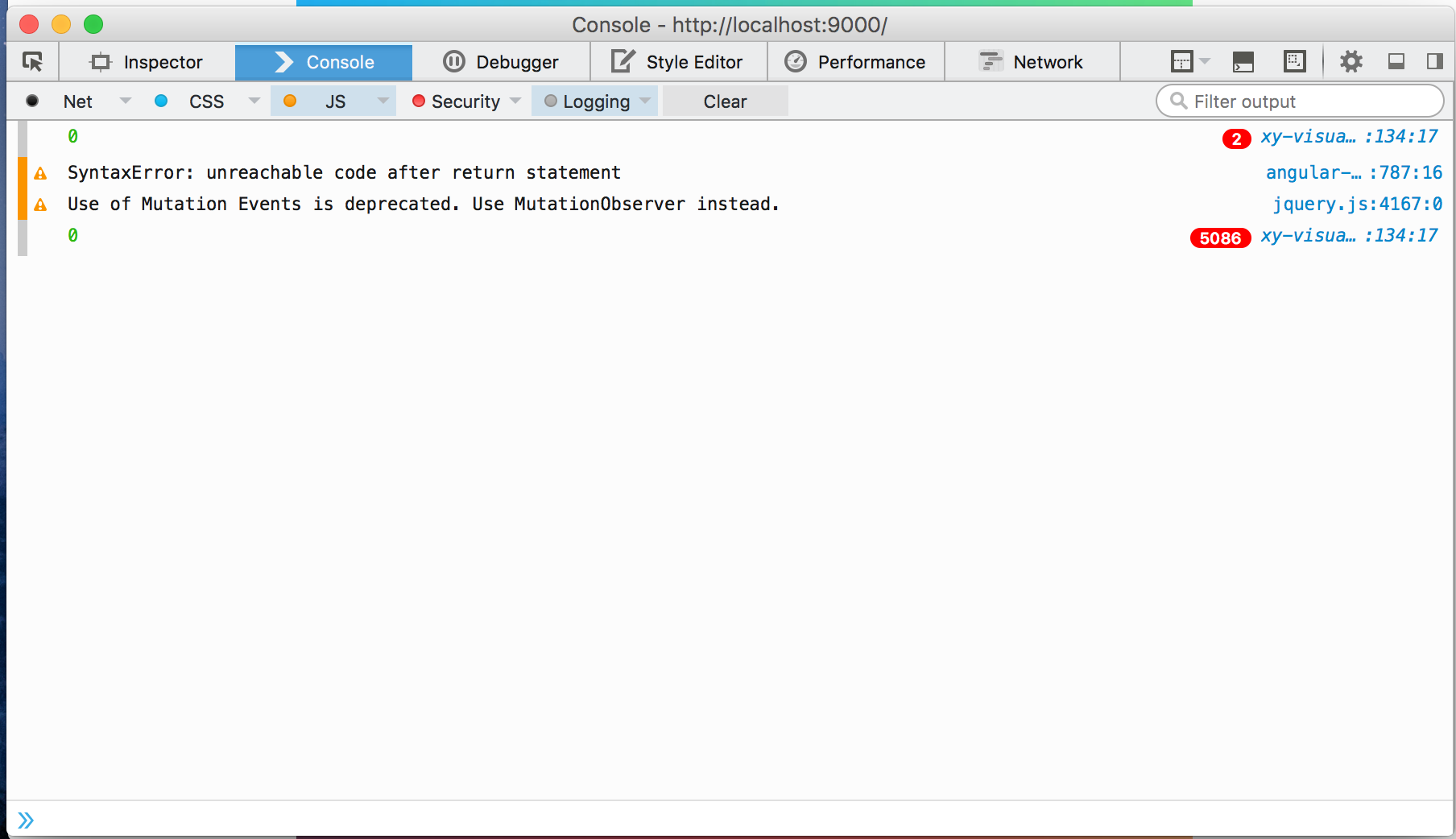
然后,正如您在图像中看到的,onTimeUpdate()函数不断地被反复调用,即使currentTime的值没有变化(每次都是0)。
同样,这种情况只发生在firefox上。Chrome,safari,甚至互联网浏览器都表现得很好。我在Mac 10.11 El Capitan上运行firefox 40.0.3,角1.4.6
有没有人对这里可能发生的事情有一些洞察力,有什么潜在的解决办法来解决这个问题?
回答 1
Stack Overflow用户
回答已采纳
发布于 2015-10-16 04:16:07
原来,罪魁祸首是这里的这条线
DOMAudioObject.audio.currentTime = $scope.currentTime;
显然,设置此值会导致事件侦听器无限期地触发。我不知道为什么。但我去掉了这一行,一切都如期而至。
我贴出了一个新问题,想看看是否有人对这种奇怪的行为有所了解。
页面原文内容由Stack Overflow提供。腾讯云小微IT领域专用引擎提供翻译支持
原文链接:
https://stackoverflow.com/questions/33063076
复制相关文章
相似问题
腾讯云开发者

Copyright © 2013 - 2026 Tencent Cloud. All Rights Reserved. 腾讯云 版权所有
深圳市腾讯计算机系统有限公司 ICP备案/许可证号:粤B2-20090059  粤公网安备44030502008569号
腾讯云计算(北京)有限责任公司 京ICP证150476号 | 京ICP备11018762号