
ios 9目标-c屏幕大小问题
我升级到ios 9和xcode 7(从xcode 6.2),现在当我启动我的应用程序时会发生这样的情况:
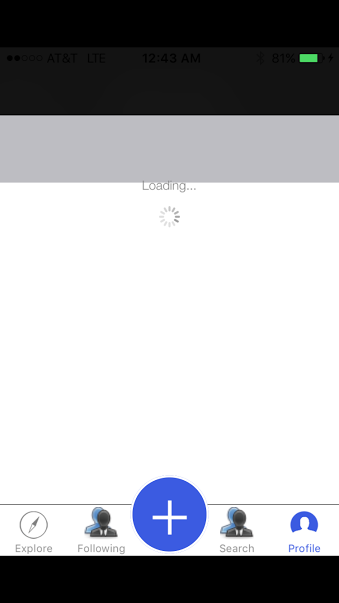
现在所有的黑棒都在上面和下面。
我的appDelegate是这样的:
- (BOOL)application:(UIApplication *)application didFinishLaunchingWithOptions:(NSDictionary *)launchOptions
{
    self.window = [[UIWindow alloc] initWithFrame:[[UIScreen mainScreen] bounds]];

    // Override point for customization after application launch.
    // self.window.backgroundColor = [UIColor whiteColor];
    // [self.window makeKeyAndVisible];


    _startViewController = [[StartViewController alloc] init];
    _startNavigationController = [[StartNavigationController alloc] initWithRootViewController:_startViewController];
    self.window.rootViewController = _startNavigationController;
    [self.window makeKeyAndVisible];

    // Need to fix this since deprecated
    // [application prefersStatusBarHidden:NO];
    // [application preferredS :UIStatusBarStyleDefault];

    // [[UIApplication sharedApplication] setStatusBarStyle:UIStatusBarStyleLightContent];

    return YES;
} 回答 4
Stack Overflow用户
发布于 2015-10-06 08:04:03
case缺少了应用程序图标和启动图像下的通用设置中的LaunchScreen.storyboard:
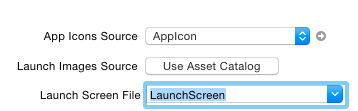
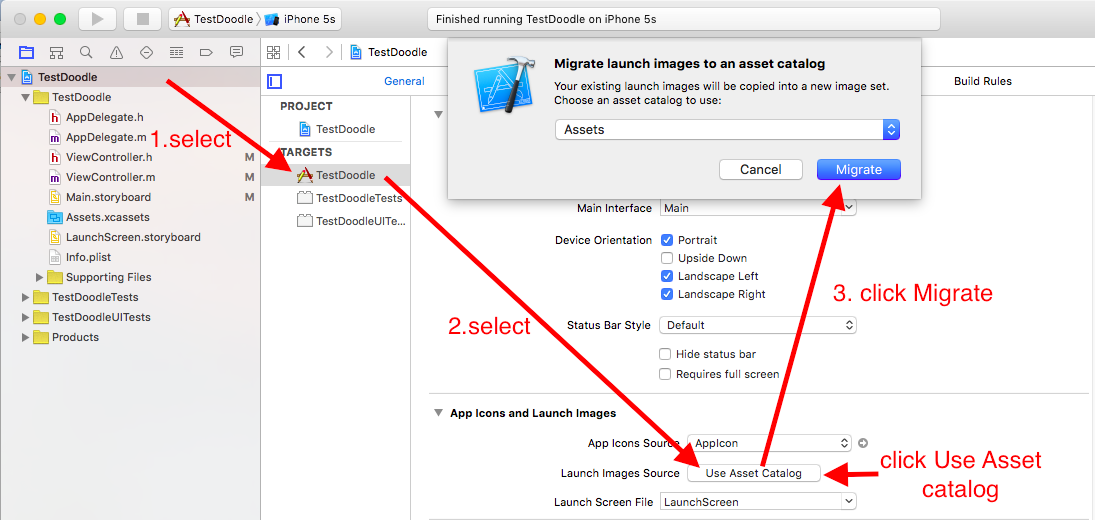
以上功能不是工作,请检查以下步骤:
- 导航到项目设置
- 在“应用图标和启动图像”下单击“使用资产目录”
- 在弹出窗口上选择“迁移”。
这应该能解决问题。
Stack Overflow用户
发布于 2015-10-06 08:15:09
首先,请在您的Images.xcassets目录中添加这些图像。您也可以更改这些图像,但要注意保持大小和标题:)
用他们的头衔来命名他们。Default.png

Default-Portrait-736h@3x.png

Default-667h@2x.png

Default-568h.png

然后选择LaunchImage at General : App图标和启动图像:启动图像源
Stack Overflow用户
发布于 2015-10-06 08:08:12
如果项目有LaunchScreen.storyboard文件,请检查它。没有这个,Xcode就会对屏幕大小做出假设。创建一个LaunchScreen.storyboard文件并将其添加到您的项目中。
https://stackoverflow.com/questions/32964581
复制相似问题
腾讯云开发者

Copyright © 2013 - 2026 Tencent Cloud. All Rights Reserved. 腾讯云 版权所有
深圳市腾讯计算机系统有限公司 ICP备案/许可证号:粤B2-20090059  粤公网安备44030502008569号
腾讯云计算(北京)有限责任公司 京ICP证150476号 | 京ICP备11018762号