
SynchronizationContext或调用
我试图在主线程中调用一个方法,它将更新多个UI元素。其中一个元素是RichTextView。我找到了3种更新UI的方法,这些方法都是在运行一段时间后,出现以下错误时崩溃的。一旦我将RichTextView更改为简单的文本框,类型2就不会再崩溃了(我仍然不确定是否是这样)。
System.StackOverflowException类型的未处理异常发生在System.Windows.Forms.dll中
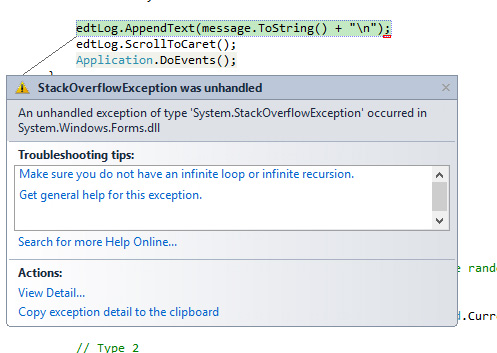
我的简化代码
    // Type 1
    private readonly SynchronizationContext synchronizationContext;

    public Form1() {
        InitializeComponent();
        // Type 1
        synchronizationContext = SynchronizationContext.Current;
    }

    //Type 3
    public void Log1(object message) {
        Invoke(new Log1(Log), message);
    }

    public void Log(object message) {
        if (this.IsDisposed || edtLog.IsDisposed)
            return;

        edtLog.AppendText(message.ToString() + "\n");
        edtLog.ScrollToCaret();
        Application.DoEvents();
    }

    private void btnStart_Click(object sender, EventArgs e) {

        for (int i = 0; i < 10000; i++) {
            ThreadPool.QueueUserWorkItem(Work, i);
        }
        Log("Done Adding");
    }

    private void Work(object ItemID) {

        int s = new Random().Next(10, 15);// Will generate same random number in different thread occasionally

        string message = ItemID + "\t" + Thread.CurrentThread.ManagedThreadId + ",\tRND " + s;

        //Type1
        synchronizationContext.Post(Log, message);

        // Type 2
        //Invoke(new Log1(Log), message);

        // Type 3
        //Log1(message);

        Thread.Sleep(s);
    }
全码
using System;
using System.Threading;
using System.Windows.Forms;

namespace Test {

    public delegate void Log1(string a);

    public partial class Form1 : Form {

        private System.ComponentModel.IContainer components = null;
        private Button btnStart;
        private TextBox edtLog;

        protected override void Dispose(bool disposing) {
            if (disposing && (components != null)) {
                components.Dispose();
            }
            base.Dispose(disposing);
        }

        private void InitializeComponent() {
            this.btnStart = new Button();
            this.edtLog = new TextBox();
            this.SuspendLayout();

            this.btnStart.Anchor = (AnchorStyles.Top | AnchorStyles.Right);
            this.btnStart.Location = new System.Drawing.Point(788, 12);
            this.btnStart.Size = new System.Drawing.Size(75, 23);
            this.btnStart.Text = "Start";
            this.btnStart.Click += new System.EventHandler(this.btnStart_Click);

            this.edtLog.Anchor = (AnchorStyles.Top | AnchorStyles.Bottom | AnchorStyles.Left | AnchorStyles.Right);
            this.edtLog.Location = new System.Drawing.Point(12, 41);
            this.edtLog.Multiline = true;
            this.edtLog.ScrollBars = ScrollBars.Vertical;
            this.edtLog.Size = new System.Drawing.Size(851, 441);

            this.AutoScaleDimensions = new System.Drawing.SizeF(6F, 13F);
            this.ClientSize = new System.Drawing.Size(875, 494);
            this.Controls.Add(this.edtLog);
            this.Controls.Add(this.btnStart);
            this.ResumeLayout(false);
            this.PerformLayout();
        }

        [STAThread]
        static void Main() {
            Application.EnableVisualStyles();
            Application.SetCompatibleTextRenderingDefault(false);
            Application.Run(new Form1());
        }


        // Type 1
        private readonly SynchronizationContext synchronizationContext;

        public Form1() {
            InitializeComponent();
            // Type 1
            synchronizationContext = SynchronizationContext.Current;
        }

        //Type 3
        public void Log1(object message) {
            Invoke(new Log1(Log), message);
        }

        public void Log(object message) {
            if (this.IsDisposed || edtLog.IsDisposed)
                return;

            edtLog.AppendText(message.ToString() + "\n");
            edtLog.ScrollToCaret();
            Application.DoEvents();
        }

        private void btnStart_Click(object sender, EventArgs e) {

            for (int i = 0; i < 10000; i++) {
                ThreadPool.QueueUserWorkItem(Work, i);
            }
            Log("Done Adding");
        }

        private void Work(object ItemID) {

            int s = new Random().Next(10, 15);// Will generate same random number in different thread occasionally

            string message = ItemID + "\t" + Thread.CurrentThread.ManagedThreadId + ",\tRND " + s;

            //Type1
            synchronizationContext.Post(Log, message);

            // Type 2
            //Invoke(new Log1(Log), message);

            // Type 3
            //Log1(message);

            Thread.Sleep(s);
        }

    }
}
问题1
为什么和何时应该使用SynchronizationContext或Invoke。有什么不同(如果我错了,因为我运行的是winform,SynchronizationContext.Current总是存在的)?
问题2为什么这里有StackOverflow错误?我做错了什么吗?在单独的方法中调用调用与在同一个工作方法中调用有什么不同(Log1崩溃了,而直接调用则没有)。
问题3
当用户在线程完成工作之前关闭应用程序时,我会得到和例外地说,在调用Log (任何3种类型)时,Form1是被释放的,并且是不可访问的。我是否应该处理线程中的异常(包括主线程)?
回答 1
Stack Overflow用户
发布于 2015-10-04 13:19:00
Application.DoEvents();这种方法如何使程序以完全无法理解的方式失败,真是令人印象深刻。基本的配方,你需要它来吹你的堆栈是一个非常容易得到的。您需要一个工作线程,它以很高的速率调用Log1(),大约每秒一千次或更多次。以及运行在UI线程上的代码,这些线程需要花费超过一毫秒的时间来完成一些昂贵的任务。就像在TextBox中添加一行。
然后:
- Log1()调用日志(),后者调用DoEvents()。
- 它允许另一个Log1()调用日志(),后者调用DoEvents。
- 它允许另一个Log1()调用日志(),后者调用DoEvents。
- 它允许另一个Log1()调用日志(),后者调用DoEvents。
- 它允许另一个Log1()调用日志(),后者调用DoEvents。
- ……
- 卡博姆!
您添加了Application.DoEvents(),因为您注意到您的UI冻结了,文本框没有显示添加的文本行,5秒后您将得到“未响应!”鬼窗。是的,它解决了那个问题。但不是很有建设性,就像你发现的那样。您想要它做的是为textbox分派画图事件。DoEvents()没有足够的选择性,它执行所有事件。包括您不依赖的事件,即调用()触发的事件。只是要有选择性:
edtLog.Update();不再是StackOverflowException了。但仍然没有一个有效的程序。你会得到一个疯狂的滚动文本框,没有人能阅读。您也不能停止它,程序仍然是死的用户输入,所以点击关闭按钮不工作。
您还没有解决程序中的基本错误。消防软管的错误,第三个最常见的线程错误之后,种族和死锁。您的工作线程正在以远远高于UI线程消耗它们的速度生成结果。最重要的是,人类所能看到的速度。您已经创建了一个不可用的用户界面。
解决这个问题,你现在从线程中得到的所有痛苦都会消失。代码太假,无法推荐特定的修补程序,但应该只显示每秒一次的快照。或者只在工作线程完成时更新UI,这是BackgroundWorker鼓励的模式。无论需要什么来重新平衡工作,这样UI线程所要做的工作就比工作线程少。
https://stackoverflow.com/questions/32931182
复制相似问题
腾讯云开发者

Copyright © 2013 - 2026 Tencent Cloud. All Rights Reserved. 腾讯云 版权所有
深圳市腾讯计算机系统有限公司 ICP备案/许可证号:粤B2-20090059  粤公网安备44030502008569号
腾讯云计算(北京)有限责任公司 京ICP证150476号 | 京ICP备11018762号