
如何为页面PHP中的可打印区域生成多个条形码图像
如何为页面PHP中的可打印区域生成多个条形码图像
提问于 2015-10-02 15:48:28
我正在使用PHP、jquery、mysql开发一个小型库存管理web应用程序.我想给应用程序添加一个条形码功能。
请让我在这里使用这个代码,在经过几次搜索后,拇指指向海报。但我被困在这里:
我会从同一页的datatable中选择带有productcode/productid的项/项,然后使用add按钮将其一个接一个地添加到可打印区域,从而生成多个条形码映像到可打印区域。
   <style>
   @font-face {
  font-family: barcode;
  src: url(free3of9.ttf);
   }
    </style>

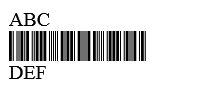
    <body> ABC
    <div style='font-family:barcode;font-size:32px;'>
   123456789    </div> DEF</body>

      </html>
回答 1
Stack Overflow用户
回答已采纳
发布于 2015-10-07 19:03:22
首先,要使用这种字体,您需要将它与正在使用的页面一起上载到您的web服务器上。这个示例将完成您用JQuery描述的内容,但是条形码不会是样式,因为jsfiddle不托管字体。
http://jsfiddle.net/Twisty/72ewdoj4/
<ul class="form">
    <li>
        <label>Top Text:</label>
        <input type="text" id="top" />
    </li>
    <li>
        <label>Barcode:</label>
        <input type="text" id="bar" />
    </li>
    <li>
        <label>Bottom Text:</label>
        <input type="text" id="bottom" />
    </li>
    <li>
        <button id="add">Add</button>
</ul>
<hr />
<table id="results">
    <tr>
        <td> <span class="label">ABC</span>
 <span class="bar label">123456789</span>
 <span class="label">DEF</span>

        </td>
    </tr>
</table>
CSS
@font-face {
    font-family: barcode;
    src: url(3OF9_NEW.TTF);
}
.label {
    display: block;
}
.bar {
    font-family:barcode;
    font-size:32px;
}
#results {
    width: 100%;
}
#results td {
    padding: 10px 0;
    text-align: center;
}
ul.form {
    margin: 0;
    padding: 0;
}
ul.form li {
    margin: 0;
    list-style: none;
}
ul.form li label {
    display: inline-block;
    width: 120px;
}
JQuery
$(document).ready(function () {
    $("#add").click(function () {
        var newLabel = "<tr><td>"
        newLabel += "<span class='label'>" + $("#top").val() + "</span>";
        newLabel += "<span class='bar label'>" + $("#bar").val() + "</span>";
        newLabel += "<span class='label'>" + $("#bottom").val() + "</span>";
        newLabel += "</td></td>";
        $("#results").append(newLabel);
    });
});页面原文内容由Stack Overflow提供。腾讯云小微IT领域专用引擎提供翻译支持
原文链接:
https://stackoverflow.com/questions/32911026
复制相关文章
相似问题
腾讯云开发者

Copyright © 2013 - 2026 Tencent Cloud. All Rights Reserved. 腾讯云 版权所有
深圳市腾讯计算机系统有限公司 ICP备案/许可证号:粤B2-20090059  粤公网安备44030502008569号
腾讯云计算(北京)有限责任公司 京ICP证150476号 | 京ICP备11018762号