
IE中的占位符div不工作(光标出现在末尾)
IE中的占位符div不工作(光标出现在末尾)
提问于 2015-09-30 23:29:41
光标不在div的开头!它出现在最后。在文本-占位符后面!
镀铬,工作完美!光标位于div的开头,在文本占位符之前,在IE中光标位于末尾.
[contenteditable=true]:empty:before{
  content: attr(placeholder);
  display: block; /* For Firefox */
}
示例-> 码页
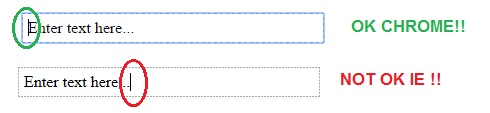
有解决办法吗?
回答 3
Stack Overflow用户
回答已采纳
发布于 2015-10-02 21:04:10
溶液-> http://jsfiddle.net/1shhhn7z/1/
$(document).on('click', '.reply-comment',function() {
var reply = $('<div class="container-reply"><div class="unselectable div-placeholder"><div class="div-placeholder2">Type a text...</div></div><div class="initial-comment"><div class="inputAddReplyComment inputADD2" contenteditable="true" spellcheck="true" aria-expanded="true" title="" data-placeholder="" id="" style=""></div></div></div>').insertAfter($(this).parent());


    reply.find('.div-placeholder').on('mousedown mouseup click', function(e) { reply.find('.inputAddReplyComment').focus(); });

    reply.find('.inputAddReplyComment').on('focus',function(e){
        var editable = this;
        function listener(evt) {
            if ($(this).text().length>0)
                reply.find('.div-placeholder').attr("style","display:none;");
            else reply.find('.div-placeholder').attr("style","display:show;");
        }
        if (editable.addEventListener) {
            if (navigator.userAgent.indexOf('Chrome') > -1)
                editable.addEventListener("input", listener, false);
            else // The event 'input' not work in IE11 ... It has to work!! I don't know why not fire... =/
            {
                editable.addEventListener("input", listener, false);
                editable.addEventListener("DOMNodeInserted", listener, false);
                editable.addEventListener("DOMNodeRemoved", listener, false);
                editable.addEventListener("DOMCharacterDataModified", listener, false);
                editable.addEventListener("keyup", listener, false);
                editable.addEventListener("keydown", listener, false);
            }
        }
        e.stopPropagation();
    });
    reply.find('.inputAddReplyComment').focus();
return false;
});Stack Overflow用户
发布于 2015-10-01 00:24:21
您可以使用JS:
    var div=document.getElementById("div");
    function clearPlaceholder() {
      if (div.innerHTML=="Enter text here...") {
        document.getElementById("div").innerHTML="";
      }
    }
    function addPlaceholder() {
      if (div.innerHTML=="") {
        document.getElementById("div").innerHTML="Enter text here...";
      }
} <div contenteditable="true" onFocus="clearPlaceholder();" onFocusOut="addPlaceholder();" id="div">Enter text here...</div>它在IE和Chrome中工作得很好..。没有测试Firefox或其他浏览器,但是它应该可以在所有启用JS的浏览器上工作。
Stack Overflow用户
发布于 2019-04-10 17:13:29
我今天也碰到这个了。您只需要做一些调整就可以使它与IE11一起工作:
[contenteditable=true]:empty::after {
    content: attr(placeholder);
    display: block; /* For Firefox */
    cursor: text; /* For Chrome */
    position: absolute;
    top: 0;
    line-height: 2em;
}
[contenteditable=true] {
    position: relative;
}使用绝对定位将其从文档流中删除。但是,当您输入并反行所有字符时,仍然会产生奇怪的效果,这就是为什么我将其改为::after的原因。
我还注意到Chrome会在占位符上使用普通游标,所以我必须特别告诉它使用文本游标。
页面原文内容由Stack Overflow提供。腾讯云小微IT领域专用引擎提供翻译支持
原文链接:
https://stackoverflow.com/questions/32877160
复制相关文章
相似问题
腾讯云开发者

Copyright © 2013 - 2026 Tencent Cloud. All Rights Reserved. 腾讯云 版权所有
深圳市腾讯计算机系统有限公司 ICP备案/许可证号:粤B2-20090059  粤公网安备44030502008569号
腾讯云计算(北京)有限责任公司 京ICP证150476号 | 京ICP备11018762号