
XTemplate对ListItem项属性的定义
XTemplate对ListItem项属性的定义
提问于 2015-09-30 08:56:59
我使用的是Sencha2.3.0,我想在XTemplate上使用一个ListItem组件(textfield)。上面的代码对于DataView/DataItem很好,但是我想使用只在List/ListItem上可用的分组属性。
嵌套的Xtemplate以DataItem的形式呈现。我怎样才能让它对ListItem起作用?我还可以接受这样的解决方案:删除这个嵌套结构并直接在ListItem上使用xtemplate作为tpl属性(当然,还必须实现带有监听器的textfield )。
列表
Ext.define( 'app.view.myList', {
    //extend: 'Ext.dataview.DataView',
    extend: 'Ext.dataview.List',

    xtype: 'mylist',

    requires: [
        'app.view.MyItem'
    ],

    config: {
        title: "myTitle",
        cls: 'mylist',
        defaultType: 'myitem',
        grouped: true,
        store: 'myStore',
        useComponents: true,
        itemCls: 'myitem',

        items: [
            {
                // some components
            }
        ]
    }
});
listitem
Ext.define( 'app.view.myItem', {

    //extend: 'Ext.dataview.component.DataItem',
    extend: 'Ext.dataview.component.ListItem',
    xtype: 'myitem',

    config: {
        cls: 'myitem',

        items: [
            {
                xtype: 'component',
                tpl: new Ext.XTemplate([
                        '<table cellpadding="0" cellspacing="0" class="myitemXTemplate">',
                            //some xtemplate content
                        '</table>'
                    ].join( "" ),
                    {
                        compiled: true
                    })
            },

            {
                label: 'some label',
                cls : 'myitemtextfield',
                xtype: 'textfield',
                name: 'myitemtextfield'
             }
        ]
    }
});
提前感谢!
回答 1
Stack Overflow用户
回答已采纳
发布于 2015-10-07 07:37:55
修改/触摸-2.4.2/示例/list/index.html
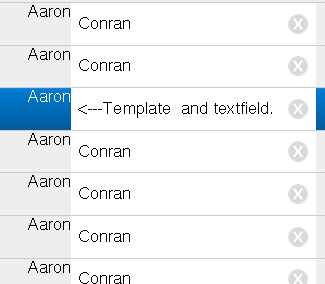
模式:
Ext.define('model1', {
    extend: 'Ext.data.Model',
    config: {
        fields: [
            {name: 'firstName', type: 'string'},
            {name: 'lastName', type: 'string'}
        ]
    }
});
The CustomListItem
Ext.define('DataItem', {
extend: 'Ext.dataview.component.ListItem',
        xtype: 'basic-dataitem',
        requires: [
                'Ext.Button',
                'Ext.Component',
                'Ext.layout.HBox',
                'Ext.field.Checkbox'
        ],
        config: {
        dataMap : {
       /* getFirstname : {
         setData : 'firstName'

         },*/
        getLastname : {
        setValue : 'lastName'
        }
        },
                layout: {
                type: 'hbox',
                        height:'200px',
                },
                firstname: {
                cls: 'firstname',
                        xtype:'component',
                        data:{data:'hej'},
                        tpl: new Ext.XTemplate([
                                '<H1>',
                                '{data}',
                                '</H1>'
                        ].join(""),
                        {
                        compiled: true
                        })

                },
                lastname: {
                xtype:'textfield',
                css:'lastname'


                }

        },
        applyFirstname : function (config) {
            return Ext.factory(config, Ext.Component, this.getFirstname());
        },
        updateFirstname : function (newName) {
            if (newName) {
                this.add(newName);
            }
        },
        applyLastname : function (config) {
            return Ext.factory(config, Ext.Component, this.getLastname());
        },
        updateLastname : function (newAge) {
            if (newAge) {
                this.add(newAge);
            }
        },
        applyFirstName: function (config) {
            return Ext.factory(config, 'Ext.Component', this.getLastname());
        },
        updateRecord: function(record) {
        if (!record) {
            return;
        }


        this.getFirstname().setData({data:record.get("firstName")});
        this.callParent(arguments);

    }
        });
商店
var store = Ext.create('Ext.data.Store', {
        //give the store some fields
        model: 'model1',
        //filter the data using the firstName field
        sorters: 'firstName',
        //autoload the data from the server
        autoLoad: true,
        //setup the grouping functionality to group by the first letter of the firstName field
        grouper: {
            groupFn: function (record) {
                return record.get('firstName')[0];
            }
        },
        //setup the proxy for the store to use an ajax proxy and give it a url to load
        //the local contacts.json file
        proxy: {
            type: 'ajax',
            url: 'contacts.json'
        }
    });
名单
 xtype: 'list',
            useSimpleItems: false,
            defaultType: 'basic-dataitem',
            id: 'list',
            ui: 'round',
            //bind the store to this list
store: store页面原文内容由Stack Overflow提供。腾讯云小微IT领域专用引擎提供翻译支持
原文链接:
https://stackoverflow.com/questions/32861922
复制相关文章
相似问题
腾讯云开发者

Copyright © 2013 - 2026 Tencent Cloud. All Rights Reserved. 腾讯云 版权所有
深圳市腾讯计算机系统有限公司 ICP备案/许可证号:粤B2-20090059  粤公网安备44030502008569号
腾讯云计算(北京)有限责任公司 京ICP证150476号 | 京ICP备11018762号