
尝试将DataGridView与ICustomTypeDescriptor结合使用
我正在尝试使用DataGridView来显示对象列表。在我想显示属性的类中,我有一些C#属性,而且出于某些原因,我也希望动态创建属性。
这里有一个示例,它对C#属性(FeatureId)很好,但是动态创建的属性(名称)返回所有实例的第一个实例的值。为什么?
首先,实现ICustomPropertyDescriptor接口的类
public abstract class PropertyPresentationSubBase : ICustomTypeDescriptor
{
public String GetClassName()
{
  return TypeDescriptor.GetClassName(this, true);
}

public AttributeCollection GetAttributes()
{
  return TypeDescriptor.GetAttributes(this, true);
}

public String GetComponentName()
{
  return TypeDescriptor.GetComponentName(this, true);
}

public TypeConverter GetConverter()
{
  return TypeDescriptor.GetConverter(this, true);
}

public EventDescriptor GetDefaultEvent()
{
  return TypeDescriptor.GetDefaultEvent(this, true);
}

public PropertyDescriptor GetDefaultProperty()
{
  return TypeDescriptor.GetDefaultProperty(this, true);
}

public object GetEditor(Type editorBaseType)
{
  return TypeDescriptor.GetEditor(this, editorBaseType, true);
}

public EventDescriptorCollection GetEvents(Attribute[] attributes)
{
  return TypeDescriptor.GetEvents(this, attributes, true);
}

public EventDescriptorCollection GetEvents()
{
  return TypeDescriptor.GetEvents(this, true);
}


public virtual PropertyDescriptorCollection GetProperties(Attribute[] attributes)
{
  PropertyDescriptorCollection rtn = TypeDescriptor.GetProperties(this);

  //rtn = FilterReadonly(rtn, attributes);

  return new PropertyDescriptorCollection(rtn.Cast<PropertyDescriptor>().ToArray());


}

public virtual PropertyDescriptorCollection GetProperties()
{

  return TypeDescriptor.GetProperties(this, true);

}


public object GetPropertyOwner(PropertyDescriptor pd)
{
  return this;
}

[Browsable(false)]
public PropertyPresentationSubBase Parent
{
  get
  {
    return m_Parent;
  }
  set
  {
    m_Parent = value;
  }
}

PropertyPresentationSubBase m_Parent = null;

[Browsable(false)]
public Type ValueType
{
  get
  {
    return valueType;
  }
  set
  {
    valueType = value;
  }
}

private Type valueType = null;

[Browsable(false)]
public string Name
{
  get
  {
    return sName;
  }
  set
  {
    sName = value;
  }
}


public abstract object GetValue();

private string sName = string.Empty;

public abstract void Change(object value);


  }
}
我还有一个从PropertyDescriptor继承的类
public class MyCustomPropertyDescriptor : PropertyDescriptor
{
PropertyPresentationSubBase m_Property;

public MyCustomPropertyDescriptor(PropertyPresentationSubBase myProperty, Attribute[] attrs, int propertyNo)
  : base(myProperty.Name + propertyNo, attrs)
{
  m_Property = myProperty;
}

#region PropertyDescriptor specific

public override bool CanResetValue(object component)
{
  return false;
}

public override string Name
{
  get
  {
    return "MyName";
  }
}

public override Type ComponentType
{
  get
  {
    return null;
  }
}

public override object GetValue(object component)
{
  return m_Property.GetValue();
}


public override string Description
{
  get
  {
    return "Description";
  }
}


public object Value
{
  get
  {
    return m_Property;
  }
}


public override string Category
{
  get
  {
    return "Category";
  }
}

public override string DisplayName
{
  get
  {
    return m_Property.Name;
  }

}


public override bool IsReadOnly
{
  get
  {
    return false;
  }
}


public override void ResetValue(object component)
{
  //Have to implement
}

public override bool ShouldSerializeValue(object component)
{
  return false;
}


public override void SetValue(object component, object value)
{
  m_Property.Change(value);
}

public override Type PropertyType
{

  get
  {
    if ((m_Property != null) &&  (m_Property.ValueType != null))
    {
      return m_Property.ValueType;
    }
    else
    {
      return System.Type.Missing.GetType();

    }
  }
}

#endregion
}
保存数据的一个小类:
public class QuadriFeatureItem
{
public QuadriFeatureItem(int featureId, string name)
{
  m_featureId = featureId;
  m_name = name;

}
public int m_featureId;

public string m_name;
}
发送到网格的类(包含FeatureId属性和动态创建的属性)
class FeaturePropertyPresentation : PropertyPresentationSubBase
{

public int FeatureId
{
  get
  {
    return m_feature.m_featureId;

  }
  set { m_feature.m_featureId = value; }
}

public FeaturePropertyPresentation(QuadriFeatureItem item)
{
  m_feature = item;
}

private QuadriFeatureItem m_feature;

public override PropertyDescriptorCollection GetProperties(Attribute[] attributes)
{
  PropertyDescriptorCollection rtn = base.GetProperties(attributes);

  CreateNameAttribute(ref rtn, attributes);

  return rtn;

}

private void CreateNameAttribute(ref PropertyDescriptorCollection pdc, Attribute[] attributes)
{

  NameProperty namePres = null;
  namePres = new NameProperty(m_feature, this);

  pdc.Add(new MyCustomPropertyDescriptor(namePres, attributes, pdc.Count));

}

public override void Change(object value)
{
  throw new NotImplementedException();
}

public override object GetValue()
{
  return this;
}
}
实现nameproperty的类:
class NameProperty : PropertyPresentationSubBase
{

public NameProperty(QuadriFeatureItem feature, FeaturePropertyPresentation parent)
  : base()
 {
   m_quadriFeatureItem = feature;
   Parent = parent;
   ValueType = typeof(string);

 }

private QuadriFeatureItem m_quadriFeatureItem;

public override void Change(object value)
{
  m_quadriFeatureItem.m_name = (string)value;
}

public override object GetValue()
{

  return m_quadriFeatureItem.m_name;

}

}
我的格式是:
public Form1()
{
  InitializeComponent();

  ShowGrid();
}

private void ShowGrid()
{

  QuadriFeatureItem no1 = new QuadriFeatureItem(1, "Nummer1");
  QuadriFeatureItem no2 = new QuadriFeatureItem(2, "Nummer2");
  QuadriFeatureItem no3 = new QuadriFeatureItem(3, "Nummer3");

  BindingSource source = new BindingSource();

  FeaturePropertyPresentation no1Pres = new FeaturePropertyPresentation(no1);
  FeaturePropertyPresentation no2Pres = new FeaturePropertyPresentation(no2);
  FeaturePropertyPresentation no3Pres = new FeaturePropertyPresentation(no3);

  source.Add(no1Pres);
  source.Add(no2Pres);
  source.Add(no3Pres);

  dataGridView1.DataSource = source;

  Show();
}
但是网格显示所有行的"Nummer1“。为什么?我在属性网格中使用这个表示类,它工作得很好。我还在属性网格中使用这个MyCustomPropertyDescriptor。
我现在的愿望是能够在数据视图中重用这个表示类和MyCustomPropertyDescriptor。在MyCustomPropertyDescriptor或PropertyPresentationSubBase中是否可以进行任何修改?
回答 1
Stack Overflow用户
发布于 2015-09-22 14:18:41
问题是您的自定义属性描述符绑定到一个具体实例。当您使用单项数据绑定(类似于对象属性的TextBox或在PropertyGrid控件中选择对象)时,该方法可以工作。但是,当您使用需要列表数据绑定的控件时(如DataGridView、ListView、ListBox、ComboBox list等)这种技术行不通。为了自动填充列,DataGridView需要一组属性,这些属性是所有项的公共。为了做到这一点,它尝试了几种获取这些信息的方法(在这里可以找到一个很好的解释-- DataGridView not showing properites of objects which implement ICustomTypeDescriptor),其中之一是获取列表中的第一项并请求属性(因此是您的调试经验)。无论如何,为了使其在列表绑定场景中工作,您的属性描述符需要以不同的方式实现。
注意PropertyDescriptor的GetValue/SetValue方法的签名。他们都有一个论点,object component。这是您需要返回或设置值的对象实例。您可以认为属性描述符与我们在编程语言中通常使用的相反。所以而不是
var val = obj.Property;
obj.Property = val;
我们有
var val = propertyDescriptor.GetValue(obj);
propertyDescriptor.SetValue(obj, val);
换句话说,您不应该将对象实例“嵌入”在属性描述符中,而应该使用传递的参数。
下面是一个属性描述符的泛型实现示例,它就是这样做的:
public class SimplePropertyDescriptor<TComponent, TValue> : PropertyDescriptor
    where TComponent : class
{
    private readonly Func<TComponent, TValue> getValue;
    private readonly Action<TComponent, TValue> setValue;
    private readonly string displayName;
    public SimplePropertyDescriptor(string name, Attribute[] attrs, Func<TComponent, TValue> getValue, Action<TComponent, TValue> setValue = null, string displayName = null)
        : base(name, attrs)
    {
        Debug.Assert(getValue != null);
        this.getValue = getValue;
        this.setValue = setValue;
        this.displayName = displayName;
    }
    public override string DisplayName { get { return displayName ?? base.DisplayName; } }
    public override Type ComponentType { get { return typeof(TComponent); } }
    public override bool IsReadOnly { get { return setValue == null; } }
    public override Type PropertyType { get { return typeof(TValue); } }
    public override bool CanResetValue(object component) { return false; }
    public override bool ShouldSerializeValue(object component) { return false; }
    public override void ResetValue(object component) { }
    public override object GetValue(object component) { return getValue((TComponent)component); }
    public override void SetValue(object component, object value) { setValue((TComponent)component, (TValue)value); }
}
你的物品的样品用法:
public override PropertyDescriptorCollection GetProperties(Attribute[] attributes)
{
    var properties = base.GetProperties(attributes);
    // Custom name property
    properties.Add(new SimplePropertyDescriptor<FeaturePropertyPresentation, string>("FeatureName", attributes,
        getValue: component => component.m_feature.m_name,
        setValue: (component, value) => component.m_feature.m_name = value, // remove this line to make it readonly
        displayName: "Feature Name"
    ));
    return properties;
}
再加上一个小例子,相当于你的例子:
using System;
using System.ComponentModel;
using System.Diagnostics;
using System.Linq;
using System.Windows.Forms;

namespace Samples
{
    // Generic implemenation of a property descriptor
    public class SimplePropertyDescriptor<TComponent, TValue> : PropertyDescriptor
        where TComponent : class
    {
        private readonly Func<TComponent, TValue> getValue;
        private readonly Action<TComponent, TValue> setValue;
        private readonly string displayName;
        public SimplePropertyDescriptor(string name, Attribute[] attrs, Func<TComponent, TValue> getValue, Action<TComponent, TValue> setValue = null, string displayName = null)
            : base(name, attrs)
        {
            Debug.Assert(getValue != null);
            this.getValue = getValue;
            this.setValue = setValue;
            this.displayName = displayName;
        }
        public override string DisplayName { get { return displayName ?? base.DisplayName; } }
        public override Type ComponentType { get { return typeof(TComponent); } }
        public override bool IsReadOnly { get { return setValue == null; } }
        public override Type PropertyType { get { return typeof(TValue); } }
        public override bool CanResetValue(object component) { return false; }
        public override bool ShouldSerializeValue(object component) { return false; }
        public override void ResetValue(object component) { }
        public override object GetValue(object component) { return getValue((TComponent)component); }
        public override void SetValue(object component, object value) { setValue((TComponent)component, (TValue)value); }
    }
    // Your stuff
    public abstract class PropertyPresentationSubBase : ICustomTypeDescriptor
    {
        public string GetClassName()
        {
            return TypeDescriptor.GetClassName(this, true);
        }

        public AttributeCollection GetAttributes()
        {
            return TypeDescriptor.GetAttributes(this, true);
        }

        public String GetComponentName()
        {
            return TypeDescriptor.GetComponentName(this, true);
        }

        public TypeConverter GetConverter()
        {
            return TypeDescriptor.GetConverter(this, true);
        }

        public EventDescriptor GetDefaultEvent()
        {
            return TypeDescriptor.GetDefaultEvent(this, true);
        }

        public PropertyDescriptor GetDefaultProperty()
        {
            return TypeDescriptor.GetDefaultProperty(this, true);
        }

        public object GetEditor(Type editorBaseType)
        {
            return TypeDescriptor.GetEditor(this, editorBaseType, true);
        }

        public EventDescriptorCollection GetEvents(Attribute[] attributes)
        {
            return TypeDescriptor.GetEvents(this, attributes, true);
        }

        public EventDescriptorCollection GetEvents()
        {
            return TypeDescriptor.GetEvents(this, true);
        }

        public virtual PropertyDescriptorCollection GetProperties(Attribute[] attributes)
        {
            PropertyDescriptorCollection rtn = TypeDescriptor.GetProperties(this);

            //rtn = FilterReadonly(rtn, attributes);

            return new PropertyDescriptorCollection(rtn.Cast<PropertyDescriptor>().ToArray());
        }

        public virtual PropertyDescriptorCollection GetProperties()
        {

            return TypeDescriptor.GetProperties(this, true);

        }


        public object GetPropertyOwner(PropertyDescriptor pd)
        {
            return this;
        }

        [Browsable(false)]
        public PropertyPresentationSubBase Parent
        {
            get
            {
                return m_Parent;
            }
            set
            {
                m_Parent = value;
            }
        }

        PropertyPresentationSubBase m_Parent = null;

        [Browsable(false)]
        public Type ValueType
        {
            get
            {
                return valueType;
            }
            set
            {
                valueType = value;
            }
        }

        private Type valueType = null;

        [Browsable(false)]
        public string Name
        {
            get
            {
                return sName;
            }
            set
            {
                sName = value;
            }
        }


        public abstract object GetValue();

        private string sName = string.Empty;

        public abstract void Change(object value);
    }
    public class QuadriFeatureItem
    {
        public QuadriFeatureItem(int featureId, string name)
        {
            m_featureId = featureId;
            m_name = name;

        }
        public int m_featureId;

        public string m_name;
    }
    class FeaturePropertyPresentation : PropertyPresentationSubBase
    {

        public int FeatureId
        {
            get
            {
                return m_feature.m_featureId;

            }
            set { m_feature.m_featureId = value; }
        }

        public FeaturePropertyPresentation(QuadriFeatureItem item)
        {
            m_feature = item;
        }

        private QuadriFeatureItem m_feature;

        public override PropertyDescriptorCollection GetProperties(Attribute[] attributes)
        {
            var properties = base.GetProperties(attributes);
            // Custom name property
            properties.Add(new SimplePropertyDescriptor<FeaturePropertyPresentation, string>("FeatureName", attributes,
                getValue: component => component.m_feature.m_name,
                setValue: (component, value) => component.m_feature.m_name = value, // remove this line to make it readonly
                displayName: "Feature Name"
            ));
            return properties;
        }
        public override void Change(object value)
        {
            throw new NotImplementedException();
        }

        public override object GetValue()
        {
            return this;
        }

    }
    // Test
    static class Test
    {
        [STAThread]
        static void Main()
        {
            Application.EnableVisualStyles();
            Application.SetCompatibleTextRenderingDefault(false);
            var dataSet = Enumerable.Range(1, 10).Select(n => new FeaturePropertyPresentation(new QuadriFeatureItem(n, "Nummer" + n))).ToList();
            var form = new Form();
            var dg = new DataGridView { Dock = DockStyle.Fill, Parent = form };
            dg.DataSource = dataSet;
            Application.Run(form);
        }
    }
}
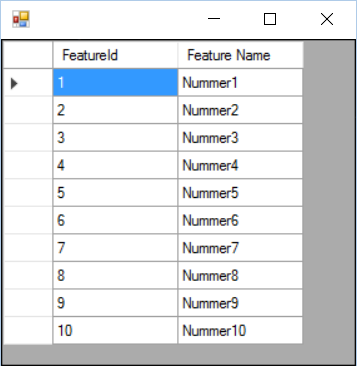
结果:
https://stackoverflow.com/questions/32693637
复制相似问题
腾讯云开发者

Copyright © 2013 - 2026 Tencent Cloud. All Rights Reserved. 腾讯云 版权所有
深圳市腾讯计算机系统有限公司 ICP备案/许可证号:粤B2-20090059  粤公网安备44030502008569号
腾讯云计算(北京)有限责任公司 京ICP证150476号 | 京ICP备11018762号