
无法使用node.js运行appjs示例应用程序
我正在尝试使用应用程序运行其中的一个示例项目,这里是https://github.com/appjs/appjs/tree/master/examples。我正在Windows (64位机)上使用最新版本的node.js (v4.1.0 )
当我尝试在命令提示符上使用下面的命令运行这个示例时
节点--和谐index.js
我得到一个错误如下,
Error: AppJS requires Node is run with the --harmony command line flag
at Object.<anonymous> (F:\programs\appjs_examples\node_modules\appjs\lib\ind
ex.js:2:9)
at Module._compile (module.js:434:26)
at Object.Module._extensions..js (module.js:452:10)
at Module.load (module.js:355:32)
at Function.Module._load (module.js:310:12)
at Module.require (module.js:365:17)
at require (module.js:384:17)
at Object.<anonymous> (F:\programs\appjs_examples\octosocial\index.js:1:73)
at Module._compile (module.js:434:26)
at Object.Module._extensions..js (module.js:452:10)
我试图寻找这个问题,但我找不到解决办法。有人能告诉我如何在和声标志中使用node.js吗?
更新我的index.js如下所示
var app = require('appjs'),
github = new (require('github'))({ version: '3.0.0' }),
KEY_F12 = process.platform === 'darwin' ? 63247 : 123;

app.serveFilesFrom(__dirname + '/assets');

var window = app.createWindow({
 width: 460,
  height: 640,
 resizable: false,
  disableSecurity: true,
  icons: __dirname + '/assets/icons'
 });

  window.on('create', function(){
   window.frame.show();
   window.frame.center();
   });

 window.on('ready', function(){
   var $ = window.$,
  $username = $('input[name=username]'),
  $password = $('input[name=password]'),
  $info = $('#info-login'),
  $label = $info.find('span'),
  $buttons = $('input, button');

 $(window).on('keydown', function(e){
  if (e.keyCode === KEY_F12) {
    window.frame.openDevTools();
  }
});

 $username.focus();

 $('#login-form').submit(function(e){
e.preventDefault();

$info.removeClass('error').addClass('success');
$label.text('Logging in...');
$buttons.attr('disabled', true);

  github.authenticate({
    type: 'basic',
   username: $username.val(),
  password: $password.val()
   });

github.user.get({}, function(err, result) {
  if (err) {
    $info.removeClass('success').addClass('error');
    $label.text('Login Failed. Try Again.');
    $buttons.removeAttr('disabled');
  } else {
    loggedIn(result);
  }
  });
});

 function loggedIn(result){
    $label.text('Logged in!');
    $('#user-avatar').append('<img src="'+result.avatar_url+'" width="64" height="64">');
   $('#user-name').text(result.name);
    $('#login-section').hide();
    $('#profile-section').show();
    ['Followers', 'Following'].forEach(function(type){
      github.user['get'+type]({ user: result.login }, populate.bind(null,     type.toLowerCase()));
});
}现在使用v0.12 of Node.js,我得到了以下错误
    F:\softwares\Node.js_v0.12\node_modules\appjs\lib\index.js:2
throw new Error ('AppJS requires Node is run with the --harmony command line
  Error: AppJS requires Node is run with the --harmony command line flag
  at Object.<anonymous> (F:\softwares\Node.js_v0.12\node_modules\appjs\lib\ind
ex.js:2:9)
   at Module._compile (module.js:460:26)
   at Object.Module._extensions..js (module.js:478:10)
   at Module.load (module.js:355:32)
   at Function.Module._load (module.js:310:12)
   at Module.require (module.js:365:17)
   at require (module.js:384:17)
   at Object.<anonymous> (F:\softwares\Node.js_v0.12\index.js:1:73)
   at Module._compile (module.js:460:26)
at Object.Module._extensions..js (module.js:478:10)回答 1
Stack Overflow用户
发布于 2015-09-20 23:01:26
只需使用节点v0.12.7和v4.0.0在本地测试代码。看起来,无论什么情况,node_modules/appjs/lib/index.js检查都会确保代理被启用。
默认情况下,--harmony标志不启用代理。但是,您可以使用--harmony_proxies。
为了帮助你了解正在发生的事情:
- 在终端中打开
node,然后键入Proxy。您将得到“未定义代理”。 - 现在,在您的终端中打开
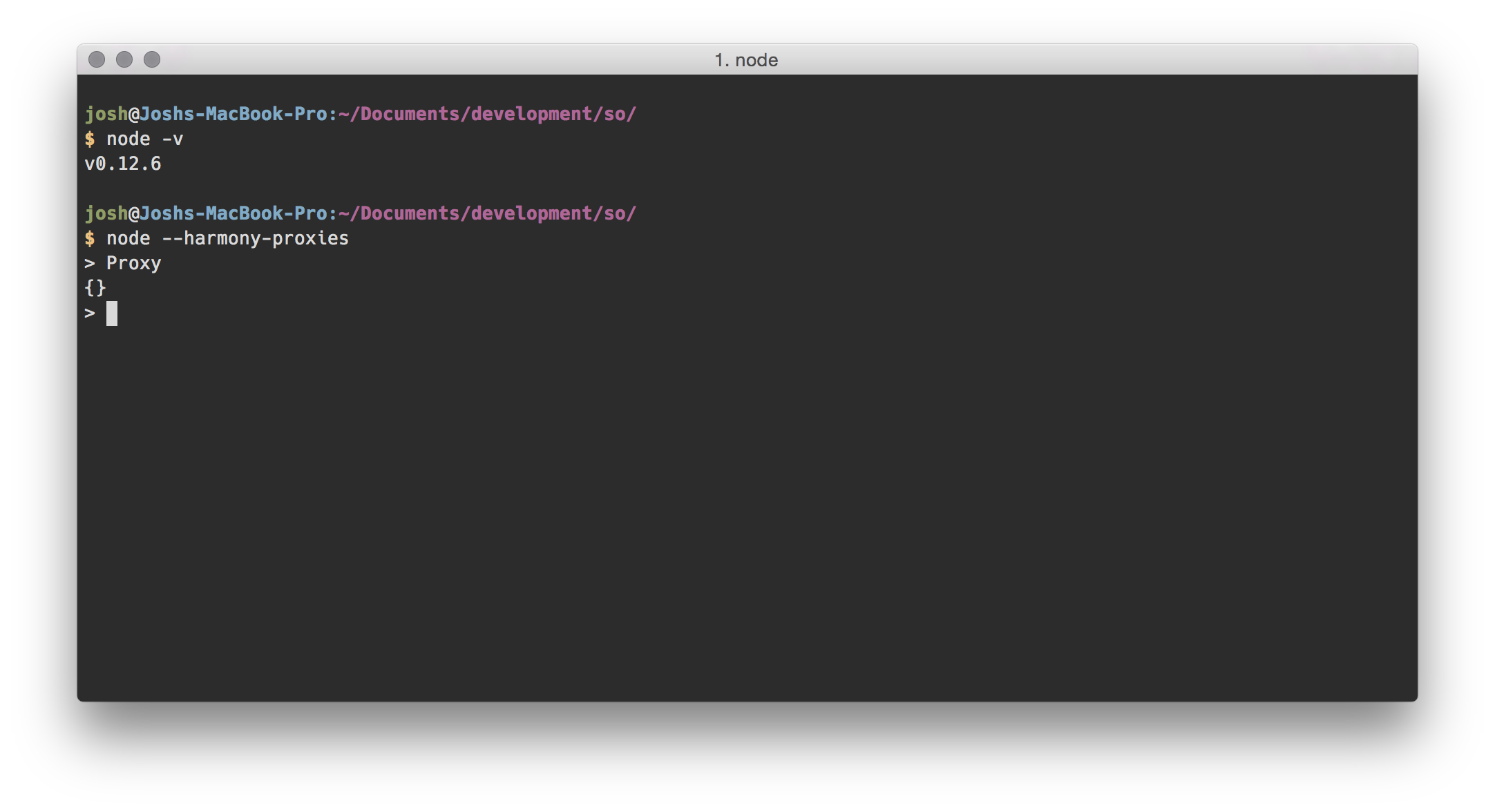
node --harmony并做同样的操作。您将得到相同的输出。 - 现在,用
node --harmony-proxies。你得到了一个空的物体。
但是,您应该能够在v4.x.x中运行它,但是您仍然需要代理标志来实现和谐。
当与node.js和io.js for v4合并时,他们发布了一页ES6特性,如果您使用的是4.x.x,则会附带这些特性。https://nodejs.org/en/docs/es6/
https://github.com/appjs/appjs是不推荐的,但是一旦您通过了模块的特性测试,它将需要32位;)
编辑:
要正确运行您的应用程序,请使用以下命令:
node --harmony-proxies index.js
下面是一个屏幕截图,以显示上面第3步的预期输出。
https://stackoverflow.com/questions/32635259
复制相似问题
腾讯云开发者

Copyright © 2013 - 2026 Tencent Cloud. All Rights Reserved. 腾讯云 版权所有
深圳市腾讯计算机系统有限公司 ICP备案/许可证号:粤B2-20090059  粤公网安备44030502008569号
腾讯云计算(北京)有限责任公司 京ICP证150476号 | 京ICP备11018762号