
JAutodoc: getter注释模板与默认注释行为合并
我试图配置JAutodoc,以便生成只包含@returns标记的getter注释,如下所示:
/**
 * @returns The non-null {@linkplain Foo foo} of this {@link IBar}.
 */
public Foo getFoo();
我已经配置了getter模板以生成以下内容:

但是,我的一般JAutodoc设置肯定有问题,因为我得到的是模板和方法名称解析的注释的混合:
/**
 * Get foo.
 * @returns The non-null {@linkplain Foo foo} of this {@link IBar}.
 */
public Foo getFoo();
这些是我的设置:
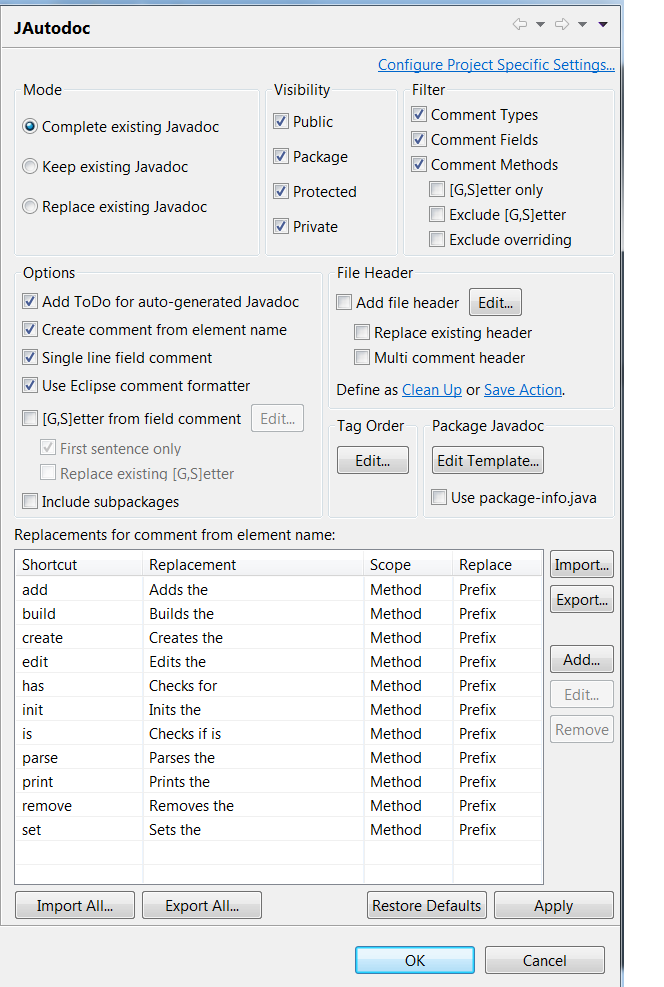
我已经从替换列表中删除了“get”替换,也没有按照这一讨论中建议的那样选中“从字段注释中删除”设置,但这并没有产生明显的差异。尽管我的示例getter是接口的一部分(在这种情况下,没有元素可以获得注释),但JAutodoc似乎并不关心这个设置,但我也尝试取消了“从元素名创建注释”设置。
我还试着在完成这些更改之后重新启动Eclipse,以防这件事发生。到目前为止,什么也没有起作用。几乎看起来,getter的注释行为是硬编码的。谁能帮我弄清楚这件事吗?
回答 1
Stack Overflow用户
发布于 2015-10-24 21:46:34
TL;DR
JAutodoc,以其当前的形式,不能做您想要它做的事情。这是因为您要求的是不完整的Javadocs。
详细信息
(这很有趣,我希望你能感谢你的努力:-)
在这种情况下,您要求JAutodoc创建不完整的Javadocs。也就是说,您在Javadoc中没有要求任何文档。(我个人认为简单的getter的重复性也很烦人。)
JAutodoc内部正在执行的步骤是:
- 应用你的模板,所以评论看起来就像你想要的一样--在一段时间内。
这是应用模板的代码。使用您的示例,下面的member参数是您的getFoo方法,并且由于您第一次应用自动注释时代码中没有注释,所以jdi参数是空的(jdi.isEmpty() == true)。
当模板被应用时,text看起来也和你想要的完全一样。text就像任何Javadoc注释一样被解析并返回。
来自net.sf.jautodoc.source.JavadocCreator
public JavadocInfo applyTemplate(final IMember member, final JavadocInfo jdi) throws Exception {
    final JavadocInfo templateJdi = new JavadocInfo();
    final String text = JAutodocPlugin.getContext().getTemplateManager().applyTemplate(member,
            config.getProperties());
    if (text != null && text.length() > 0) {
        templateJdi.parseJavadoc(text);
    }
    return jdi.isEmpty() ? templateJdi : jdi.merge(templateJdi);
}- 现在,从
JavadocInfo返回的applyTemplate被传递给createJavadoc。在createJavadoc中,代码检查是否有注释(不包括@params、@return等)。由于没有,它尝试从现有信息中自动插入一些内容。简单地说,它只是非camel-案例的名称的方法和作出的评论。
来自net.sf.jautodoc.source.JavadocCreator
public String createJavadoc(final IMethod method, final String indent, final String lineSeparator,
        final JavadocInfo jdi) throws JavaModelException {

    final List<String> text = jdi.getComment();
    if (text.isEmpty()) {
        if (config.isCreateDummyComment()) {
            if (method.isConstructor()) {
                text.add(Constants.JDOC_CONSTRUCTOR);
            }
            else if (method.isMainMethod()) {
                text.add(Constants.JDOC_MAIN);
            }
            else {
                String comment = CommentManager.createComment(config, method.getElementName(),
                        CommentManager.METHOD, true, true, CommentManager.FIRST_TO_UPPER);
                text.add(comment + Constants.DOT);
            }
        }
        else {
            text.add("");
        }
    }
    else {
        checkForDot(text);
    }
现在调用上述两个方法的代码如下:
来自net.sf.jautodoc.source.SourceManipulator.addJavadoc(IMember)
if (config.isCreateDummyComment()) {
    jdi = javadocCreator.applyTemplate(member, jdi);
}
newJavadoc = javadocCreator.createJavadoc((IMethod) member, indent, lineDelimiter, jdi);从这些代码片段中可以看到,应用模板和创建注释部分(这是您不需要的!)由相同的if语句config.isCreateDummyComment()控制。如果语句连接到Create comment from element name选项。
示例
这个问题没有发生,因为这个方法是一个getter,但是在任何地方都适用。假设您有以下代码:
/**
 * @param myFirstParam this is important and I documented it
 */
public int doThisAndThat(int myFirstParam, int anotherParamHere) {
    return 0;
}然后将JAutodoc应用到它(与Complete existing Javadoc一起),然后得到:
在未设置Create comment from element name时:
/**
 *
 *
 * @param myFirstParam this is important and I documented it
 * @param anotherParamHere
 * @return
 */
public int doThisAndThat(int myFirstParam, int anotherParamHere) {
    return 0;
}使用Create comment from element name设置:
/**
 * Do this and that.
 *
 * @param myFirstParam this is important and I documented it
 * @param anotherParamHere the another param here
 * @return the int
 */
public int doThisAndThat(int myFirstParam, int anotherParamHere) {
    return 0;
}
获取源
我无法在任何常见的嫌疑人(github等)上找到源代码,但可以在这里下载:http://sourceforge.net/projects/jautodoc/files/jautodoc/1.13.0/
因此,如果您愿意,可以编辑源代码并重新构建插件。或者用开发工具提交一个特性请求。
总结
JAutodoc,以其目前的形式,不能做你要求它做的事情。但是,这基本上是通过设计实现的,因为如果您说您想要自动创建Create comment from element name (内部称为created注释),那么您希望为您创建完全完整的Javadoc。
最后,请记住,如果没有注释,那么方法汇总表中什么都不会出现,生成的Javadocs看起来很不完整。
https://stackoverflow.com/questions/32635089
复制相似问题
腾讯云开发者

Copyright © 2013 - 2026 Tencent Cloud. All Rights Reserved. 腾讯云 版权所有
深圳市腾讯计算机系统有限公司 ICP备案/许可证号:粤B2-20090059  粤公网安备44030502008569号
腾讯云计算(北京)有限责任公司 京ICP证150476号 | 京ICP备11018762号