
iReport设计器4.0.2不处理销售订单行的“打印重复值”
我检查了许多互联网上的参考链接,以实现OpenERP 7.0中的jasper,但是我没有为该报告找到任何打印重复行的内容。
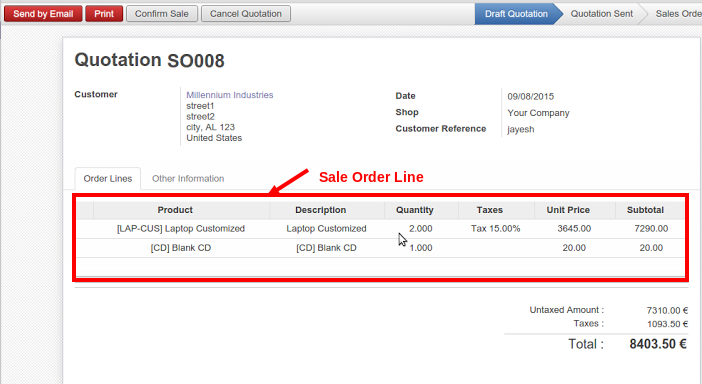
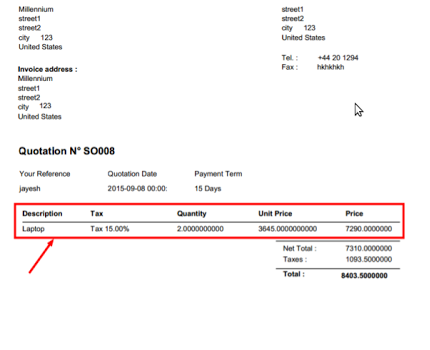
我希望通过(iReport 4.0.2)在销售订单报告中将销售订单行打印为重复值。
我已经在我的报告中打印了唯一的单行销售订单行。我的问题是如何使用Jasper报告工具打印多个销售订单行。
销售订单SO008 :
使用Jasper iReport 4.0.2工具打印销售订单报告:
回答 1
Stack Overflow用户
发布于 2015-09-22 05:46:26
我把听演示与xml文件。
如果您使用eclip来完成此操作,则创建数据文件(xml、db、csv等)的第一个适配器,如果您已经配置了japser或ireport,则创建文件菜单中的create选项。
然后,为genrate报告选择template并在下一个级别中选择after,然后从数据源中选择element或data字段(如xml、csv等)。
我把听到的xml和jasper报告文件与代码和预览。
simple_Blue.jrxml
<?xml version="1.0" encoding="UTF-8"?>
<!-- Created with Jaspersoft Studio version 6.1.1.final using JasperReports Library version 6.1.1  -->
<!-- 2015-09-22T11:03:31 -->
<jasperReport xmlns="http://jasperreports.sourceforge.net/jasperreports" xmlns:xsi="http://www.w3.org/2001/XMLSchema-instance" xsi:schemaLocation="http://jasperreports.sourceforge.net/jasperreports http://jasperreports.sourceforge.net/xsd/jasperreport.xsd" name="Simple_Blue" pageWidth="595" pageHeight="842" columnWidth="535" leftMargin="20" rightMargin="20" topMargin="20" bottomMargin="20" uuid="cad2717b-4892-4b9b-b88d-6a498ba5c63d">
    <property name="com.jaspersoft.studio.data.defaultdataadapter" value="NEW_DATAADAPTER1.xml"/>
    <queryString language="xPath">
        <![CDATA[/root/item]]>
    </queryString>
    <field name="id_1" class="java.lang.String">
        <fieldDescription><![CDATA[@id]]></fieldDescription>
    </field>
    <field name="name_1" class="java.lang.String">
        <fieldDescription><![CDATA[name]]></fieldDescription>
    </field>
    <field name="price_1" class="java.lang.String">
        <fieldDescription><![CDATA[price]]></fieldDescription>
    </field>
    <background>
        <band/>
    </background>
    <title>
        <band height="72">
            <frame>
                <reportElement mode="Opaque" x="-20" y="-20" width="595" height="92" backcolor="#006699" uuid="c001d49d-79c2-4348-a3cd-2879583050ee"/>
                <staticText>
                    <reportElement x="20" y="20" width="234" height="43" forecolor="#FFFFFF" uuid="6a037f28-72c8-4a1a-838b-87c3717e514d"/>
                    <textElement>
                        <font size="34" isBold="true"/>
                    </textElement>
                    <text><![CDATA[TITLE]]></text>
                </staticText>
                <staticText>
                    <reportElement x="395" y="43" width="180" height="20" forecolor="#FFFFFF" uuid="eaf746c8-e90d-4037-8277-294c4097ecca"/>
                    <textElement textAlignment="Right">
                        <font size="14" isBold="false"/>
                    </textElement>
                    <text><![CDATA[Add a description here]]></text>
                </staticText>
            </frame>
        </band>
    </title>
    <pageHeader>
        <band height="13"/>
    </pageHeader>
    <columnHeader>
        <band height="21">
            <line>
                <reportElement x="-20" y="20" width="595" height="1" forecolor="#666666" uuid="d5b453e8-1a8b-4177-ab6c-15aa584044f0"/>
            </line>
            <staticText>
                <reportElement mode="Opaque" x="0" y="0" width="185" height="20" forecolor="#006699" backcolor="#E6E6E6" uuid="a2ea42b0-c324-4c0c-94bb-1441747bfe2d"/>
                <textElement textAlignment="Center">
                    <font size="14" isBold="true"/>
                </textElement>
                <text><![CDATA[id_1]]></text>
            </staticText>
            <staticText>
                <reportElement mode="Opaque" x="185" y="0" width="185" height="20" forecolor="#006699" backcolor="#E6E6E6" uuid="8d72f4c9-6fd5-4700-9a5e-13434c64558d"/>
                <textElement textAlignment="Center">
                    <font size="14" isBold="true"/>
                </textElement>
                <text><![CDATA[name_1]]></text>
            </staticText>
            <staticText>
                <reportElement mode="Opaque" x="370" y="0" width="185" height="20" forecolor="#006699" backcolor="#E6E6E6" uuid="66dce252-f290-405f-ac8a-2f11cc065bb3"/>
                <textElement textAlignment="Center">
                    <font size="14" isBold="true"/>
                </textElement>
                <text><![CDATA[price_1]]></text>
            </staticText>
        </band>
    </columnHeader>
    <detail>
        <band height="20">
            <line>
                <reportElement positionType="FixRelativeToBottom" x="0" y="19" width="555" height="1" uuid="abfcf8b6-867c-46fb-b320-1fb3961e00e2"/>
            </line>
            <textField isStretchWithOverflow="true">
                <reportElement x="0" y="0" width="185" height="20" uuid="b62d2690-c680-42ef-ad61-930ecf0c5512"/>
                <textElement>
                    <font size="14"/>
                </textElement>
                <textFieldExpression><![CDATA[$F{id_1}]]></textFieldExpression>
            </textField>
            <textField isStretchWithOverflow="true">
                <reportElement x="185" y="0" width="185" height="20" uuid="97605ce2-8f11-4e21-a8f7-d1a7d4a4f3da"/>
                <textElement>
                    <font size="14"/>
                </textElement>
                <textFieldExpression><![CDATA[$F{name_1}]]></textFieldExpression>
            </textField>
            <textField isStretchWithOverflow="true">
                <reportElement x="370" y="0" width="185" height="20" uuid="29b984d4-6fe4-43b4-83d3-54e168fc2c17"/>
                <textElement>
                    <font size="14"/>
                </textElement>
                <textFieldExpression><![CDATA[$F{price_1}]]></textFieldExpression>
            </textField>
        </band>
    </detail>
    <summary>
        <band/>
    </summary>
</jasperReport>而xml文件是temp.xml。
<root>

<item id="1">
    <name>House Box</name>
    <price>5000</price>
</item>
<item id="2">
    <name>New Box</name>
    <price>11000</price>
</item>
<item id="3">
    <name>Kepp Box</name>
    <price>9000</price>
</item>
<item id="4">
    <name>Sound Box</name>
    <price>7000</price>
</item>
<item id="5">
    <name>Desh Box</name>
    <price>3000</price>
</item>
<item id="6">
    <name>Cloud Box</name>
    <price>1000</price>
</item>

</root>很抱歉,我有一个图片,但我没有分享听到,因为我没有名誉,现在显示我分享它通过谷歌驱动器,公共链接是:https://drive.google.com/open?id=0B4rHgCCP3rA9SzdFZVBmTkhwTlU
https://stackoverflow.com/questions/32602967
复制相似问题
腾讯云开发者

Copyright © 2013 - 2026 Tencent Cloud. All Rights Reserved. 腾讯云 版权所有
深圳市腾讯计算机系统有限公司 ICP备案/许可证号:粤B2-20090059  粤公网安备44030502008569号
腾讯云计算(北京)有限责任公司 京ICP证150476号 | 京ICP备11018762号