
具有自定义搜索字段的列可见性
具有自定义搜索字段的列可见性
提问于 2015-09-14 12:16:54
我正在尝试创建一个具有自定义搜索和列可见性的datatable。
我所做的是-
    <div class="container">
        <table id="employee-grid"  class="display" cellspacing="0" width="100%">
            <thead>
                <tr>
                    <th>Employee name</th>
                    <th>Salary</th>
                    <th>Position</th>
                    <th>City</th>
                    <th>Extension</th>
                    <th>Joining date</th>
                    <th>Age</th>
                </tr>
            </thead>
            <thead>
                <tr>
                    <td><input type="text" id="0"  class="employee-search-input"></td>
                    <td><input type="text" id="1" class="employee-search-input"></td>
                    <td><input type="text" id="2" class="employee-search-input" ></td>
                    <td><input type="text" id="3" class="employee-search-input" ></td>
                    <td><input type="text" id="4" class="employee-search-input" ></td>
                    <td  valign="middle"><input  readonly="readonly" type="text" id="5" class="employee-search-input datepicker" ></td>
                    <td><input type="text" id="6" class="employee-search-input" ></td>
                </tr>
            </thead>
        </table>
    </div>
JS
$(document).ready(function()
{
var dataTable =  $('#employee-grid').DataTable(
{
    processing: true,
    serverSide: true,
    //ajax: "employee-grid-data.php", // json datasource for AJAX Data

    "ajax":
    {
        "url": "employee-grid-data.php",
        //"type": 'POST',
        "data": function ( d )              //Sending Custom Data for manupulating with elements out of the table
                {
                    d.myKey = "myValue";
                    // d.custom = $('#myInput').val();
                    // etc
                },
    },

    //"pagingType": "full_numbers", //Adding Last and First in Pagination
    stateSave: true,
    "language":{                    //Custom Message Setting
                    "lengthMenu": "Display _MENU_ records per page",    //Customizing menu Text
                    "zeroRecords": "Nothing found - sorry",             //Customizing zero record text - filtered
                    "info": "Showing page _PAGE_ of _PAGES_",           //Customizing showing record no
                    "infoEmpty": "No records available",                //Customizing zero record message - base
                    "infoFiltered": "(filtered from _MAX_ total records)"   //Customizing filtered message
                },
    "lengthMenu": [[5, 10, 25, 50, -1], [5, 10, 25, 50, "All"]],        //For customizing number of data sets per page

    dom: 'l<"toolbar"> Bfrtip',     //"Bfrtip" is for column visiblity - B F and R become visible

    initComplete:   function()  //Adding Custom button in Tools
                    {
                        $("div.toolbar").html('<button type="button" onclick="addNewEntry()">Add a New Record</button>');
                    },
    buttons:    [                   //Column Visiblity Buttons
                    {
                        extend: 'colvis',
                        collectionLayout: 'fixed three-column',
                        postfixButtons: [ 'colvisRestore' ]
                    }
                ],
});
});
我要去接-
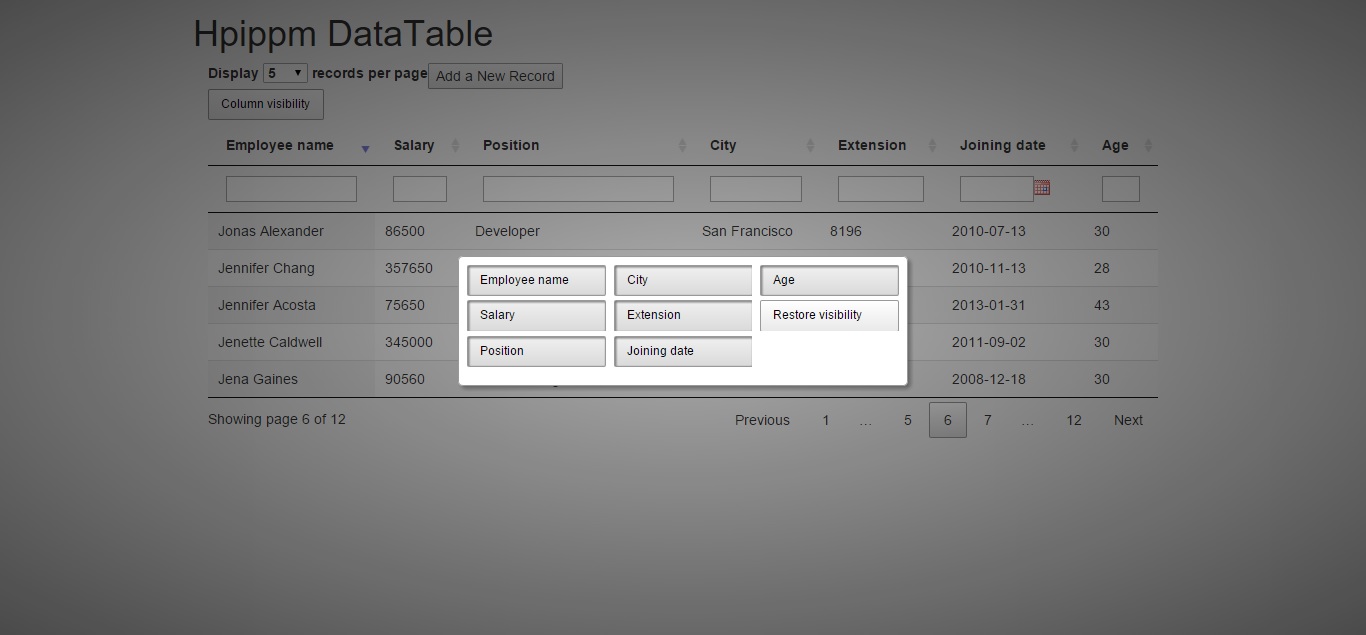
工作很好,但是如果我试图用它折叠任何专栏,就会有问题。我得到了类似的东西-
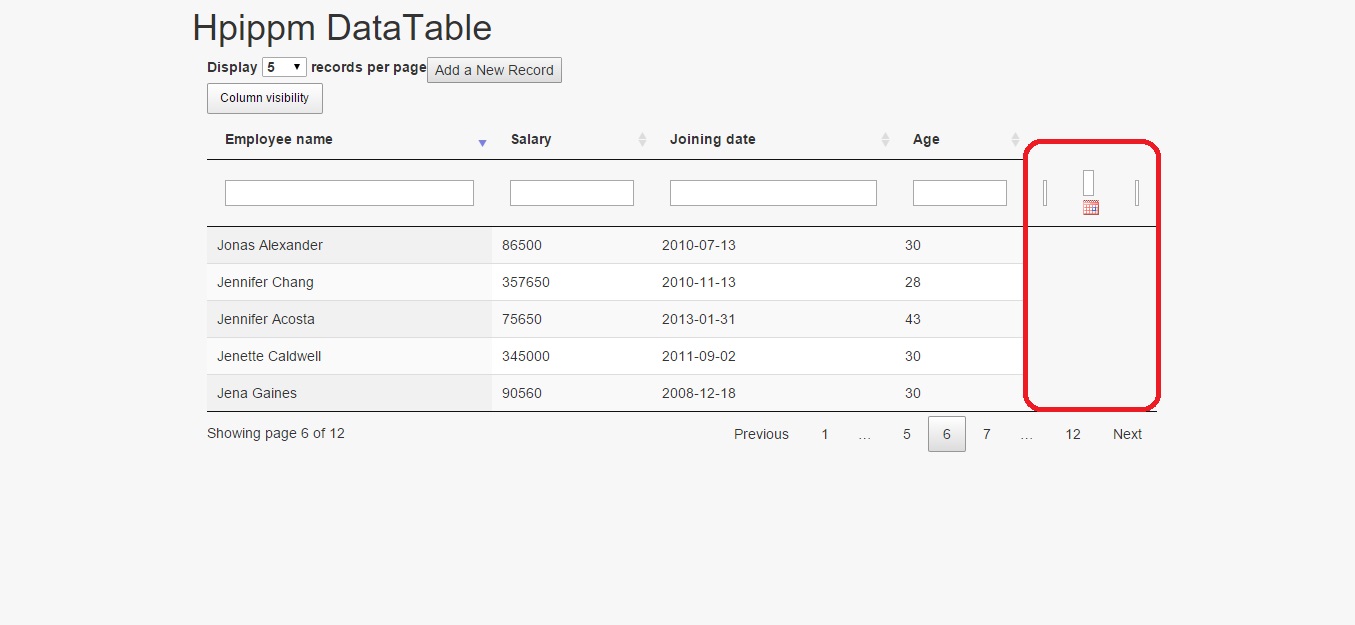
因此,当其他项隐藏时,表的列过滤器不会隐藏。
回答 1
Stack Overflow用户
回答已采纳
发布于 2015-09-14 12:22:16
溶液
您正在使用两个thead元素,将其改为一个有两行的元素,如下所示。
<thead>
    <tr>
        <th>Employee name</th>
        <th>Salary</th>
        <th>Position</th>
        <th>City</th>
        <th>Extension</th>
        <th>Joining date</th>
        <th>Age</th>
    </tr>
    <tr>
        <td><input type="text" id="0"  class="employee-search-input"></td>
        <td><input type="text" id="1" class="employee-search-input"></td>
        <td><input type="text" id="2" class="employee-search-input" ></td>
        <td><input type="text" id="3" class="employee-search-input" ></td>
        <td><input type="text" id="4" class="employee-search-input" ></td>
        <td  valign="middle"><input  readonly="readonly" type="text" id="5" class="employee-search-input datepicker" ></td>
        <td><input type="text" id="6" class="employee-search-input" ></td>
    </tr>
</thead>在本例中,还需要使用orderCellsTop: true选项告诉DataTables使用顶部行进行排序。
演示
有关代码和演示,请参见这个jsFiddle。
页面原文内容由Stack Overflow提供。腾讯云小微IT领域专用引擎提供翻译支持
原文链接:
https://stackoverflow.com/questions/32564588
复制相关文章
相似问题
腾讯云开发者

Copyright © 2013 - 2026 Tencent Cloud. All Rights Reserved. 腾讯云 版权所有
深圳市腾讯计算机系统有限公司 ICP备案/许可证号:粤B2-20090059  粤公网安备44030502008569号
腾讯云计算(北京)有限责任公司 京ICP证150476号 | 京ICP备11018762号