
多行自动滚动FlowLayoutPanel
多行自动滚动FlowLayoutPanel
提问于 2015-09-14 12:10:42
我有50张照片。我需要在FlowLayoutPanel中添加这些图像,在第一行之后添加30个图像,在第二行中添加20个图像。所以我还需要在控件上显示滚动条。
我将视频分成帧(图像)并在FlowLayoutPanel中显示。当我上传第一个视频时,下面是设置图像的代码:
for (i = 1; i < len - 1; i++)
{
    ImagePanel mybt = new ImagePanel(storagePath + words[0] + "_" +
                                     i + ".jpg", words[0] + "_" + i + ".jpg");
    flowLayoutPanel1.Controls.Add(mybt);
}
在那之后,当我上传第二个图像时,我想要显示像第一行那样的图像,我们有第一个视频图像,在中断后,我需要显示第二个视频上传图像。如果有人知道怎么可能的话。
回答 1
Stack Overflow用户
回答已采纳
发布于 2015-09-14 12:22:45
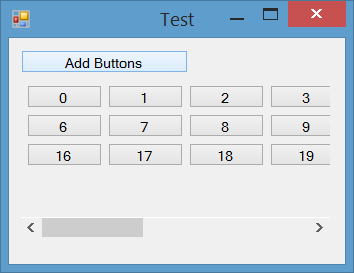
为了得到像你在截图中看到的结果:
- 将
FlowLayoutPanel放在Panel中,并将AutoScroll属性设置为true - 将
AutoSize属性的FlowLayoutPanel设置为true - 将
WrapContent属性的FlowLayoutPanel设置为true(默认) - 将
AutoScroll属性的FlowLayoutPanel设置为false(默认) - 在添加控件时,可以使用
SetFlowBreak中断所需控件的流。
截图
码
private void button1_Click(object sender, EventArgs e)
{
    for (int i = 0; i < 20; i++)
    {
        var btn = new Button() { Text = i.ToString() };
        if (i == 5 || i==15 )
            this.flowLayoutPanel1.SetFlowBreak(btn, true);
        this.flowLayoutPanel1.Controls.Add(btn);
    }
}
在这里,我打破了流动,在5和15。
页面原文内容由Stack Overflow提供。腾讯云小微IT领域专用引擎提供翻译支持
原文链接:
https://stackoverflow.com/questions/32564463
复制相关文章
相似问题
腾讯云开发者

Copyright © 2013 - 2026 Tencent Cloud. All Rights Reserved. 腾讯云 版权所有
深圳市腾讯计算机系统有限公司 ICP备案/许可证号:粤B2-20090059  粤公网安备44030502008569号
腾讯云计算(北京)有限责任公司 京ICP证150476号 | 京ICP备11018762号