
如何使雪碧坐在移动的雪碧上
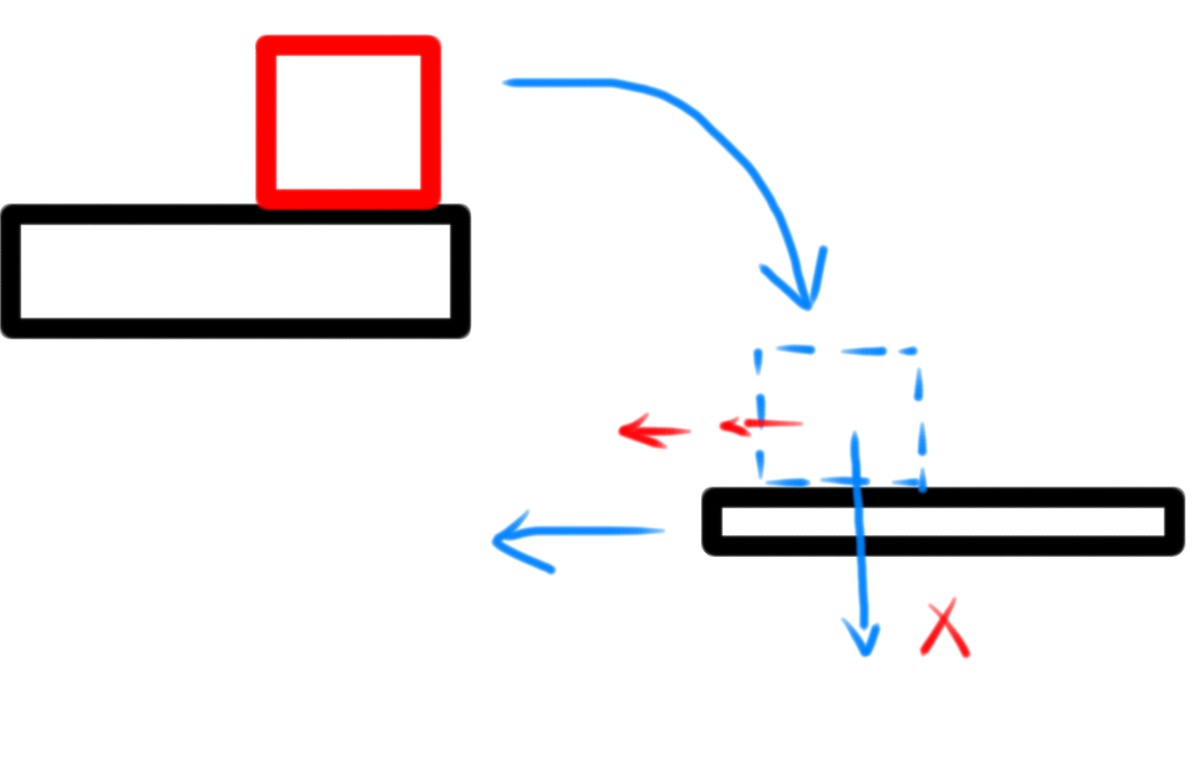
如何使一个精灵坐在移动的雪碧上,并与它一起旅行。我让红色盒子冲动地跳起来,当它落在正在移动的黑色方块上时,如果它掉下来,红色盒子就停留在移动的物体上,就像没有摩擦力一样。在重力条件下,摩擦力1.0甚至都试着增加质量,但都没有效果。请给我详细的说明如何使它工作?谢谢覆盖func didMoveToView(视图: SKView) { /*在这里设置场景*/
    self.physicsWorld.gravity = CGVectorMake(0.0, -9.8)
    SquareOne.fillColor = UIColor.orangeColor()
    SquareOne.position = CGPoint(x: self.frame.midX, y: self.frame.midY)
    SquareOne.physicsBody = SKPhysicsBody(rectangleOfSize: SquareOne.frame.size)
    SquareOne.physicsBody?.friction = 1.0
    SquareOne.physicsBody?.restitution = 0.0

    addChild(SquareOne)


    SquareTwo.fillColor = UIColor.greenColor()
    SquareTwo.position = CGPoint(x: self.frame.midX, y: self.frame.midY - 100)
    SquareTwo.physicsBody = SKPhysicsBody(rectangleOfSize: SquareTwo.frame.size)
    SquareTwo.physicsBody?.dynamic = false
    SquareTwo.physicsBody?.affectedByGravity = false
    SquareTwo.physicsBody?.friction = 1.0
    SquareTwo.physicsBody?.restitution = 0.0
    addChild(SquareTwo)

}

override func touchesBegan(touches: Set<NSObject>, withEvent event: UIEvent) {
    /* Called when a touch begins */

    for touch in (touches as! Set<UITouch>) {
        let location = touch.locationInNode(self)
        SquareTwo.runAction(SKAction.moveByX(-100, y: 0.0, duration: 3.0))
    }
}
回答 4
Stack Overflow用户
发布于 2015-09-11 07:30:43
在物理模拟中,你应该应用速度和力使模拟正确地工作。使用SKAction无法正确地模拟物理。
首先,需要使SquareTwo成为动态的,这样它才能受到力量的影响。使SquareTwo的质量变大,使身体不受其他SquareOne与之碰撞的影响。
SquareTwo.physicsBody?.dynamic = true
SquareTwo.physicsBody?.affectedByGravity = false
// Make the mass big so that the body is not affected by the other body colliding with it.
SquareTwo.physicsBody?.mass = 1000000然后在touchesBegan内部你可以设定一个速度到SquareTwo
override func touchesBegan(touches: Set<NSObject>, withEvent event: UIEvent) {
    /* Called when a touch begins */

    for touch in (touches as! Set<UITouch>) {
        let location = touch.locationInNode(self)
        SquareTwo.physicsBody?.velocity = CGVectorMake(-10, 0)
     }
}Stack Overflow用户
发布于 2015-09-11 01:45:02
您可以删除红色块,然后将其作为子节点添加到移动块中:
var redBlockPosition = childNodeWithName("redBlockName")?.position //find where red block is in self
var movingBlockPosition = childNodeWithName("movingBlockName")?.position //find where moveing block is in self
var redBlockPositionFromMovingBlock = CGPointMake(redBlockPosition.x + movingBlockPosition.x, redBlockPosition.y - movingBlockPosition.y) //find where red block is from moving block's origin
childNodeWithName("redBlockName")?.removeFromParent() //remove red block
redBlock.position = redBlockPositionFromMovingBlock //change redBlock's position
childNodeWithName("movingBlockName")?.addChild(redBlock) //add red block as a child node of moving block
希望这能帮上忙,祝你好运。
Stack Overflow用户
发布于 2015-09-11 02:44:11
试试redBox.physicsBody.allowsRotation = NO,
一个布尔值,表示物理物体是否受施加于它的角力和脉冲的影响。
调整redBox.physicsBody.restitution在0.0到1.0之间,
物理身体的弹性。
https://stackoverflow.com/questions/32513802
复制相似问题
腾讯云开发者

Copyright © 2013 - 2026 Tencent Cloud. All Rights Reserved. 腾讯云 版权所有
深圳市腾讯计算机系统有限公司 ICP备案/许可证号:粤B2-20090059  粤公网安备44030502008569号
腾讯云计算(北京)有限责任公司 京ICP证150476号 | 京ICP备11018762号