
C# LINQ和XML获取子节点
在获取节点值时遇到问题。不确定为什么下面的代码没有这样做。
<?xml version="1.0" encoding="utf-8"?>
<?xml-stylesheet type='text/xsl' href='STIG_unclass.xsl'?>
<Benchmark xmlns:dsig="http://www.w3.org/2000/09/xmldsig#" xmlns:xhtml="http://www.w3.org/1999/xhtml" xmlns:xsi="http://www.w3.org/2001/XMLSchema-instance" xmlns:cpe="http://cpe.mitre.org/language/2.0" xmlns:dc="http://purl.org/dc/elements/1.1/" id="Windows_7_STIG" xml:lang="en" xsi:schemaLocation="http://checklists.nist.gov/xccdf/1.1 http://nvd.nist.gov/schema/xccdf-1.1.4.xsd http://cpe.mitre.org/dictionary/2.0 http://cpe.mitre.org/files/cpe-dictionary_2.1.xsd" xmlns="http://checklists.nist.gov/xccdf/1.1">
    <status date="2015-06-16">accepted</status>
    <title>Windows 7 Security Technical Implementation Guide</title>
    <description>
        The Windows 7 Security Technical Implementation Guide (STIG) is published as a tool to improve the security of Department of Defense (DoD) information systems.  The requirements were developed from DoD consensus, as well as the Windows 7 Security Guide and security templates published by Microsoft Corporation.  Comments or proposed revisions to this document should be sent via e-mail to the following address:  disa.stig_spt@mail.mil.
    </description>
    <notice id="terms-of-use" xml:lang="en">Developed_by_DISA_for_the_DoD</notice>
    <reference href="http://iase.disa.mil">
        <dc:publisher>DISA, Field Security Operations</dc:publisher>
        <dc:source>STIG.DOD.MIL</dc:source>
    </reference>
    <plain-text id="release-info">Release: 20 Benchmark Date: 24 Jul 2015</plain-text>
</Benchmark>
示例XML文件。
下面是我的代码。
String Title = LoadedXML.Element("Benchmark").Attribute("id").Value;
var XMLData = LoadedXML.Element("Benchmark").Elements("plain-text")
                 .Single(release => release.Attribute("id").Value == "release-info").Value;
有什么方法可以同时得到多个节点值吗?比如一次得到标题和发布值,而不是为每一个单独的一个?
回答 2
Stack Overflow用户
发布于 2015-09-10 13:58:06
您的代码失败了,因为您的XML包含Namespace,并且不能直接访问节点。如果您想确认这一点,只需查询LoadedXML.Elements()并检查调试器中的值,就可以清楚地看到名称空间:-
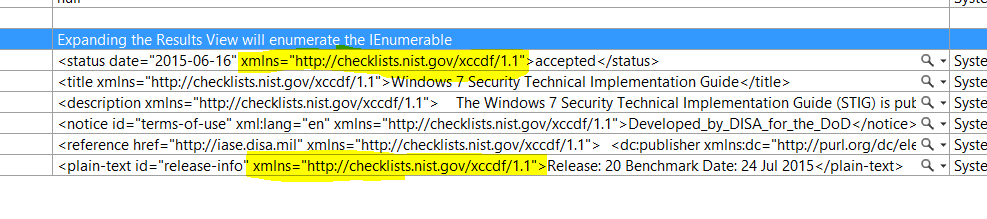
因此,您需要声明名称空间并使用它:-
XNamespace ns = "http://checklists.nist.gov/xccdf/1.1";如果希望同时获取两个阀门,则可以将其投影为以下匿名类型:-
var result = LoadedXML.Root.Elements(ns + "plain-text")
                      .Where(x => (string)x.Attribute("id") == "release-info")
                      .Select(x => new
                             {
                                 Title = (string)x.Document.Root.Attribute("id"),
                                 XMLData = x.Value
                             }).FirstOrDefault();
这个查询提供了以下输出:-

Stack Overflow用户
发布于 2015-09-10 04:29:19
Linq通常用于查询XML以筛选其节点,然后根据需要获取所需的元素/值。这更像是使用SQL查询表。
如果因此需要所有/大部分XML,那么更好的方法是将XMl配置为本机(此处的C#)对象,并将其映射到所需的模型对象。XML总是可以被认为是对象的序列化版本(尽管它也可以手动地),并且可以反序列化回实际的对象。
.Net对所有这些都有本机支持,有关详细信息,请参阅XML序列化和反序列化的msdn链接。您可以编写一个小的方法来像这样反序列化您的对象。
using System.Xml.Linq;
using System.Xml.Serialization;

public class XMLHelper
{
    public T DeserializeData<T>(string data)
    {
        XmlSerializer serializer = new XmlSerializer(typeof(T));
        StringReader reader = new StringReader(data);
        var deserializedObject = serializer.Deserialize(reader);
        return deserializedObject == null ? default(T) : (T)deserializedObject;
    }
}要获得字符串,您可以像File.ReadAllText(xmlFilePath)或其他更简单的操作一样。
这将为您提供整个XML的去属性对象。如果需要其他转换对象,可以手动映射该对象,也可以使用AutoMapper。
https://stackoverflow.com/questions/32492852
复制相似问题
腾讯云开发者

Copyright © 2013 - 2026 Tencent Cloud. All Rights Reserved. 腾讯云 版权所有
深圳市腾讯计算机系统有限公司 ICP备案/许可证号:粤B2-20090059  粤公网安备44030502008569号
腾讯云计算(北京)有限责任公司 京ICP证150476号 | 京ICP备11018762号