
如何在选项卡deep_link zurb基础中添加偏移量?
如何在选项卡deep_link zurb基础中添加偏移量?
提问于 2015-09-08 12:09:05
我正在使用代码的选项卡
<div class="row tabs-home" >
<dl class="tabs text-center " data-tab data-options="deep_linking:true">
    <dd><a href="#panel0">CRS</a></dd>
    ...
    <dd><a href="#panel5">Soluções Marketing</a></dd>
</dl>
有一个标题与“位置:固定”,并点击标签滚动发生2,但在标题之下。点击标签有必要有一个偏移头图像3。
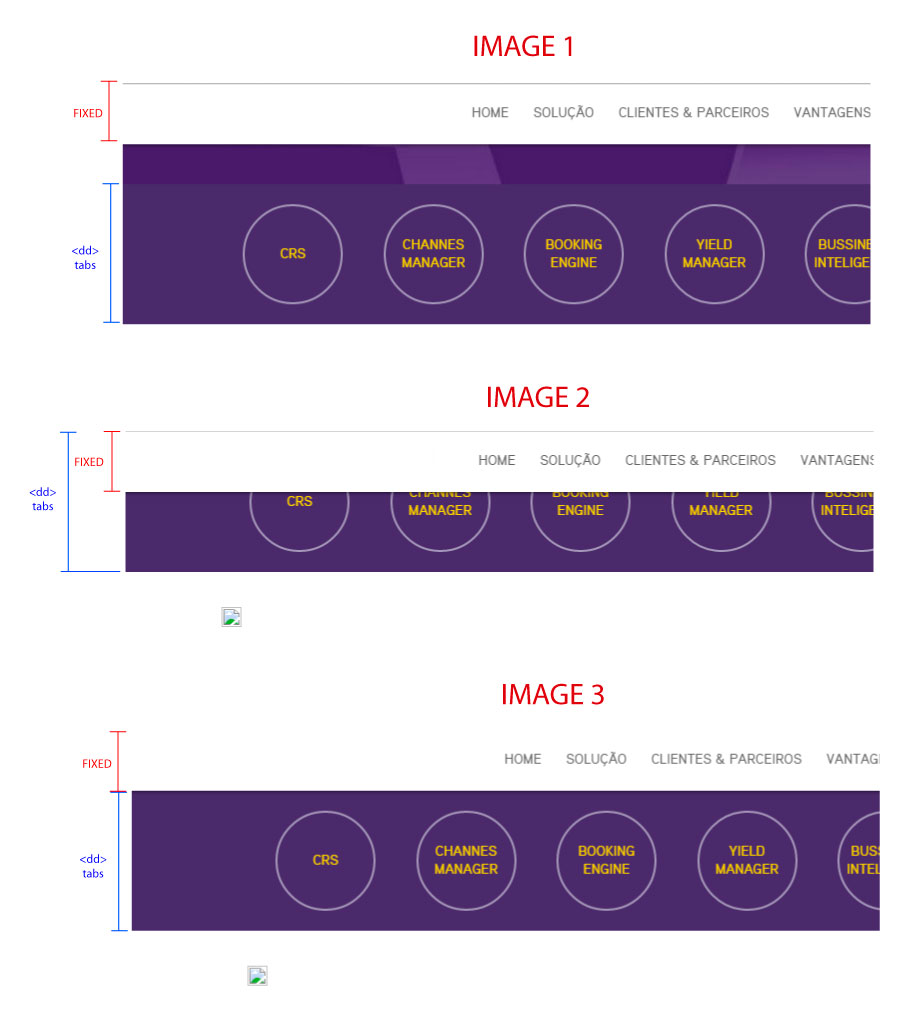
]1

我试着改变了foundation.tab.js。并添加了foundation.tab.js中的第207行
if (settings.deep_linking) {

            if (settings.scroll_to_content) {

                // retain current hash to scroll to content
                go_to_hash(location_hash || target_hash);

                if (location_hash == undefined || location_hash == target_hash) {
                    tab.parent()[0].scrollIntoView();
                    tab.parent()[0].animate({  scrollTop: $('#tab-fixed').offset().top + 200  });
                } else {
                    S(target_hash)[0].scrollIntoView();
                }
            } else {
                // prefix the hashes so that the browser doesn't scroll down
                if (location_hash != undefined) {
                    go_to_hash('fndtn-' + location_hash.replace('#', ''));
                } else {
                    go_to_hash('fndtn-' + target_hash.replace('#', ''));
                }
            }
        }
这
tab.parent()[0].animate({ scrollTop: $('#tab-fixed').offset().top + 200 });如何在单击时,滚动有一个偏移的标题?
回答 1
Stack Overflow用户
回答已采纳
发布于 2015-09-10 09:19:33
好的,我用jquery中的um滚动顶解决了这种情况,并删除了这个deep_link。
        //SCROLL TAB
        $(document).ready(function(){
            $('#tab-fixed').on('click', function(){
                $('html,body').animate({scrollTop: $(this).offset().top - 190}, 500);
            });
        });
HTML
<section id="tab-fixed" class="clearfix">
<div id="line-tabs" class="clearfix">
    <div class="row tabs-home" >
        <dl class="tabs text-center " data-tab>
            <dd><a href="#crs-panel1">CRS</a></dd>
             ...
            <dd><a href="#crs-panel3">Soluções Marketing</a></dd>
        </dl>
    </div>
</div>
页面原文内容由Stack Overflow提供。腾讯云小微IT领域专用引擎提供翻译支持
原文链接:
https://stackoverflow.com/questions/32457461
复制相关文章
相似问题
腾讯云开发者

Copyright © 2013 - 2026 Tencent Cloud. All Rights Reserved. 腾讯云 版权所有
深圳市腾讯计算机系统有限公司 ICP备案/许可证号:粤B2-20090059  粤公网安备44030502008569号
腾讯云计算(北京)有限责任公司 京ICP证150476号 | 京ICP备11018762号