
如何减少PhotoKit对内存的使用?
如何减少PhotoKit对内存的使用?
提问于 2015-09-07 03:06:35
我使用PhotoKit从系统相册中获取照片,并将它们放到UICollectionView中。
- 对于
UICollectionViewCell,我将其设置为: cell.imageView.contentMode = UIViewContentModeScaleAspectFill; - 初始化我的
UICollectionView时,我只从collection:Camera Roll获取照片PHAsset:: [ fetchAssetCollectionsWithType:PHAssetCollectionTypeSmartAlbum enumerateObjectsUsingBlock:^(PHAssetCollection * PHFetchResult,NSUInteger idx,BOOL *stop) {NSLog(@“相册名称:%@",collection.localizedTitle);if (collection.localizedTitle isEqualToString:@”相机卷“){ _fetchedPhotos = PHAsset fetchAssetsInAssetCollection:集合选项:0;_pickedStatuses = @[].mutableCopy;NSMutableArray *assets =@ @[].mutableCopy;_manager = [PHCachingImageManager alloc init];_options = [PHImageRequestOptions alloc init];_options.resizeMode = PHImageRequestOptionsResizeModeExact;_options.deliveryMode =_options.deliveryMode CGFloat scale = UIScreen mainScreen.scale;CGSize targetSize = CGSizeMake(layout.itemSize.width*scale,layout.itemSize.height*scale);//我不确定在这里是否应该调用此api:_manager startCachingImagesForAssets:PHImageContentModeAspectFill:PHImageContentModeAspectFill layout.itemSize.width*scale;}]; - 然后,我从上面的
UIImage请求PHFetchResult: -(UICollectionViewCell *)collectionView:(UICollectionView *)collectionView cellForItemAtIndexPath:(NSIndexPath *)indexPath { MYCell *cell = (MYCell *)collectionView collectionView forIndexPath:indexPath;CGFloat scale = UIScreen mainScreen.scale;CGSize targetSize =CGSizeMake;*资产=;_manager requestImageForAsset:资产目标大小:targetSize contentMode:PHImageContentModeAspectFill options:_options结果处理程序:^(UIImage *result,NSDictionary *info) { cell.imageView.image =结果;};返回单元格;}
但是,当我运行它并足够快地滚动UICollectionView时,我发现内存的使用变得像这样陡峭:
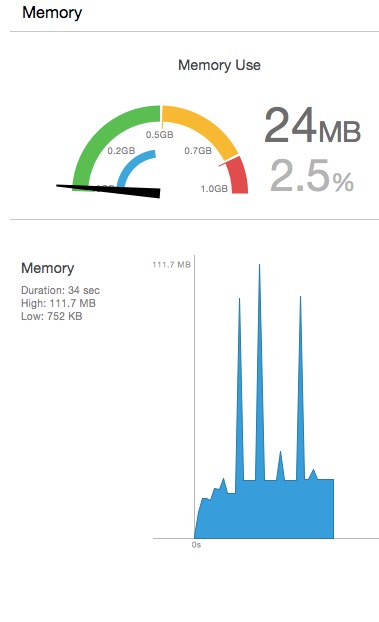
我如何减少它,以防它崩溃时内存不足?
回答 2
Stack Overflow用户
回答已采纳
发布于 2015-09-07 07:42:54
我现在所做的就是
- 减少获取的
PHAsset对象的目标大小; - 尝试采用缓存。我的代码如下: PHImageRequestOptionsDeliveryModeOpportunistic;scale = 1.5;/或更小的if (! _manager ) {_manager= [PHCachingImageManager alloc init];} if (! _options ) {_options= [PHImageRequestOptions alloc init];} _options.resizeMode = PHImageRequestOptionsResizeModeExact;_options.deliveryMode =_options.deliveryMode NSRange range = NSMakeRange(0,_fetchedPhotos.count);NSIndexSet *set = NSIndexSet indexSetWithIndexesInRange:range;NSArray *assets =NSIndexSet objectsAtIndexes:set;CGSize targetSize = CGSizeMake(_layout.itemSize.width*scale,_layout.itemSize.height*scale);_manager startCachingImagesForAsset:assets:targetSize contentMode:PHImageContentModeAspectFill options:_options;
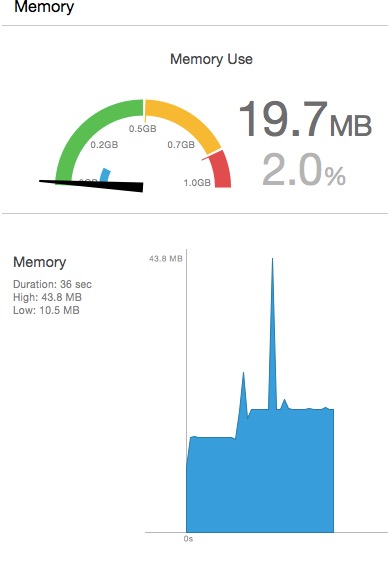
现在,即使我滚动UICollectionView的速度足够快,顶部的内存也会比50 MB少,而且多亏了Caching (我猜它是基于我的代码工作的)它没有那么大的波动,内存使用是这样的:
根据另一个post here更新,建议不要指定PHImageRequestOptions对象。相反,您可以让iOS来决定什么是最好的,以最好的质量和最少的时间呈现照片。
Stack Overflow用户
发布于 2015-09-24 06:12:34
我建议看看我提到的here的答案。这不仅可以帮助您缓存,而且苹果的Photos示例将帮助您克服任何问题。
页面原文内容由Stack Overflow提供。腾讯云小微IT领域专用引擎提供翻译支持
原文链接:
https://stackoverflow.com/questions/32430531
复制相关文章
相似问题
腾讯云开发者

Copyright © 2013 - 2026 Tencent Cloud. All Rights Reserved. 腾讯云 版权所有
深圳市腾讯计算机系统有限公司 ICP备案/许可证号:粤B2-20090059  粤公网安备44030502008569号
腾讯云计算(北京)有限责任公司 京ICP证150476号 | 京ICP备11018762号