
在悬停时更改行的背景色
在悬停时更改行的背景色
提问于 2015-09-07 00:39:06
当您悬停在行上(使用UserStyles脚本)时,我试图更改行的背景色。
我拍了一张页面的截图,发现六角色代码是#F3F6FC。
这里是我试图修改的页面。
从上一篇这样的帖子,我试着去做
tr:hover {
    background-color: #000;
}

tr:hover td {
    background-color: transparent; /* or #000 */
}
但这不起作用。任何帮助都将不胜感激。
此外,如果不能同时使用检查工具和悬停,那么当我悬停在表上时,如何使用Chrome工具来检查元素呢?
回答 2
Stack Overflow用户
回答已采纳
发布于 2015-09-07 00:43:59
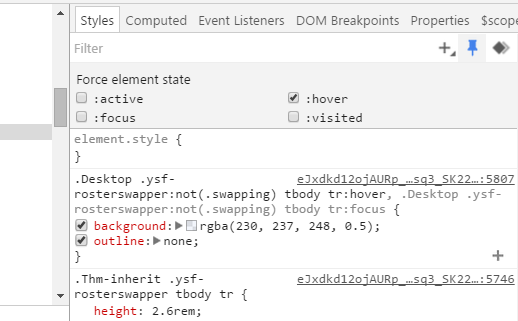
您可以在设置悬停状态的同时使用检查工具,使用Chrome Dev tools的“样式”选项卡中的Filter Pin下拉菜单以及您正在查看的元素是:
.Desktop .ysf-rosterswapper:not(.swapping) tbody tr:hover, .Desktop .ysf-rosterswapper:not(.swapping) tbody tr:focus{
  background: rgba(230, 237, 248, 0.5);
  outline: none;
}
Stack Overflow用户
发布于 2015-09-07 00:49:34
你的悬停在我看来还不错,但我还是举了个例子。元素检查器中列出了悬停规则。要查看Chrome的检查器中的悬停规则,您可能需要扩展一些属性。这里有一个截图来帮助你:
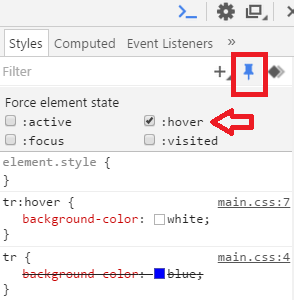
贷记:参见: Chrome Developer Tools中的悬停状态
示例CSS/HTML
td {
  color: white;
}
tr {
  background-color: blue;
}
tr:hover {
  background-color: white;
}
tr:hover td {
  color: blue;
}<table>
<tr>
<td>cell 1</td>
<td>cell 2</td>
<td>cell 3</td>
</tr>
<tr>
<td>cell 1</td>
<td>cell 2</td>
<td>cell 3</td>
</tr>
<tr>
<td>cell 1</td>
<td>cell 2</td>
<td>cell 3</td>
</tr>
</table>
页面原文内容由Stack Overflow提供。腾讯云小微IT领域专用引擎提供翻译支持
原文链接:
https://stackoverflow.com/questions/32429704
复制相关文章
相似问题
腾讯云开发者

Copyright © 2013 - 2026 Tencent Cloud. All Rights Reserved. 腾讯云 版权所有
深圳市腾讯计算机系统有限公司 ICP备案/许可证号:粤B2-20090059  粤公网安备44030502008569号
腾讯云计算(北京)有限责任公司 京ICP证150476号 | 京ICP备11018762号