
Matlab函数rgb2ntsc在OpenCV中的C++实现
Matlab函数rgb2ntsc在OpenCV中的C++实现
提问于 2015-09-02 16:32:37
我正在尝试用rgb2ntsc在OpenCV中实现Matlab函数‘C++’。
根据Matlab: YIQ = rgb2ntsc( RGB ),RGB是输入的彩色图像。
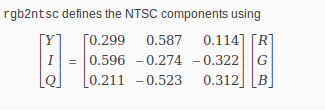
在OpenCV中使用C++的矩阵乘法有一些准则:
1)每个矩阵(2通道或1通道)的通道数相同,2)矩阵应以浮点值表示
那么,如何将输入的彩色图像(输入有3通道)与NTSC组件相乘呢?
回答 2
Stack Overflow用户
回答已采纳
发布于 2015-09-02 16:43:33
不确定我是否是对的,但YIQ有3个与RGB相同的值,所以图片仍然是3通道。
如果你把浮点数与浮点数或整数相乘,你就得到了浮点数,所以我看不出乘法的问题。也许我不能正确理解你的问题。上面的乘法应该是:
Y = 0.299*R+0.587*G+0.114*B,
I = 0.596*R-0.274*G-0.322*B,
依我看诸如此类。
如果RGB是整数表示,您可能会想到如下所示:
template<typename intType>
float convertIntToFloat(intType number){
    return (1.0/std::numeric_limits<intType>::max())*number;
}
把它转换成浮子。
Stack Overflow用户
发布于 2015-09-02 18:46:34
您应该使用来自Vec3f的OpenCV类型(实际上是一个3x1矩阵):
// I assume you have RGB values as unsigned char in [0-255] interval
// here using a dummy color
unsigned char R = 255;
unsigned char G = 127;
unsigned char B = 64;

// construct a Vec3f from those, divide by 255 to get them in [0-1] interval
Vec3f colorRGB(R/255.0f, G/255.0f, B/255.0f);

// matrix for RGB -> YIQ conversion
Matx33f matYIQ( 0.299f,  0.587f,  0.114f,
                0.596f, -0.274f, -0.322f,
                0.211f, -0.523f,  0.312f);

// do the conversion
// a warning ... I & Q can be negative
// Y => [0,1]
// I => [-1,1]
// Q => [-1,1]
Vec3f colorYIQ = matYIQ * colorRGB;
--编辑--
下面是一个更好的版本,只使用OpenCV特性来转换整个映像
// let's define the matrix for RGB -> YIQ conversion
Matx33f matYIQ( 0.299f,  0.587f,  0.114f,
                0.596f, -0.274f, -0.322f,
                0.211f, -0.523f,  0.312f);

// I assume you have a source image of type CV_8UC3
// CV_8UC3: 3 channels, each on unsigned char, so [0,255]
// here is a dummy one, black by default, 256x256
Mat ImgRGB_8UC3(256, 256, CV_8UC3);

// We need to convert this to a new image of type CV_32FC3
// CV_32FC3: 3 channels each on 32bit float [-inf, +inf]
// we need to do this because YIQ result will be in [-1.0, 1.0] (I & Q)
// so this obviously cannot be stored in CV_8UC3
// At the same time, we will also divide by 255.0 to put values in [0.0, 1.0]
Mat ImgYIQ_32FC3;
ImgRGB_8UC3.convertTo(ImgYIQ_32FC3, CV_32FC3, 1.0/255.0);

// at this point ImgYIQ_32FC3 contains pixels made of 3 RGB float components in [0-1]
// so let's convert to YIQ
// (cv::transform will apply the matrix to each 3 component pixel of ImgYIQ_32FC3)
cv::transform(ImgYIQ_32FC3, ImgYIQ_32FC3, matYIQ);页面原文内容由Stack Overflow提供。腾讯云小微IT领域专用引擎提供翻译支持
原文链接:
https://stackoverflow.com/questions/32358451
复制相关文章
相似问题
腾讯云开发者

Copyright © 2013 - 2026 Tencent Cloud. All Rights Reserved. 腾讯云 版权所有
深圳市腾讯计算机系统有限公司 ICP备案/许可证号:粤B2-20090059  粤公网安备44030502008569号
腾讯云计算(北京)有限责任公司 京ICP证150476号 | 京ICP备11018762号